8
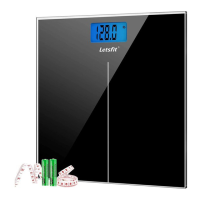
1. Open the battery compartment on the back of the scale.
2. Remove the old batteries and dispose of them properly.
3. Install four new 1.5V AAA batteries, making sure they are placed under
the correct polarity.
4. Replace the battery compartment cover.
Battery Replacement
4. Converting Weight Units
• Convert the unit in the app
Go to Account page → "Setting" → "Unit" in the app to convert units
from pounds (lb) to kilograms (kg).
• Convert the unit on the scale
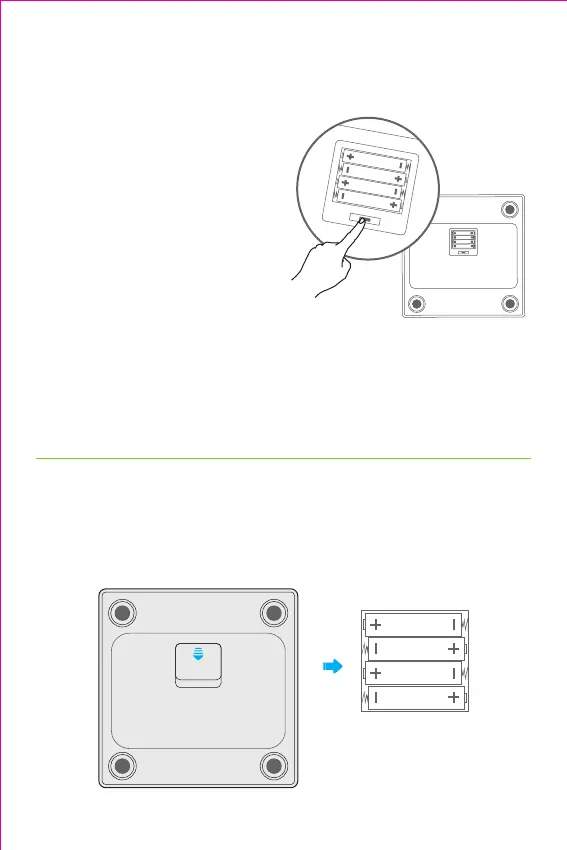
1) Apply pressure onto the weighing
platform to activate the scale.
2) Open the battery compartment
cover on the back of the scale,
press the unit conversion button
to convert units from pounds (lb)
to kilograms (kg).
3) Place the scale back onto a hard,
flat surface when you are ready to
measure.
Notes:
• When the scale is connected to your phone, convert the unit in the app;
otherwise, convert the unit on the scale.
• Unit St is not available in this model of scale.



 To Next Page