EasyManua.ls Logo

Letsfit SP1 - User Manual

Letsfit SP1
12 pages
Print Icon
To Next Page IconTo Next Page
Loading...
SP1
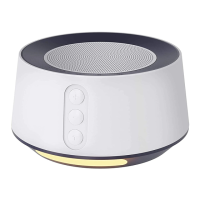
Sleep Sound Machine
User Manual
Thank you for purchasing our product. This manual addresses
the safety guidelines, warranty and operating instructions. Please
review this manual thoroughly before operating your device.
Question and Answer IconNeed help?

Do you have a question about the Letsfit SP1 and is the answer not in the manual?

Summary

Package Contents

Product Overview and Controls

Component Identification

Diagram and labels identifying all device controls and ports.

Powering the Device

Connecting to Power Source

Instructions for connecting the machine to a power source using the adapter.

Device Power Control

How to turn the sleep sound machine on and off using the power switch.

Machine Operation and Settings

Choosing Soundscapes

Select from 20 soothing sounds, including white noise, fan sounds, and natural sounds.

Volume Control

Adjust the audio volume by tapping or holding the plus or minus buttons.

Setting Auto-Off Timer

Configure the timer for 15-120 minutes or turn it off for continuous playback.

Setting the Clock

Set the current time and adjust clock display brightness across 6 levels.

Configuring Alarms

Set two distinct alarms with customizable ringtones and on/off functionality.

Night Light Functionality

Turn the night light on/off and adjust its brightness using the dedicated button.

Ambient Light Settings

Choose from 6 colors or color-changing mode for the ambient light.

Child Lock Activation

Activate or deactivate the child lock feature to prevent accidental operation.

Factory Reset and Specifications

Performing a Factory Reset

Reset the machine to its original factory settings by holding the power button.

Technical Specifications

Details include model, audio output, voltage, temperature, humidity, and dimensions.

Safety and Warranty Information

Important Safety Instructions

Covers indoor use, cleaning, water proximity, insertion of objects, aerosol use, heat sources, and environment.

Warranty Details

Provides information on the one-year hassle-free warranty for the device.

Overview

This document describes the SP1 Sleep Sound Machine, a device designed to provide soothing sounds and ambient lighting for relaxation and sleep.

Function Description

The SP1 Sleep Sound Machine offers a comprehensive set of features to aid in sleep and relaxation:

  • Sound Generation: It provides 20 soothing sounds categorized into:
    • White Noise: White Noise, Pink Noise, Brown Noise, Turbine Hall, Baby Brown Noise.
    • Fan Sound: Sleeping Fan Noise, Desk Fan Noise, Ambient Machine Sound, Vacuum Cleaner, Clothes Dryer.
    • Natural Sound & Lullaby: Train Voice, Campfire, Forest Morning, Crickets, Little Rain, Thunder, Ocean, Twinkle Twinkle Little Star, Hush Little Baby, Rock-A-Bye Baby.
  • Volume Control: Adjustable volume for all sounds.
  • Auto-Off Timer: Allows users to set a timer for 15, 30, 60, 90, or 120 minutes, or to turn off the timer for continuous play.
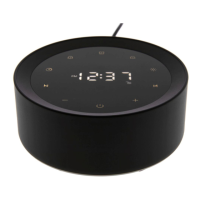
  • Clock Functionality: Displays the current time with adjustable brightness.
  • Alarm Functionality: Supports setting two independent alarms with 8 selectable ringtones: Digital clock, Alarm bell, Bird morning, Melodic, Manor, Twilight, Vivifying, Brisk. Each alarm has a distinct ring light color (Alarm 1: yellow, Alarm 2: blue).
  • Snooze Mode: Allows users to postpone an alarm by tapping the touch area or waving a hand above the machine. The snooze duration is 9 minutes, and it can be postponed up to five times.
  • Night Light: A dedicated night light feature with adjustable brightness, activated by tapping the time display area.
  • Colorful Ambient Light: Offers an ambient light with 6 color options (red, yellow, blue, pink, aqua, purple) and a color-changing mode. Brightness is adjustable.
  • Child Lock: A safety feature to prevent accidental operation, activated and deactivated by a specific button combination.

Important Technical Specifications

  • Model: SP1
  • Audio Output: 3W
  • Working Voltage: DC 5V/1A
  • Working Temperature: -10°C to 50°C
  • Working Humidity: 20% to 90% (non-condensing)
  • Dimension: 116 x 116 x 55 mm

Usage Features

The device is designed for intuitive operation with a combination of physical buttons and a touch-sensitive display area.

  • Power On/Off: Connect to a power source using the provided adapter, then tap the power button to turn the machine on or off. Note that the power switch does not affect the night light, ambient light, or alarms.
  • Sound Selection: Use the "Previous Track" (K) or "Next Track" (▷) buttons to cycle through the 20 available sounds. The corresponding icon for the selected sound will appear on the touch screen.
  • Volume Adjustment: Use the "+" and "-" buttons to increase or decrease the volume.
  • Timer Setting: Tap the "Timer" (L) button to set the auto-off timer. Tap and hold the "Timer" button to turn off the timer directly.
  • Clock Setting:
    1. Tap and hold the "Clock Setting" (D) button to enter time setting mode; the hour will flash.
    2. Use "+" / "-" buttons to adjust the hour, observing AM/PM indicators. Short tap "Clock Setting" to confirm hour and move to minute setting.
    3. Use "+" / "-" buttons to adjust the minute. Short tap "Clock Setting" to complete.
  • Clock Brightness: Short tap the "Clock Setting" (D) button to cycle through 6 brightness levels.
  • Alarm Setting:
    1. Tap and hold "Alarm 1" (1) or "Alarm 2" (2) button to enter alarm setting mode; the hour will flash.
    2. Use "+" / "-" buttons to adjust the hour, observing AM/PM indicators. Short tap the respective alarm button to confirm hour and move to minute setting.
    3. Use "+" / "-" buttons to adjust the minute. Short tap the respective alarm button to confirm minute and move to ringtone setting.
    4. Use "+" / "-" buttons to choose from 8 ringtones. Short tap the respective alarm button to complete. A successful alarm setup will display the corresponding icon on the screen.
  • Alarm On/Off: Short tap "Alarm 1" (1) or "Alarm 2" (2) button to toggle the alarm on or off.
  • Snooze: When an alarm sounds, tap the touch area or wave a hand within 10cm above the machine to snooze for 9 minutes. The alarm icon will flash.
  • Night Light Control: Tap the time display area to turn the night light on/off. Tap and hold the "Ambient Light" (※) button to adjust its brightness when on.
  • Ambient Light Control: Tap the "Ambient Light" (※) button to cycle through 6 colors and a color-changing mode. Tap and hold the "Ambient Light" button to adjust its brightness. Tap the time display area to turn off the ambient light.
  • Child Lock Activation/Deactivation:
    • Activate: Tap and hold the "Power Switch" (ن) and "+" buttons simultaneously for 2 seconds until a "Beep Beep" sound is heard. The "" icon will display.
    • Unlock: Tap and hold the "Power Switch" (ن) and "-" buttons simultaneously for 2 seconds. The "" icon will display.
  • Restoring Factory Defaults: Tap and hold the "Power Switch" (ن) button for about 5 seconds until a "Factory Recovery" voice prompt is heard, and the machine turns off.

Maintenance Features

  • Cleaning: Regularly clean the machine with a soft, dry cloth. Avoid using liquids, sprays (solvents, chemicals, alcohol), or abrasives.
  • Safety Guidelines:
    • Designed for indoor use only.
    • Do not use near water (bathtub, swimming pool, faucet, basin).
    • Do not drop or insert objects into openings.
    • Avoid operating where aerosol products are used or oxygen is administered.
    • Keep away from direct sunlight, heat-radiating products (electric heaters, stereo equipment).
    • Avoid dusty, humid, moist, poorly ventilated areas, or areas subject to constant vibration.
    • Place away from external interference sources like transformers, electric motors, or other electronic devices to prevent distortion.
    • Do not apply excessive force to control buttons.
    • Route power cords to prevent walking on or pinching.
    • Disconnect power when unused for extended periods or when moving the machine.
    • Use only for its intended purpose.
    • Requires close supervision when used by or near children, invalids, or disabled persons.
    • Do not operate if the cord, cable, or housing is damaged.

The product comes with a ONE-year hassle-free warranty.
Letsfit SP1 Specifications

General IconGeneral
BrandLetsfit
ModelSP1
CategorySpeakers
LanguageEnglish

Related product manuals