- 5 -
1) Digital clock
2) Alarm bell
3) Bird morning
4) Melodic
5) Manor
6) Twilight
7) Vivifying
8) Brisk
8 types of ringtones:
Set Alarms
You can set two alarms on the machine.
● Alarm time & ringtone setting:
1) Tap and hold the " " or " " button to enter the setting
mode and the hour will begin flashing.
2) Tap or hold the "+" / "-" button to change the hour value,
paying attention to the AM and PM indicators. Short tap
the " " or " " button to confirm and enter the minute
setting and the minute will begin flashing.
3) Tap or hold the "+" / "-" button to change the minute
value. Short tap the " " or " " button to confirm and
enter the ringtone setting.
4) Tap the "+" / "-" button to choose a ringtone (8 ringtones
available). Short tap the " " or " " button to complete
setting. When the alarm is set successfully, the
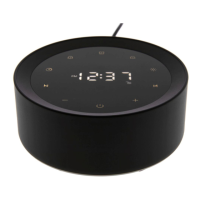
corresponding icon will be displayed on the touch screen.
2
1
21
2
1
21
● Turn on / off the alarm:
Short tap the " " or " " button.
2
1


 To Next Page