Volume Control
Tap or hold the "+" / "-" button to increase / decrease the
volume.
Set Auto-Off Timer
When the music is playing or the light is on, tap the " "
button to set the timer for 15/30/60/90/120mins or turn it off.
You can also tap and hold the " " button to turn off the
timer directly.
Note:
Turn off the timer if you wish to listen to the sounds or use
the light continuously.
- 5 -
Note:
If there is no operation for 10 seconds in setting mode, the
machine will automatically save the current parameters and
exit the setting mode.
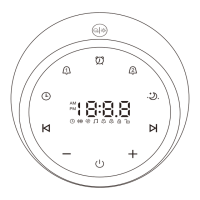
Set Clock
● Clock time setting:
1) Tap and hold the " " button to enter the setting mode
and the hour will begin flashing.
2) Tap or hold the "+" / "-" button to change the hour value,
paying attention to the AM and PM indicators. Short tap
the " " button to confirm and enter the minute setting
and the minute will begin flashing.
3) Tap or hold the "+" / "-" button to change the minute
value. Short tap the " " button to complete setting.
● Clock brightness setting:
Short tap the " " button to adjust the brightness (6 levels).


 To Next Page