Letus35 Mini User Guide
5
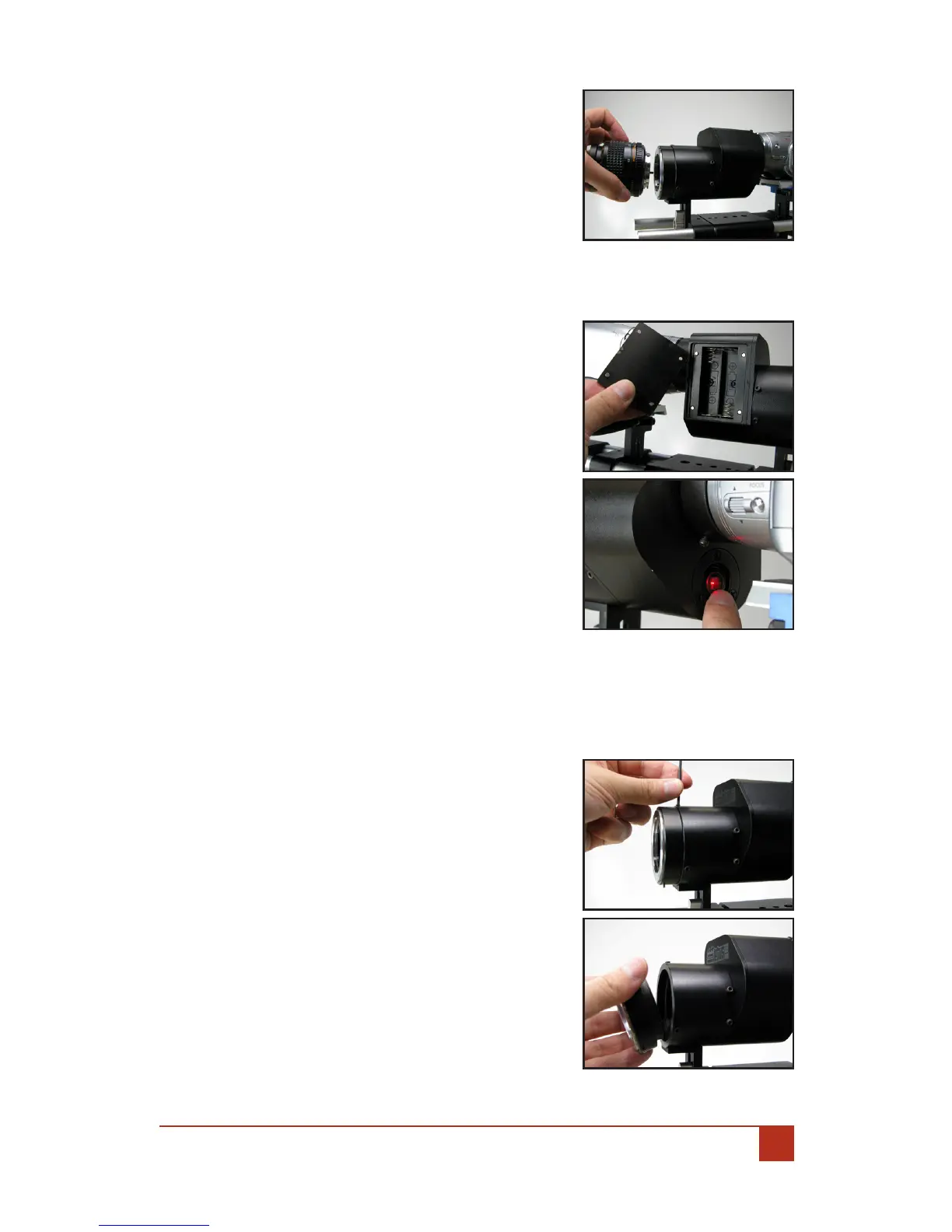
Insert the lens mount into the front tube 2.
of the unit. Make sure to seat the mount
ush against the tube.
Tighten the three (3) set screws to rmly 3.
lock the Lens Mount in place.
Now, attach the appropriate Lens to your 4.
Lens Mount.
Powering Up The Letus35 Mini:F.
Open the battery cover located on the side 1.
of your Letus35 Mini 35mm DOF Adapter.
Insert 2 New AA Batteries.2.
Replace the Battery Cover.3.
Turn on the Letus35 Mini 35mm DOF 4.
Adapter by pressing the red LED button
on the back. When in operating mode, the
LED will glow Red.
Happy Shooting:G.
You may want to readjust white balance for »
your camera according to taste. Do so by
following normal operations for your cam-
era to manually white balance.
Happy Shooting! »
Changing The Lens Mounts: III.
The Letus35 Mini 35mm DOF adapter will allow you
to use dierent lens types for your project. Each
lens type will require a unique lens mount. Here
are the steps to swap in/out the lens mounts:
Using the Allen Wrench tool included with 1.
your package, loosen the three (3) screws
located at the very front of your Letus35
Mini 35mm DOF Adapter.
Remove the current lens mount.2.
Insert the optional lens mount into the 3.
front tube of the unit. Make sure to seat
the mount ush against the tube.


 To Next Page