levante-products.com
LEV0608bb/Page 6 of 12/Issue 1/06.19
PROGRAMMING THE UNIT
The Factory Pre-Set Programme
This Channel Programmer has been designed
to be simple to use, requiring minimal user
intervention with a pre-programmed heating
profile.
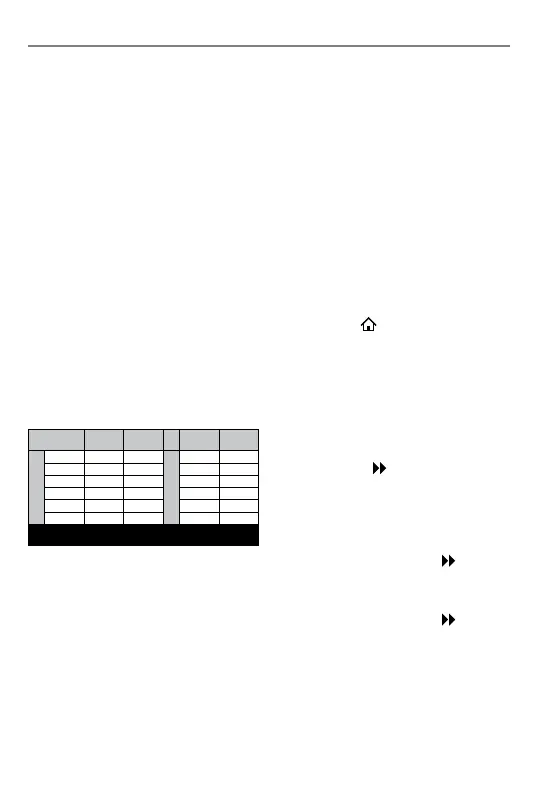
The pre-set heating times and temperatures
will suit most people (see table below). To
accept the factory pre-set settings, move
the slider to RUN which will revert the
programmer to Run Mode (the colon (:) in the
LCD display will begin to flash).
If the user changes from the factory-set
programme and wants to return to it,
pressing the reset button with a non metallic
pointed tool will return the unit to the
factory-set programme.
N.B. Every time the reset is pressed, the time
and date must be set again (page 5).
7 Day:
In 7 day setting, the pre-set settings are the
same as 5/2 Day programme (Mon to Fri and
Sat/Sun).
24 Hr:
In 24hr setting, the pre-set settings are
the same as Mon to Fri of the 5/2 Day
programme.
Setting the Programmer Option
(5/2, 7 day, 24hr)
1. Switch the slider to HEATING. Press either
the +/– button to move between 7 day,
5/2 day or 24hr operation.
5/2 Day operation is shown by MO, TU,
WE, TH, FR flashing (5 Day) and then SA,
SU flashing (2 Day)
7 Day operation is shown by just one day
flashing at a time
24 hr operation is shown by MO, TU, WE,
TH, FR, SA, SU flashing at the same time.
2. Wait 15 seconds to automatically confirm
or press the
Home button. Move the
slider to RUN to return to Run Mode.
Setting the Central Heating Programme
1. Move the slider to HEATING. Choose
between 5/2 day, 7 day or 24 hr
programmer operation (see above steps
1-2).
2. Press the Next
button. Press the Day
button until the desired day/block of days
you want to programme is flashing.
3. The display shows the 1st ON time.
Press +/– to set the time (10 minutes
increments). Press the Next
button.
4. The display shows the 1st OFF time.
Press +/– to set the time (10 minutes
increments). Press the Next
button.
5. The display will now show the 2nd ON
time. Repeat steps 3-4 until all remaining
ON/OFF periods have been set. On the
last OFF period, press the Day button
until the next desired day/block of days
you want to programme is flashing.
Event Std Time
Econ
Time
Std Time
Econ
Time
Week Days
1st ON 06:30 00:00
Weekends
07:30 00:00
1st OFF 08:30 05:00 10:00 05:00
2nd ON 12:00 13:00 12:00 13:00
2nd OFF 12:00 16:00 12:00 16:00
3rd ON 17:00 20:00 17:00 20:00
3rd OFF 22:30 22:00 22:30 22:00
N.B. If 2PU or 2GR is selected, then events 2nd ON and 2nd OFF
are skipped


 To Next Page