3
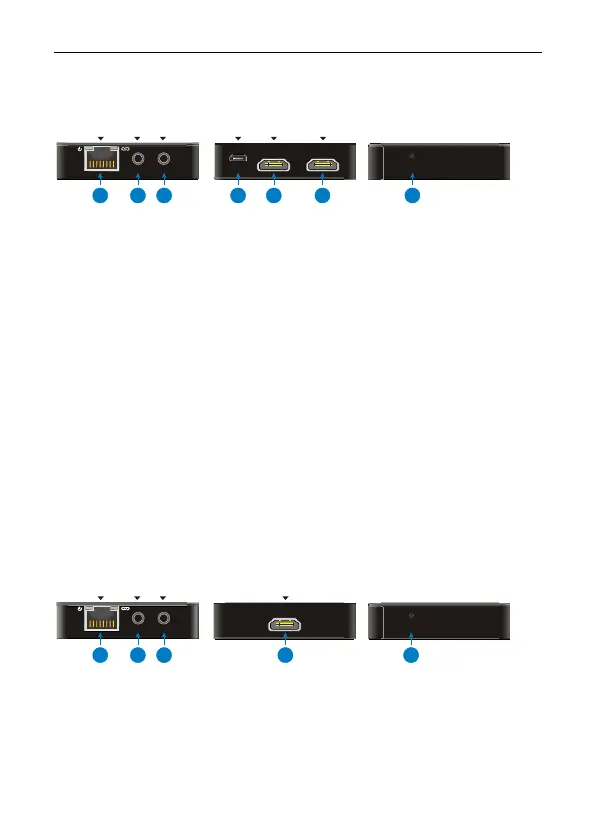
Panel Description
Transmitter (TX)
① CAT OUT: RJ45 connector with Green& Yellow indicators. Connect to
Receiver over CATx cable.
The Green indicator lights up when powered on.
The Yellow indicator lights up when linked successfully between
Transmitter and Receiver.
② IR IN: Connect with IR Receiver.
③ IR OUT: Connect with IR Emitter.
④ DC 5V: Micro USB, connect to the power adaptor.
⑤ HDMI IN: Connect to HDMI source.
⑥ HDMI OUT: HDMI loop output, connect to display.
⑦ RESET: Reboot.
Receiver (RX)
① CAT IN: RJ45 connector with Green& Yellow indicators. Connect to
Transmitter over CATx cable.
② IR IN: Connect with IR Receiver.
HDM I OUT
HDM I IN
DC 5V
IR OU TIR IN CAT OUT
RES ET
1
2
3
4
5
6
7
EQ SETTI NG
IR OU TIR IN CAT IN
1
2
3
4
5
HDM I OUT



 To Next Page