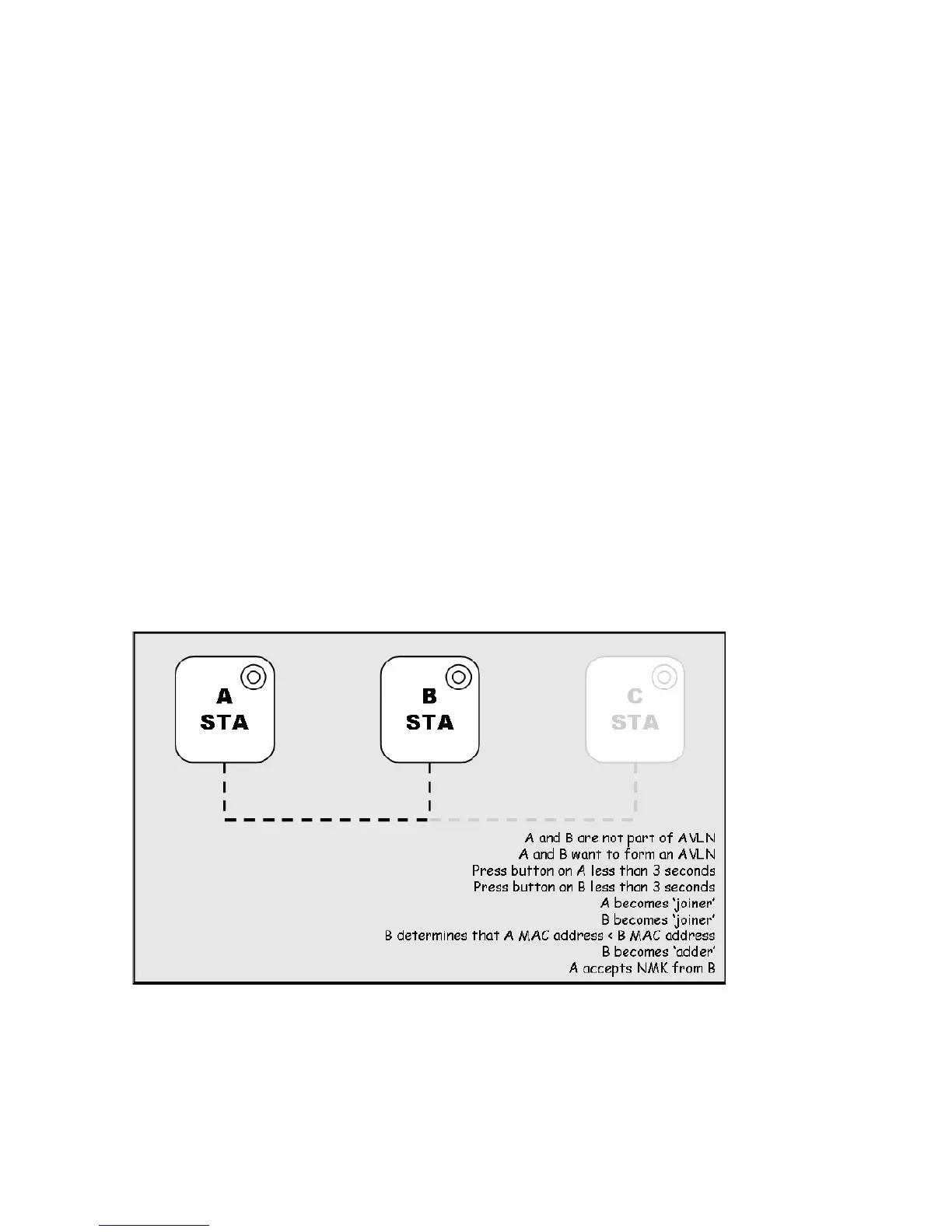
Four possible scenarios
This section describes how to add and remove devices using HomePlug AV Simple Connect
Technology and covers some of the technical details of how the technology works.
Case 1: Forming a Network
Two devices with different network membership key (NMK) values are connected to the same
powerline. The user wants them to form a logical network.
1. Press each device Network ID button > 10 sec till all LEDs re-flash to generate the random
network password key first.
2. Press the button on the first device for less than 3 seconds.
3. Press the button on the second device for less than 3 seconds. The button on the second
device must be pressed within 1 minute, by default however the interval is programmable.
4. Wait for connection to complete and the PLC LED will be ON.
The PWR LED on both devices will flash evenly at 1-second intervals until the operation
succeeds or fails. It will illuminate steadily on successful completion. If an error occurs, the PWR
LED on the ‘adder’ will flash unevenly until the Network ID button on the ‘adder’ is pressed again
or the ‘joiner’ is reset by holding the Network ID buttons down for more than 10 seconds.
The join operation can be cancelled by pressing the Network ID button on the first device again,
for less than 3 seconds, instead of pressing the button on the second device.














 To Next Page