
 Need help?
Do you have a question about the LevelOne PLI-3510 and is the answer not in the manual?
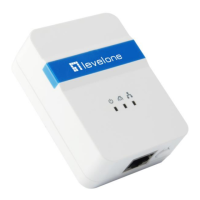
Explains the LevelOne PLI-3510's operation and benefits for home networking.
Lists technical standards, speed, modulation, frequency, and security of the device.
Describes the function of the PWR, PLC, and ETH LEDs on the adapter.
Lists the items included in the PLI-3510 package.
Outlines the OS and hardware requirements for the Powerline Utility and adapter.
Provides step-by-step instructions for connecting the powerline device and checking LED status.
Guides the user through installing the configuration utility from the CD-ROM.
Details how to remove the Powerline Utility via the Control Panel's Add/Remove Programs.
Introduces the main screen of the utility and its initial display.
Explains how to create private networks by changing network names and passwords.
Details the system and hardware information displayed in the diagnostics screen.
Displays software version, copyright, and release date information.
Explains how to use the reset button to restore factory default settings.
Describes the Network ID button's role in managing logical networks and connecting devices.
Details the procedure for forming a new logical network using the Network ID button.
Explains how to add a new device to an existing logical network.
Describes how to remove a device from a logical network.
Explains how to add multiple devices to an existing network sequentially.
 General
| Category | Powerline Adapter |
|---|---|
| Model | PLI-3510 |
| Data Transfer Rate | 200 Mbps |
| Security | 128-bit AES Encryption |
| Standards | HomePlug AV |
| Ports | 1 x Ethernet |
| Range | 300 meters |
| Plug Type | EU |
| Operating Frequency | 2-28 MHz |
| LED Indicators | Power, Ethernet |













 To Next Page