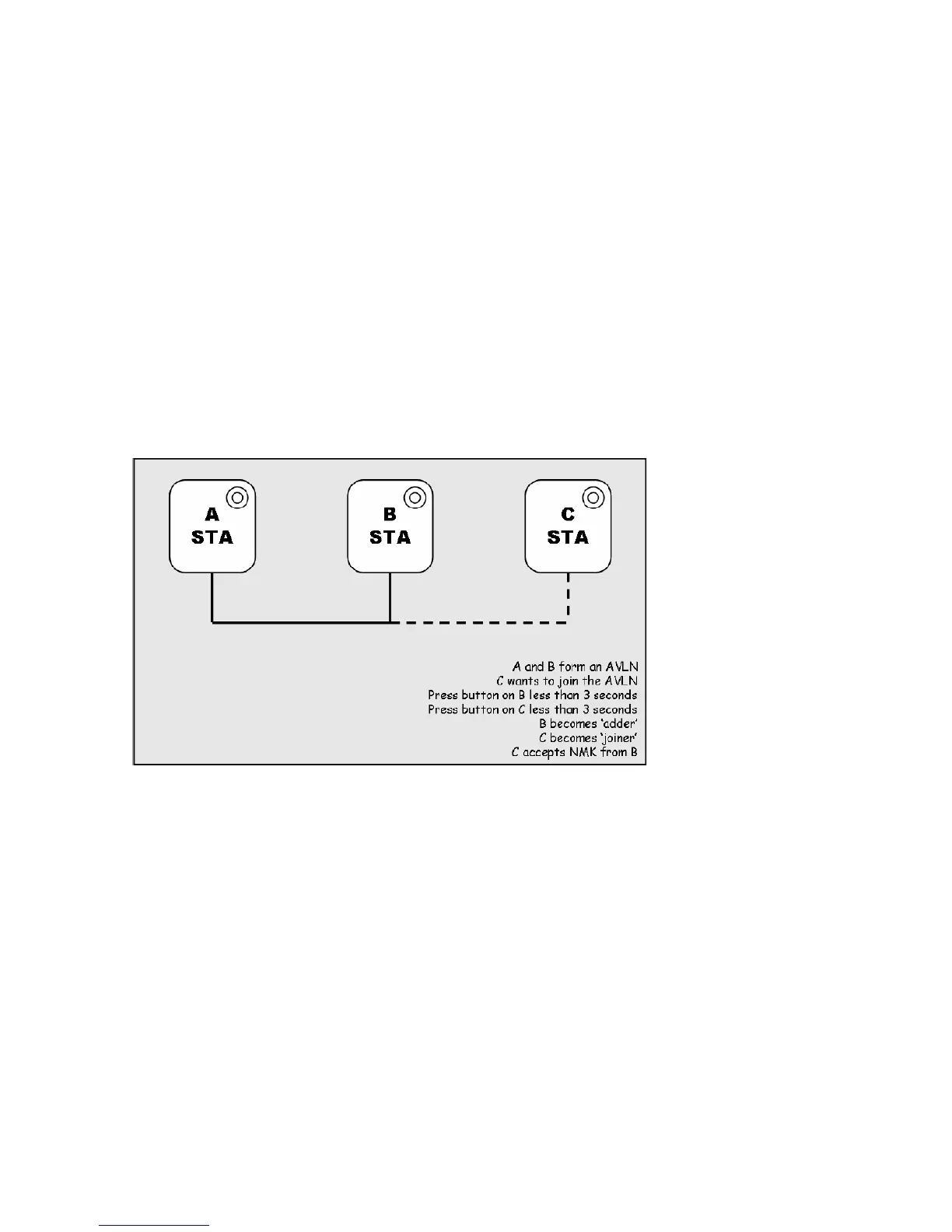
Case 2: Joining a Network
In this scenario a network exists. The user wants a new device, the ‘joiner’, to join the network.
Any device on the existing network can become the ‘adder’.
1. Press the Network ID button on the ‘joiner’ for less than 3 seconds.
2. Press the Network ID button on any network device for less than 3 seconds, making it the
‘adder’. You have 1 minute, by default, to press this Network ID button.
3. Wait for connection to complete and the PLC LED will be ON.
The PWR LED on both devices will flash at 1-second intervals until the process succeeds or fails.
It will illuminate steadily on success. If an error occurs, the PWR LED on the ‘adder’ will flash
unevenly until the Network ID button on the ‘adder’ is pressed again or the ‘joiner’ is reset by
pressing the Network ID button for more than 10 seconds, as described in Case 3:
The join operation can be cancelled by pressing the Network ID button on the first device again,
for less than 3 seconds, instead of pressing the Network ID button on the second device.
If you press Network ID buttons on three or more devices, only the first two will respond. The
others will not. See Case 4 for a variation on this rule.
You can press the Network ID button on the ‘adder’ before pressing the Network ID button on the
‘joiner’. It does not matter which is pressed first. See Case 4 for a case where the ‘adder’ may be
pressed before the ‘joiner’. Once a ‘joiner’ becomes a member of the network, it may become the
‘adder’ in the next join operation.














 To Next Page