8. Maximum Transmission Unit (MTU): Most ISP offers MTU value to users. The default
MTU value is 0(auto).
9. NAT disable: the option bridges data form WAN port to LAN port.
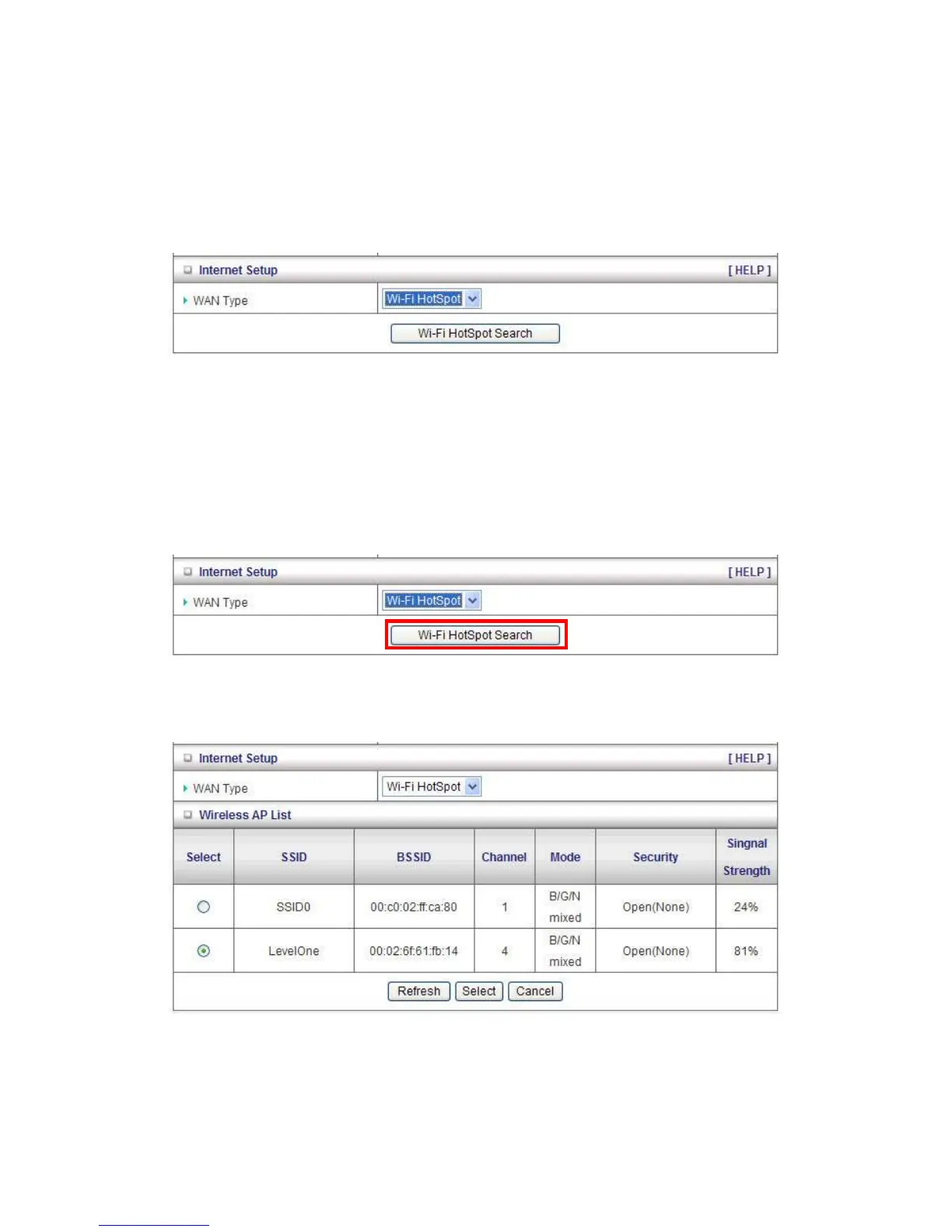
Wi-Fi HotSpot Types: This WAN type allows you to share one Wi-Fi Hotspot account with your
friends or colleagues. Local clients connect to this device via Wi-Fi connection, and surfing
Internet by connecting to remote Wi-Fi Hotspot. Just follow a few steps below to connect to remote
Wi-Fi HotSpot.
Note. If choosing Wi-Fi HotSpot WAN type, the wireless channel of WLAN will be set to as same
as wireless channel of remote Wi-Fi HotSpot.
Step 1: Click “Wi-Fi HotSpot” Search” button to search any available Wi-Fi Hotspot or Wi-Fi AP
(Access Point) in your environment.
Step 2: After finish searching, it will list all available Wi-Fi APs in your environment. You can select
one of the lists to start to connect, or press “Refresh” button to search again.
Step 3: Click “Save” button to save settings after selecting. There will be a field here for you to
input encryption key if remote Wi-Fi Hotspot or Wi-Fi AP requires.














 To Next Page