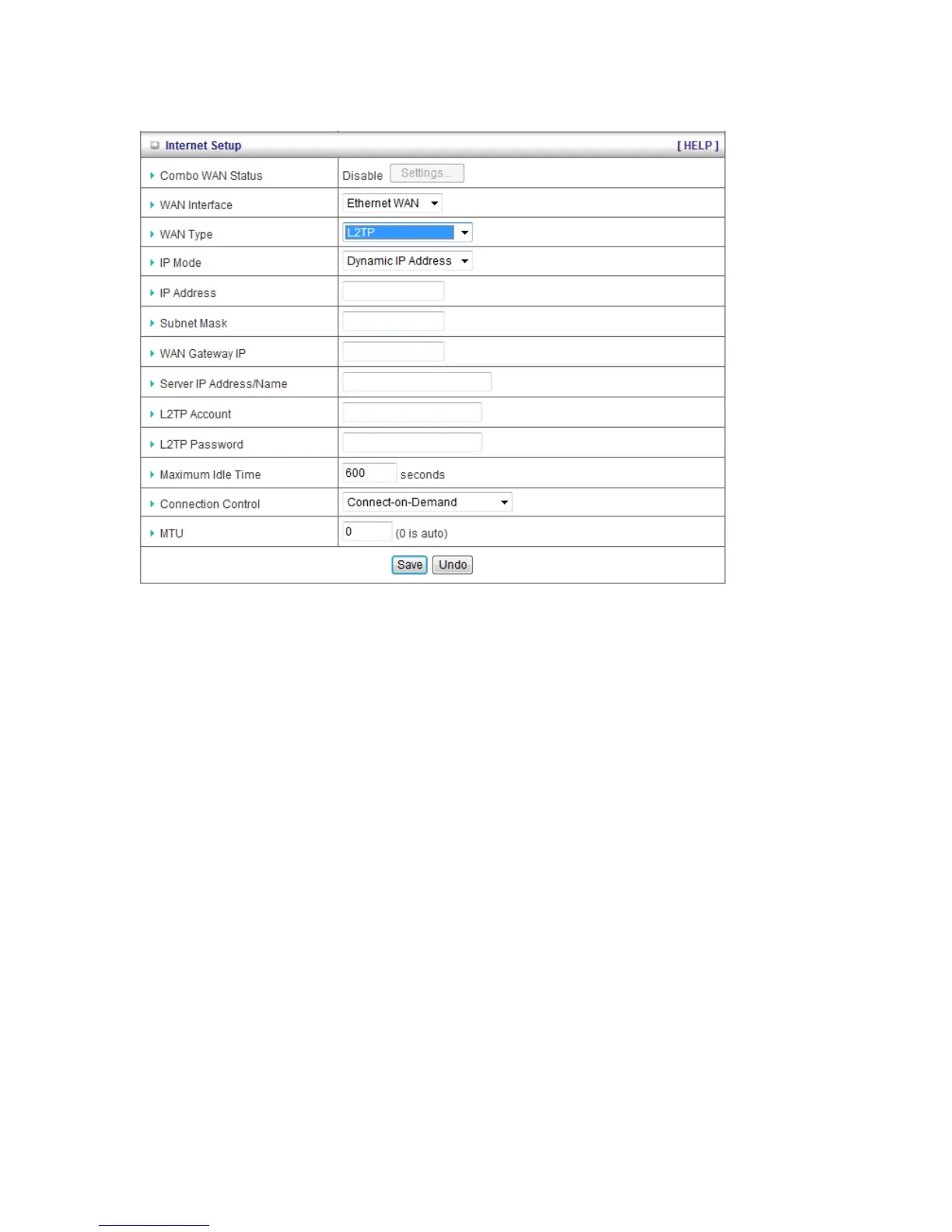
G. L2TP
1. WAN Type: Choose L2TP.
2. IP Mode: You can select “Static IP Address” or “Dynamic IP Address”.
3. My IP Address*, My Subnet Mask*, and Gateway IP*: The IP address, subnet mask,
and IP address of gateway your ISP assigned to you.
4. Server IP Address/Name: The IP address of the L2TP server.
5. L2TP Account and Password: The account and password your ISP assigned to you.
6. Connection ID: Optional. Input the connection ID if your ISP requires it.
7. Connection Control: There are 3 options to start connection:
Auto Reconnect (Always-on): The device will always try to link to Internet.
Connect-on-demand: The device won’t try to connect to Internet until LAN PCs or
devices try to go to Internet. Once Internet connection is established, this device will
drop the connection if maximum idle time is reached.
Manually: The device won’t try to connect to Internet until users press “connect”
button at Status page. Once Internet connection is established, this device will drop
the connection if maximum idle time is reached.
8. Maximum Idle Time: the time of no activity to disconnect your L2TP session. Set it to zero
or enable “Auto-reconnect” to disable this feature.
9. Maximum Transmission Unit (MTU): Most ISP offers MTU value to users. The default
MTU value is 0 (auto).
Note. The items with * above are only available when choosing Static IP Address in IP mode.














 To Next Page