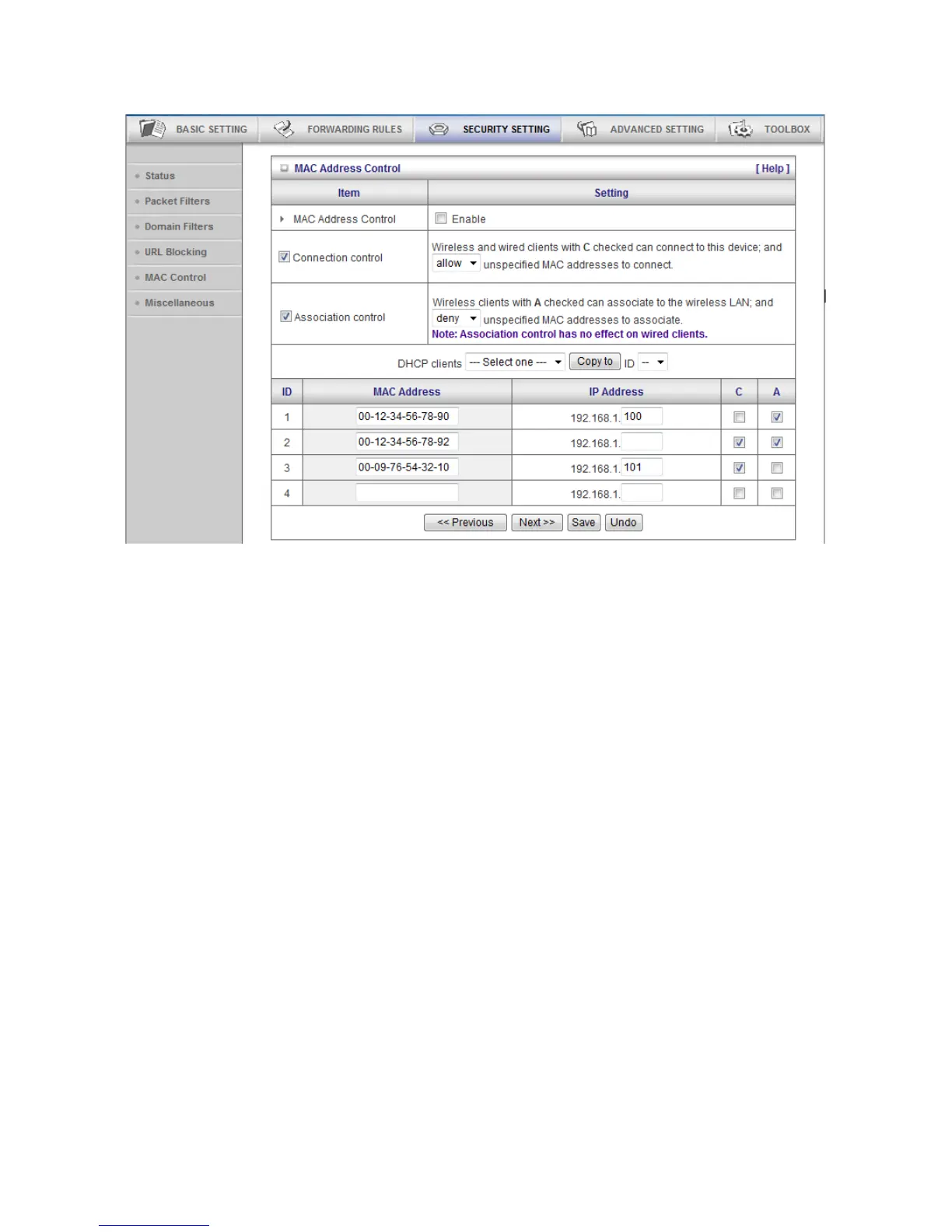
In this scenario, there are three clients listed in the Control Table. Clients 1 and 2 are wireless, and client 3 is
wired.
1.The "MAC Address Control" function is enabled.
2."Connection control" is enabled, and all of the wired and wireless clients not listed in the "Control table" are
"allowed" to connect to this device.
3."Association control" is enabled, and all of the wireless clients not listed in the "Control table" are "denied" to
associate to the wireless LAN.
4.Clients 1 and 3 have fixed IP addresses either from the DHCP server of this device or manually assigned:
ID 1 - "00-12-34-56-78-90" --> 192.168.1.100
ID 3 - "00-09-76-54-32-10" --> 192.168.1.101
Client 2 will obtain its IP address from the IP Address pool specified in the "DHCP Server" page or
can use a manually assigned static IP address.
If, for example, client 3 tries to use an IP address different from the address listed in the Control
table (192.168.1.101), it will be denied to connect to this device.
5.Clients 2 and 3 and other wired clients with a MAC address unspecified in the Control table are all allowed
to connect to this device. But client 1 is denied to connect to this device.
6.Clients 1 and 2 are allowed to associate to the wireless LAN, but a wireless client with a MAC address not
specified in the Control table is denied to associate to the wireless LAN. Client 3 is a wired client and so is















 To Next Page