Home
LevelOne
Adapter
WUA-1610
Page 24
LevelOne WUA-1610 - Page 24
31 pages
Manual
Save Page as PDF
To Next Page
To Next Page
To Previous Page
To Previous Page
Loading...
-
22
-
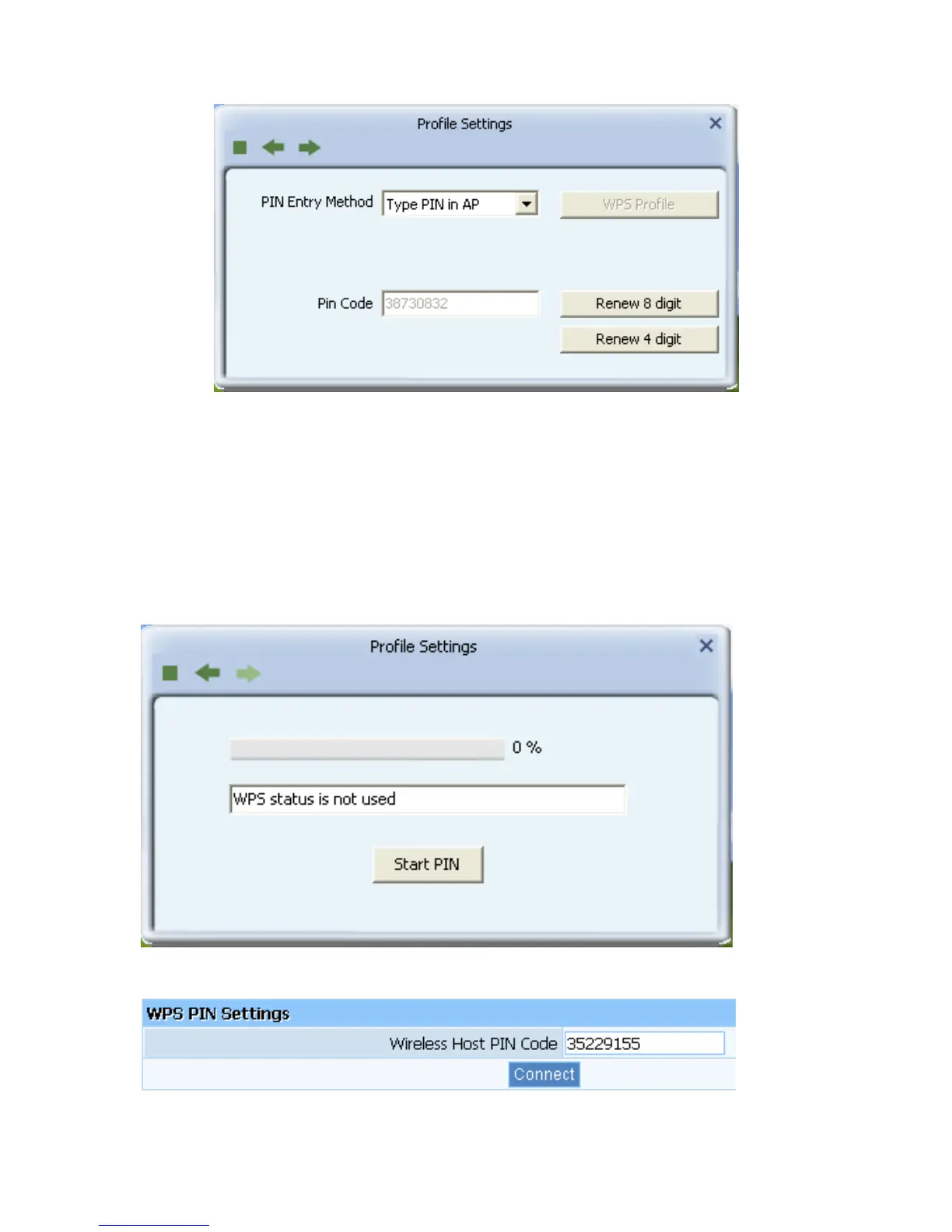
Click
“Start
PIN”
button,
then
In
put
the
PIN
co
de
o
f
the
adapter’s
W
PS
page
into
the
router’s
WPS
c
onfigure
page,
then
click
“conn
ect”,
please
wait
a
moment,
the
co
nnection
between
the
adapter
and
the
ro
uter
will
be
established au
tomatically.
23
25
Table of Contents
Main Page
Default Chapter
1
User Manual
1
Table of Contents
2
Chapter 1 Introduction
3
Package Contents
3
Product Features
3
Led Indicator Description
4
Product Usage
4
Before Installation
4
Disable Other Manufacturers Wireless Network Adapters
5
Product Maintenance
6
Working Environment
7
System Requirements
7
Chapter 2 Installation Guide
7
Hardware Installation
8
Driver and Software Installation
8
Connect to Wireless Network
12
Chapter 3 System Configuration
14
General
15
Profile
15
Link Information
25
Advanced
27
Appendix 1: FAQ
29
Other manuals for LevelOne WUA-1610
Brochure & Specs
3 pages
Related product manuals
LevelOne WUA-1810E
30 pages
LevelOne WUA-0605
29 pages
LevelOne WUA-0614
38 pages
LevelOne WUA-0600
30 pages
LevelOne WUA-0624
38 pages
LevelOne WPC-0600
20 pages
LevelOne PLI-4051
28 pages
LevelOne USB-0502
17 pages
LevelOne PLI-2040
5 pages
LevelOne USB-0401
16 pages
LevelOne USB-0301
17 pages
LevelOne PLI-4052
30 pages














 To Next Page