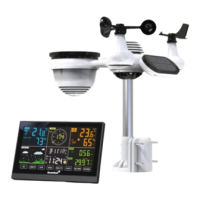
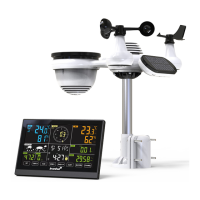
The Levenhuk Wezzer PRO LP380 Weather Station is a comprehensive device designed for monitoring various environmental conditions. It includes a display console and a Y-shaped outdoor multisensor, which integrates a thermohygrometer, rain gauge, wind speed sensor, and UV/light sensor. The kit also comes with a wind vane, a 5V DC adapter, U-bolts with mounting clamps, a zip bag for a 10mm single-head wrench, a user manual, and a warranty card.
Function Description:
The weather station provides real-time data on atmospheric pressure, temperature (indoor and outdoor), humidity (indoor and outdoor), wind speed and direction, UV index, light intensity, and precipitation. It also offers a weather forecast for the next 6 hours based on atmospheric pressure changes. The device can display daily maximum/minimum values for various parameters and features an alarm mode with customizable thresholds for temperature, humidity, precipitation, and wind speed. A snooze function is available for alarms. The console can upload live data from its sensors to selected Internet weather forecast services like Ecowitt Weather, Weather Underground, Weather Cloud, and Weather Observation Website (WOW).
Important Technical Specifications:
- Atmospheric pressure: 700–1100 hPa, 20.6–32.5 inHg, 525–825 mmHg.
- Air humidity: 1–99% RH (indoor and outdoor).
- Temperature: 0… +50°C (+32… +122°F) indoors, –40… +60°C (–40… +140°F) outdoors.
- Wind speed: 0–50 m/s, 0–180 km/h, 0–112 mph, 0–97 knots.
- Precipitation: 0–9999 mm (0–393.6 in).
- Light intensity: 1–200 klx, 0–18.6 kfc, 7–1580 W/m².
- UV index: 0–15.
- Screen: Color LCD.
- Time format: 24 hours, 12 hours.
- Radio signal frequency: 433 MHz.
- Radio signal radius: 100 m (in an open area), 30 m with obstacles.
- Transmission interval: 60s (indoors), 16s (outdoors).
- Power supply (base station): 3 alkaline AAA batteries.
- Power supply (multisensor): 2 alkaline AA batteries.
- Wi-Fi: Requires an active 2.4GHz Wi-Fi network.
Usage Features:
The display console features several buttons for navigation and settings:
- SET: Views MAC address, enters setup mode (hold for 2 seconds).
- TEMP: Views wind chill, heat index, and dew point. Hold for 5 seconds to register a new transmitter.
- RAIN: Views precipitation intensity, daily, weekly, monthly, annual, and total data. Hold for 2 seconds to reset current precipitation data.
- WIND/+: Views wind speed/gusts and direction. In setup mode, selects units or scrolls values (hold for 2 seconds for larger increments).
- PRESSURE/–: Views absolute pressure (average for 12, 24, 48, 72 hours). Hold for 2 seconds to view absolute and relative pressure. In setup mode, selects units or scrolls values (hold for 2 seconds for larger increments).
- ALARM: Views upper and lower alarm thresholds. In alarm mode, views precipitation or wind data.
- MAX/MIN: Views maximum/minimum values for temperature, humidity, precipitation, wind, UV index, light, and absolute pressure. Hold for 2 seconds to reset all max/min values.
- LIGHT/SNOOZE: Adjusts LCD backlight brightness (high/medium/off). Hold for 5 seconds to register a new transmitter. Also functions as a snooze button for alarms.
The device supports automatic daylight saving time when connected to ecowitt.net. It also features trend arrow indicators for temperature, humidity, and pressure, showing changes over a three-hour period. The wireless signal strength indicator displays reception quality with up to 5 bars.
Maintenance Features:
- Rain gauge cleaning: Clean every 3 months by rotating the funnel counterclockwise, lifting it, and wiping with a damp cloth. Insecticide can be used for insect problems.
- Solar radiation sensor and solar panel cleaning: Clean every 3 months with a damp cloth.
- Battery replacement: Replace batteries every 1–2 years, or every 3 months in harsh environments. Use 1.5V lithium batteries in cold climates; alkaline batteries are suitable for most climates. Rechargeable batteries are not recommended. Apply corrosion inhibitor to battery terminals when replacing.
- Snowy conditions: Spray the top of the weather station with anti-icing silicone spray to prevent snow accumulation.
- Troubleshooting: Includes steps for remote sensor connectivity issues (reset button, battery removal), high temperature readings (move sensor to shadier area), relative pressure discrepancies (check calibration with official weather station), rain gauge showing rain when none (ensure sensor is stable and level), and Wi-Fi connection problems (check Wi-Fi symbol, modem settings, AC power, 2.4GHz network, guest network support).
- Reset to factory settings: Power down the console, remove batteries, disconnect the DC adapter, wait, then reconnect. Hold WIND/+ and PRESSURE/– simultaneously during power-up.
- Registering a new transmitter: Hold LIGHT/SNOOZE for 5 seconds.

 Need help?
 General


 To Next Page