41920-A70
6 DI-070-41920-25B
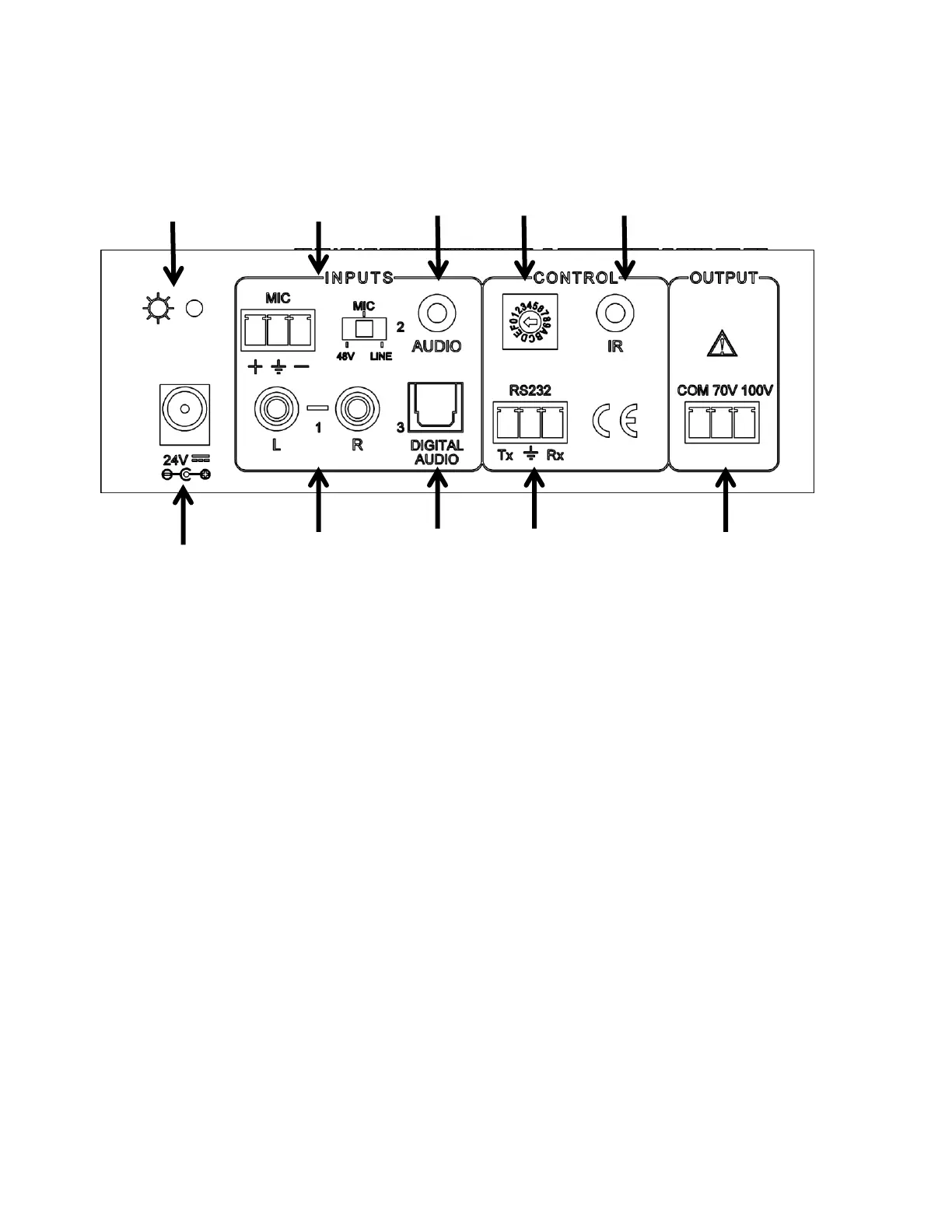
Rear Panel
1. POWER INDICATOR – Lights red when the power is connected
2. MICROPHONE INPUT – 3-pole captive screw connector for microphone input, the switch
selects 48V (for condenser microphones), MIC (for dynamic microphones), and LINE for line
level input
3. 3.5MM INPUT – 3.5mm mini jack for stereo audio input
4. ID CODE – 16 codes range from 0 to F (hexadecimal) for RS-232 addressing
5. IR INPUT– Connects to an IR target to allow the use of an IR remote control
6. PORT POWER – Connects to the power adapter (24VDC)
7. RCA INPUT– L+R audio input
8. DIGITAL AUDIO INPUT – Connects to an optical digital audio output (PCM format only)
9. RS232 – 3-pole captive screw connector for serial control
10. AUDIO OUTPUT – Connects with 70V or 100V speakers



 To Next Page