2 3
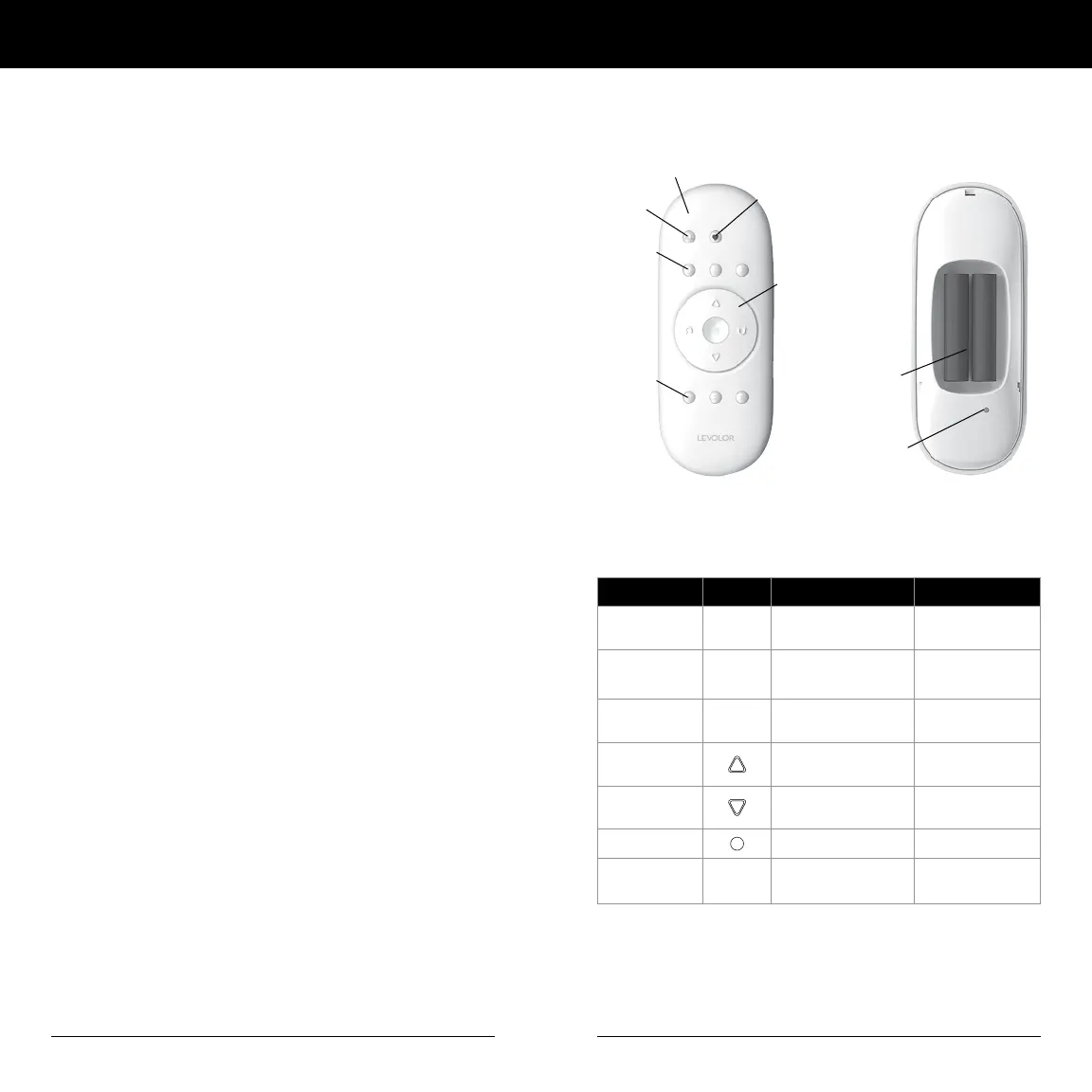
Remote Control Buttons
BACK
Battery
Compartment
Reset
Button
All
Favorite
Groupings
Groupings
Function Arrows,
Lower/Raise
FRONT
Button Key Symbol Function LED Light Color
All
all
Select all shading
groups at once
Groupings
1 ,2, 3,
4, 5, 6
Shading Groups Blue LED
Indicator Light
Favorite
♥
Moves shade to preset
favorite position
Open
Shade Up &
Window Uncovered
Close
Shade Down &
Window Covered
Stop
Stops Shade
Programming
Light
White LED
Indicator Light
Programming
Light
Remote Control Guide Remote Control Guide
Table of Contents
© 2020 LEVOLOR
®
, Inc.
Thank you for purchasing a LEVOLOR
®
motorized window
covering. This guide will help you set up and operate your
new remote control and help you understand all functions
and capabilities, allowing you to make the most of your new
window coverings.
Table of Contents
Remote Control Buttons ...................................................3
Explanation of Functions ........................................... 4 – 5
GROUPS ........................................................................4
FAVORITES ...................................................................4
Travel Limit / Stops ......................................................5
Manual Control Button .................................................5
Standard Battery Pack .................................................5
Satellite Battery Pack ...................................................5
Remote Reset Button ...................................................5
LEVOLOR App Overview ....................................................6
Getting Started ..................................................................7
Battery Placement .......................................................7
Tools Needed to Mount Remote Holder......................7
Mounting Instructions ..................................................7
Activating and Operating ..........................................8 – 10
Join a Window Covering to a GROUP ..........................8
Set a FAVORITE Position ..............................................8
Operating Window Coverings ......................................9
Remove a Window Covering from a GROUP .............10
Create a Duplicate or Second Remote ......................10
Additional Programming ..................................................11
Reset Window Covering Programming ......................11
Reset Travel Limits .......................................................11
Reset Remote .............................................................12
Battery Replacement ......................................................12
Troubleshooting ...............................................................13
Radio Frequency Compliance ........................................ 14
Warranty ............................................................................15



 To Next Page