31
ENGLISH
KARAOKE FUNCTION
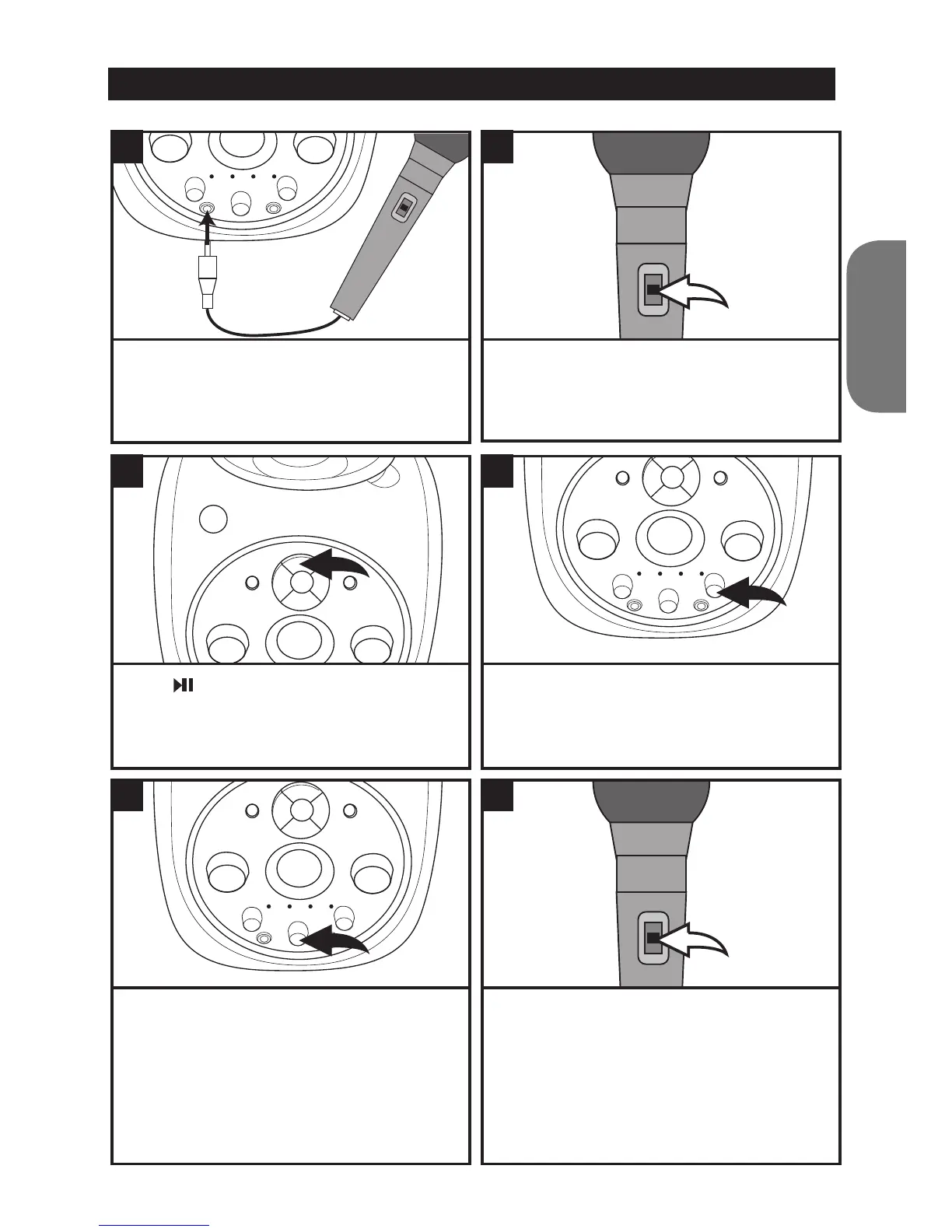
Press to start playing the CD. Note: All CD
functions such as fast forward, rewind, pause,
repeat and programming work as normal
when using the karaoke function.
If you are using a multiplex CD you can adjust
the AVC (Auto Voice Control) by turning the
dial to change the volume level of the singer.
If you turn the control to the left, you can mute
the CD singer so that when you start singing
only your voice can be heard. If you turn it
to the right, the vocal tracks will play at the
normal volume.
Rotate the ECHO control left to decrease the
echo and right to increase it.
When you have nished using the karaoke,
remember to turn the microphone off by sliding
the switch to the OFF position.
3
5
4
6
Connect the microphone jack to the
microphone 1 or 2 socket on the karaoke
player. Make sure the VOLUME control is
turned to a low setting.
Slide the microphone switch to the ON position.
To turn the microphone off, simply slide the
switch to the OFF position.
1 2



 To Next Page