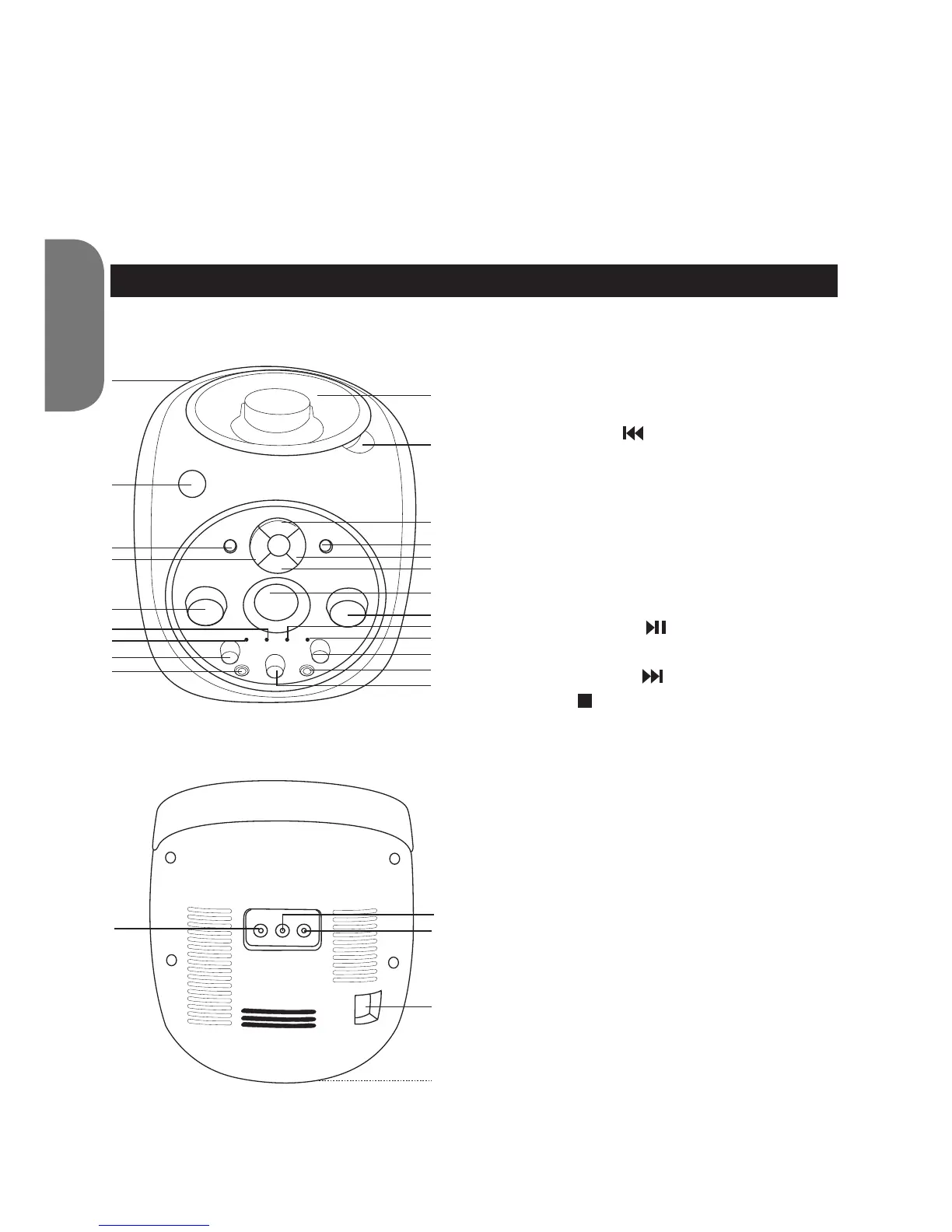
LOCATION OF CONTROLS
Front
1. Carrying handle
2. POWER button
3. REPEAT button
4. REW/SKIP button
5. VOLUME control
6. Play indicator
7. Power indicator
8. BALANCE control
9. Microphone jack 1
10. CD door
11. CD OPEN tab
12. PLAY/PAUSE button
13. PROGRAMME button
14. F. FWD/SKIP button
15. STOP button
16. Display
17. MICROPHONE VOLUME control
18. Repeat indicator
19. Programme indicator
20. ECHO control
21. Microphone jack 2
22. AVC (Auto Voice) control
Back
23. Video out jack
24. Audio out (right) jack
25. Audio out (left) jack
26. AC IN jack
27. Battery compartment (bottom of unit)
10
11
12
13
14
15
16
17
19
20
21
9
22
18
8
7
6
5
4
3
2
1
25
26
27
24
23
Cleaning the unit
• To prevent re or shock hazard, disconnect your unit from the AC power
source when cleaning.
• If the cabinet becomes dusty, wipe it with a soft, dry dust cloth. Do not use
any wax, polish sprays or abrasive cleaners on the cabinet.
• Never allow any water or other liquids to get inside the unit while cleaning.



 To Next Page