ST600IM ST600IM
Réinitialisation
Garantie
FRANÇAIS
5
ENGLISH
6
ATTENTION: Si la télécommande vient à mal fonctionner ou à recevoir une
décharge électrostatique, enlevez les piles puis réinsérez-les au bout de
quelques minutes.
NOTE: Conservez ce guide d’utilisation car il contient des informations
importantes. Ce produit est couvert par une garantie de deux ans. Pour faire
usage de cette garantie et bénéficier de notre service après-vente, contactez
votre revendeur et présentez votre preuve d’achat. Notre garantie couvre les
défauts de fabrication et dans les matériaux imputables au fabricant, à
l’exception des défauts et dommages causés par une utilisation non conforme
aux instructions ou résultant de modifications apportées au produit (telles que
l’exposition à des températures extrêmes ou à l’humidité, etc).
LEXIBOOK S.A,
2, avenue de Scandinavie,
91953 Courtaboeuf Cedex France
Assistance technique : 0892 23 27 26 (0,34 € TTC/Min)
http://www.lexibook.com
Protection de l’Environnement
Les appareils électriques et électroniques ne doivent pas être mis au rebut avec
le reste de vos ordures ménagères! Aidez activement à la protection de
l’environnement et à la conservation des ressources en faisant usage des points
de collecte agréés (si disponibles) pour un recyclage approprié de cet appareil.
Introduction
Battery Installation
This Universal Remote Control can operate up to 6 types of devices: televisions
(TV), video cassette recorders (VCR), and digital video disc players (DVD),
Satellite (SAT), Cable view (CAB), audio devices (AUD).
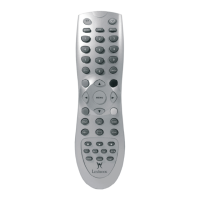
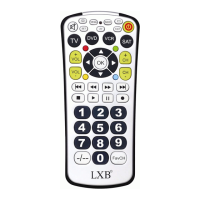
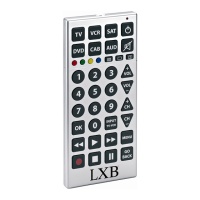
Take a look at the product image located at the back of the cover page to
familiarize yourself with the features of this remote control. You may also need to
review the operating manuals of your original remotes to refresh yourself on the
functions of those units.
1. Remove the battery compartment cover located on the bottom of the unit.
2. Insert 2 x AA-size alkaline batteries according to the polarities (+/- signs)
located inside the battery compartment. Replace the battery compartment
cover.
3. Press the ON/OFF button; the LED should illuminate. If it does not, insert other
batteries and try again.
Note: all settings will be lost when replacing the batteries.
A. Teletext On key
B. Teletext Off key
C. Teletext Hold key
D. Teletext Red key
E. Teletext Green key
F. Teletext Yellow key
G. Teletext Blue key
H. LED
I. On/Off
J. Mute
K. Volume
L. Channel
M. Backward
N. Play
O. Fast Forward
P. Record
Q. Stop
R. Pause
Key correspondence
Important: when you use the remote, first select the type of device you wish to
use by pressing the corresponding device key (TV, VCR, SAT, DVD, CAB, AUD).
Note: the advanced functions mentioned in this table (DVD player and AUDIO
device) are not applicable to all brands of DVD players or audio devices.
Key
name
Key function
for TV, VCR,
SAT, CAB
Key function for DVD
(special function key has
higher precedence)
Key function for AUDIO
(digit keys has higher
precedence)
1
2
3
4
5
6
7
8
9
0
SETUP > MENU > DIGIT 1
TOP MENU > DIGIT 2
TITLE > DIGIT 3
REPLAY > DIGIT 4
RANDOM > DIGIT 5
REPEAT > DIGIT 6
ANGLE > DIGIT 7
SUBTITLE > DIGIT 8
ZOOM > DIGIT 9
OPEN > CLOSE > EJECT > DIGIT 0
DIGIT 1 > SELECT TAPE OR VCR
DIGIT 2 > SELECT CD, DVD OR LD
DIGIT 3 > SELECT TV
DIGIT 4 > SELECT VIDEO1
DIGIT 5 > SELECT VIDEO2
DIGIT 6 > SELECT SAT
DIGIT 7 > SELECT VIDEO
DIGIT 8 > SELECT PHONO
DIGIT 9> SELECT CD, DVD, OR DISC
DIGIT 0 > SELECT TUNER
DIGIT 1
DIGIT 2
DIGIT 3
DIGIT 4
DIGIT 5
DIGIT 6
DIGIT 7
DIGIT 8
DIGIT 9
DIGIT 0
100mm (W) x 150mm (h) 100mm (W) x 150mm (h)


 To Next Page
 Loading...