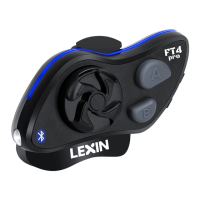
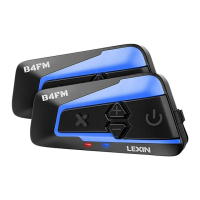
The LEXIN LX-A4 SAFE CHATTER is a motorcycle 4-rider 1000M full-duplex stereo Bluetooth wireless helmet headset system, designed for integration into most open-face, flip-front, and full-face helmets. This device allows riders to make hands-free calls on their Bluetooth mobile phones, listen to stereo music, or receive voice instructions from GPS navigations wirelessly. It also facilitates intercom conversations in full duplex with a passenger or multi-pair up to four riders in a small group, with a talk range of up to 1000 meters (3,280 feet) between any two riders.
A key feature of the LX-A4 SAFE CHATTER is its wireless remote control, which LEXIN specifically designed to allow drivers to fully control the Bluetooth interphone without removing their hands from the grip. This enhances convenience and safety, as riders can confidently operate functions such as Phone/Hang Off or Play/Pause, adjust Volume +/-, and manage Intercom Rider A, B, and C.
The LX-A4 SAFE CHATTER is compliant with Bluetooth Specification v3.0, supporting several profiles: Headset Profile (HSP), Hands-Free Profile (HFP), and Advanced Audio Distribution Profile (A2DP). Users should check compatibility with other devices. The headset boasts superior audio fidelity, achieved through wide-fidelity, non-ported, and ultra-slim helmet speakers. It also offers excellent wind and ambient noise reduction thanks to its miniature boom microphone. The main unit is powered by a rechargeable Lithium Ion/Polymer power cell, providing 8-12 hours of use on a full charge.
Usage Features:
Powering On/Off and Charging:
To power on, press and hold the POWER Button for approximately 6 seconds until the blue LED illuminates. To power off, either short press the Reset Button once for a quick power off, or press and hold the POWER Button for about 6 seconds until the blue LED stops blinking and remains on, then release the button. For charging, plug the micro USB cable into the USB port. The LED will turn red during charging and turn off when both the main unit and the remote control are fully charged. A full charge takes about 2.5 hours, and the remote control can be used for 3 months on a full charge.
Pairing with Bluetooth Devices:
Before initial use, the LX-A4 SAFE CHATTER needs to be paired with Bluetooth devices. This pairing is a one-time operation for each device, and the headset will automatically reconnect when within range.
- Pairing a Mobile Phone: Press and hold the POWER Button for about 8 seconds until the LED flashes red and blue alternately. Search for Bluetooth devices on your mobile phone, where the headset will appear as "Motor Phone." Enter "0000" for the PIN. Once pairing is complete, the blue LED will blink every 5 seconds.
- Pairing a Stereo Bluetooth Adaptor: Turn on your audio source and prepare the Stereo Bluetooth Adaptor for pairing. Put the LX-A4 SAFE CHATTER main unit into Bluetooth pairing mode (as described above). Turn on or plug in the Stereo Bluetooth Adaptor. The audio source will automatically begin playing through the LX-A4 SAFE CHATTER main unit once pairing is complete.
- Pairing Bluetooth GPS Navigation: The pairing procedure is the same as for mobile phones. Refer to the GPS navigation manual for specific details.
Volume and Music Control:
Volume can be adjusted by short pressing the Volume - & Volume + Buttons. A beep will indicate maximum or minimum volume levels.
Safe Mobile Phone Calls:
- Answering Incoming Calls: The headset will automatically answer incoming calls after 3-5 seconds, or you can short press the Phone/Play Button to answer immediately.
- Rejecting Incoming Calls: Press and hold the Phone/Play Button for 2 seconds.
- Ending Active Phone Calls: Short press the Phone/Play Button.
- Last Phone Call Number Redial: Press and hold the Phone/Play Button for 2-3 seconds. If the headset disconnects from the mobile phone (e.g., due to RF interference or metal blocking), short press the Power button to reconnect.
Bluetooth Intercom Talk:
The LX-A4 SAFE CHATTER can be paired with up to three other headsets for group intercom conversations.
- Pairing Two LX-A4 Headsets: Start with both headsets powered off. Press and hold the Power Button on both headsets for 6 seconds until their LEDs flash red and blue alternately. Short press the power button on either headset (A or B) and wait for the LEDs to turn blue and for the intercom connection to establish. Press the power button to start or end the intercom conversation. When in an intercom conversation, both blue and red LEDs will blink simultaneously.
- Pairing Four LX-A4 Headsets: Turn on the two headsets (A and B) you wish to pair. Press and hold the RIDER B Button on Headset A for 6 seconds until its LED flashes red and blue alternately. Simultaneously, press and hold the RIDER A Button on Headset B for 6 seconds until its LED flashes red and blue alternately. Short press the RIDER A Button on Headset B or the RIDER B Button on Headset A, and wait for the LEDs to turn blue and for the intercom connection to establish. Additional pairings between headsets (A and C, A and D, B and C, B and D, C and D) can be made following the same procedure.
- Starting Intercom Talk: Short press the Rider A, Rider B, or Rider C button to initiate a conversation between any two riders.
- Disconnecting Intercom Talk: To end an intercom conversation, short press the Rider A, Rider B, or Rider C button.
- Note: For LX-R6 Dual Pack users, units are pre-paired; simply press the power button to start or end intercom talk.
- Note: The headset does not have a Rider D Button; Rider A Button is used for Rider D.
- Note: During pairing, only two headsets should be powered on, with others off.
- Important Note: Pairing should only be done by pressing buttons on the main unit, not on the wireless remote control.
Intercom Operation with Remote Control:
When using the remote control for intercom functions (Rider A, B, C buttons), avoid repeated presses, as this can confuse the main unit. The remote control's button functions mirror those on the main unit and do not require separate pairing. Allow 1-5 seconds for the main unit to react to each operation.
- If an intercom rider is already in a conversation or on a mobile phone call, you cannot initiate a new intercom call and will hear a low-tone double beep indicating a busy signal.
- If an intercom rider goes out of range, static noise may occur, leading to disconnection. The LX-A4 SAFE CHATTER will automatically attempt to reconnect every 8 seconds, indicated by high-tone double beeps. To stop reconnection attempts, short press the Rider A, Rider B, or Rider C Button.
Stereo Music:
Music can be enjoyed via Bluetooth wireless stereo or the enclosed stereo audio cable.
- Bluetooth Wireless Stereo: After pairing your Bluetooth audio device (supporting A2DP) with the LX-A4 SAFE CHATTER, you can remotely control music playback. Adjust volume using the Volume + or Volume – Buttons on either the main unit or the wireless remote control. Play/pause music by pressing the Phone/Play Button on the main unit or the wireless remote control.
- Stereo Audio Cable: Plug your stereo MP3 player directly into the LX-A4 SAFE CHATTER using the enclosed 3.5mm audio cable. Volume and music playback are controlled via the MP3 player.
Function Priority:
The LX-A4 SAFE CHATTER prioritizes functions as follows:
- Mobile phone (highest)
- Intercom
- Bluetooth stereo music, FM radio (lowest)
Higher-priority functions will always interrupt lower-priority ones. For example, stereo music is interrupted by an intercom call, and an intercom conversation is interrupted by an incoming mobile phone call.
Reset:
If the LX-A4 SAFE CHATTER malfunctions, it can be reset by pressing the Reset Button on the headset main unit. This will switch off the device, requiring you to power it on again to resume use.
Installation Instructions:
- Insert the back plate of the clamp between the helmet's internal padding and external shell. Attach the front bracket to the proper position on the left bottom edge of the helmet and tighten with screws. If the helmet shell is thick, use the spacer in the middle of the clamp. Alternatively, for special large or half helmets, use the sticker-style mounting bracket.
- Mount the microphone in the nose section, slightly to the left of center. For open-face helmets, adjust the microphone direction so the triangular mark points towards your mouth.
- Place the speakers into the cheek pads, pressing them and the microphone firmly against the Velcro pads.
- Tuck the wires into the gap between the helmet liner and shell.
- Mount the LX-A4 SAFE CHATTER main unit onto the bracket and slide it into the L-shape hole.
Maintenance Features:
Care and Maintenance:
To maintain your LX-A4 SAFE CHATTER and ensure its longevity, follow these guidelines:
- Avoid using or storing the device in dusty or dirty environments, as this can damage moving parts and electronic components.
- Do not store the device in high-heat areas, as high temperatures can shorten the life of electronic devices, damage batteries, and warp or melt plastics.
- Do not store the device in cold-temperature areas. When the device returns to normal temperature, moisture can form inside, damaging electronic circuit boards.
- Do not attempt to open the LX-A4 case.
- Avoid dropping or knocking the device, as rough handling can break internal circuit boards and fine mechanics.
- Do not use harsh chemicals, cleaning solvents, or strong detergents to clean the device.
- Do not paint the device, as paint can clog moving parts and prevent proper operation.
These suggestions apply to the headset main unit, speaker-microphone clamp unit, and power charger.

 Need help?
 General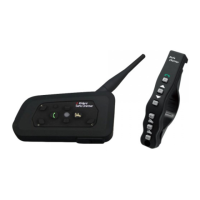

 To Next Page