4. General Operation Instructions
4A. Powering On/Off and Charging
• Power On
Press & hold the POWER Button for about 6 seconds to power on. The
blue LED turns on.
• Power Off
Just short press the Reset Button one time for quick power off, or press and hold the
POWER Button for about 6 seconds to power off. The blue LED will stop
blinking but keep on, then release the button.
• Charge
Plug the micro USB cable into the USB port.The LED turns on red while charging,
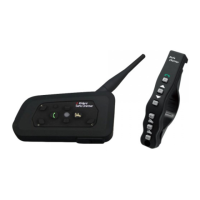
and turns off when the main unit and the remote control is fully charged. It takes
about 2.5 hours to be completely charged. Every time in fully charge the remote
control can use for 3 months.
4B. Pairing the LX-A4 with a Bluetooth Device
Before using the LX-A4 SAFE CHATTER Bluetooth headset with any of Bluetooth
devices for the first time, you need to do the pairing operation. It can be paired with
Bluetooth mobile phones, Bluetooth audio devices such as MP3 or GPS, and with
other LX-A4 SAFE CHATTER Bluetooth headsets. This pairing operation is only
required once for each Bluetooth device, and the headset will remain paired with the
devices and automatically connects to the paired devices again when they are within
range.
• Pairing a Mobile Phone
1. Press & hold the POWER Button for about 8 seconds until the LED
flashes red and blue alternately.
2. Search for Bluetooth devices on your mobile phone. The headset will be listed on
your mobile phone as Motor Phone.
3. Enter 0000 for the PIN.
4. Your mobile phone will confirm that pairing is complete. Then only the blue LED
blinks every 5 seconds.
• Pairing a Stereo Bluetooth Adaptor
1. Turn on audio source and prepare Stereo Bluetooth Adaptor for pairing
2. Put LX-A4 SAFE CHATTER main unit in Bluetooth pairing mode (see above)
3. Turn on or plug in Stereo Bluetooth Adaptor
4. Audio source will automatically start playing though LX-A4 SAFE CHATTER
main unit when pairing is complete
• Pairing Bluetooth GPS Navigation
1. You can listen to Bluetooth voice instructions from a Bluetooth GPS navigation.
2. The paring procedure is the same with the procedure of “Pairing Mobile Phone”.
3. Please refer to the manual of the Bluetooth GPS navigation for details.


 To Next Page