2
Setup information
Step 1: Connect
the hardware
1 Turn off and unplug your printers.
2 Connect the network and printer cables. If you are connecting
only one parallel printer, use port PAR 1 on the print server.
3 Connect the print server power supply.
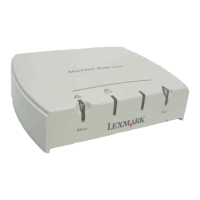
Note: The three-port model
(shown in the illustration) has
two parallel ports and one serial
port. The one-port models are
parallel only.
For information about using the
serial port, refer to the online
documentation on the drivers
CD that shipped with your print
server.
MarkNet™ External Print
Servers support Ethernet or
Token-Ring networks.
4 Plug all the power cords into properly grounded electrical
outlets. The print server turns on automatically.
5 Turn on the printers.
6 Press and release Menu and Test simultaneously to reset the
print server. The Menu and Test buttons are located on top of
the print server.


 To Next Page