Use the To
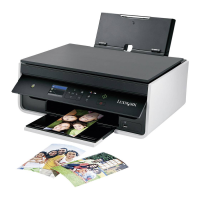
8 Paper feed guard Prevent items from falling into the paper slot.
9 Paper guides Keep paper straight when feeding.
10
12
13
17
16
14
15
11
Use the To
10 Scanner glass Scan or copy photos and documents.
11 Power supply with port Connect the printer to the power cord.
12 Duplex unit
• Print on both sides of a sheet of paper.
• Clear paper jams.
13 USB port Connect the printer to a computer using a USB cable.
Warning—Potential Damage: Do not touch the USB port except when plugging in or
removing a USB cable or installation cable.
14 Printhead access area Install the printhead.
Note: The carrier moves to the printhead access area when no printhead is installed in
the printer.
15 Jam clearance cover Access and clear paper jams.
16 Ink cartridge access area Install, replace, or remove ink cartridges.
17 Scanner unit
• Access the ink cartridges and printhead.
• Clear paper jams.
About your printer 11




 To Next Page

