ES300h_OM_OM33B71U_(U)
295
5-1. Basic Operations
5
Lexus Display Audio system
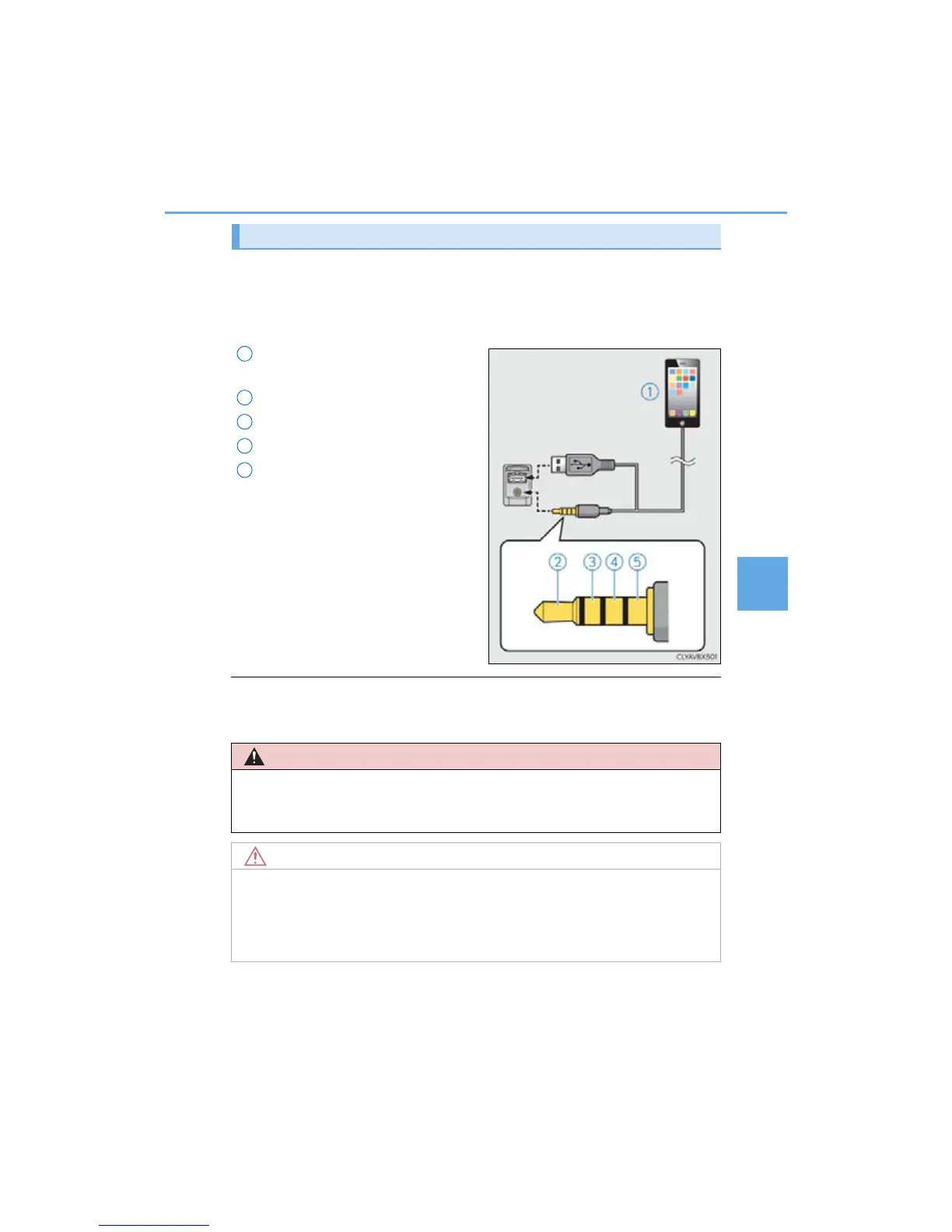
To view a video on an iPod video or VTR, it is necessary to use a 4-pole AUX
cable to connect the portable audio device.
When connecting a portable audio device to the AUX port, use a 4-pole AUX
cable with a plug that matches the exact layout shown in the illustration.
Connected device (portable audio
device, etc.)
Left audio
Right audio
Ground
Video
When using an iPod video, a cable that
has a 4-pole AUX plug and a USB con-
nector is necessary. Connect the plug
and connector to the AUX and USB
ports.
■ When using a 4-pole AUX cable
If a 4-pole AUX cable with a different layout is used, audio and/or video may not be out-
put properly.
Using a 4-pole AUX cable
1
2
3
4
5
■ If the armrest cannot be fully closed
Depending on the size and shape of the USB memory that is connected to the system,
the armrest may not close fully. In this case, do not forcibly close the armrest as this may
damage the USB memory or the terminal, etc.



 To Next Page