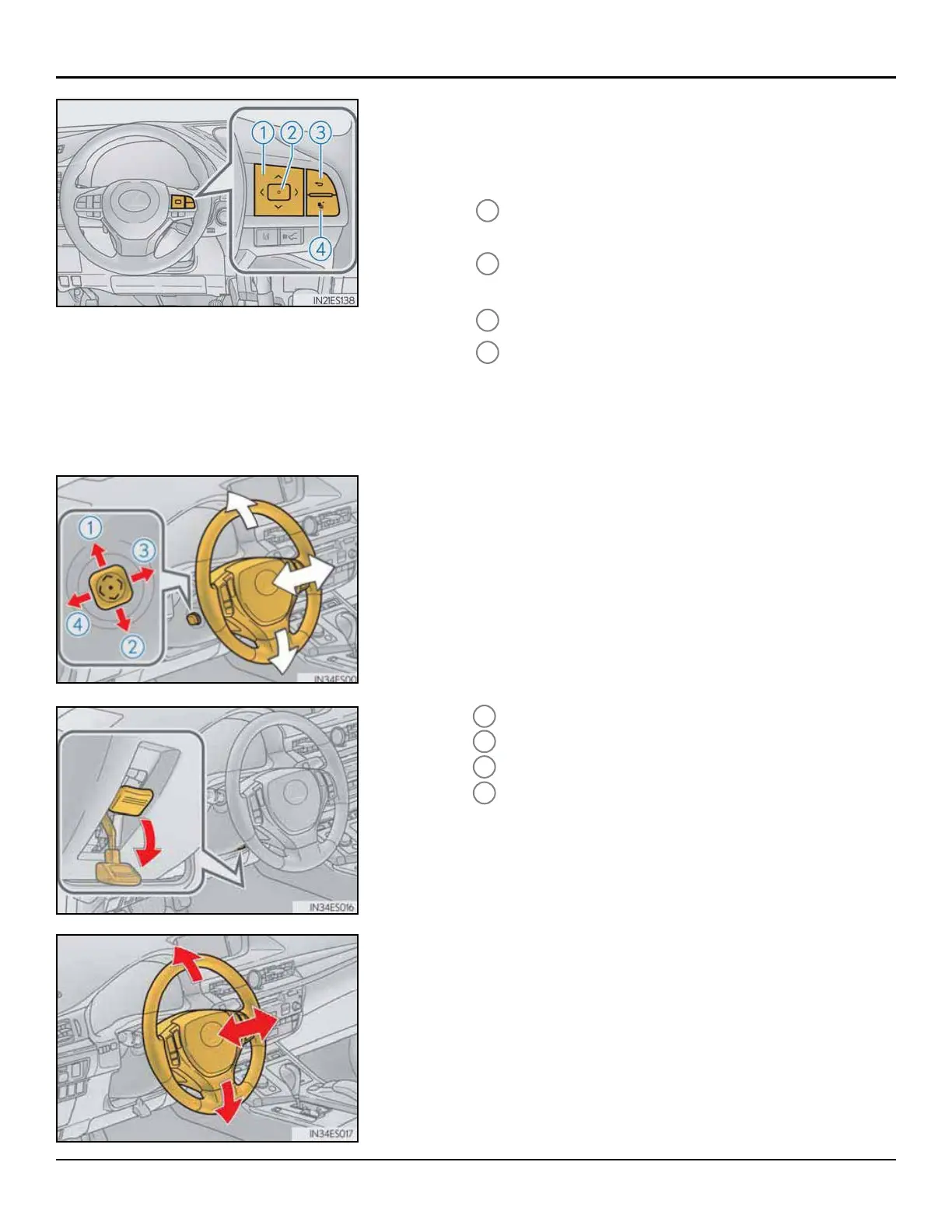
MULTI-INFORMATION DISPLAY
Themulti-informationdisplayprovidesinformationon
vehicledrivingconditionsandwarningmessages.
1
Switchmenu,scrollup/downthescreenandmove/
up/downthecursor
2
Press:Enter/Set
Pressandhold:Reset
3
Returntopreviousscreen
4
Movethemainmeter
NOTE:
Openanydoorandtrunk,andcheckthattheopening
conditionindicatorisdisplayed.
Refertothemulti-informationdisplaysectioninthevehicle’s
Owner’s Manualforacomprehensivelistofthesystem’s
functionsanddisplays.
*Ifequipped
TILT AND TELESCOPIC STEERING WHEEL
Checksteeringwheeladjustmentoperation:
a)Poweradjustment
1
Up
2
Down
3
Towardthedriver
4
Awayfromthedriver
b)Manualadjustment
Holdthesteeringwheelandpushtheleverdowntoset
thesteeringwheelinthedesiredposition.
24
ES350/ES300h
INSPECTION DETAILS - C. LEFT FRONT



 To Next Page