39
1-2. Opening, closing and locking the doors and trunk
1
Before driving
LS460_BRAZIL_08_(L/O_0712)
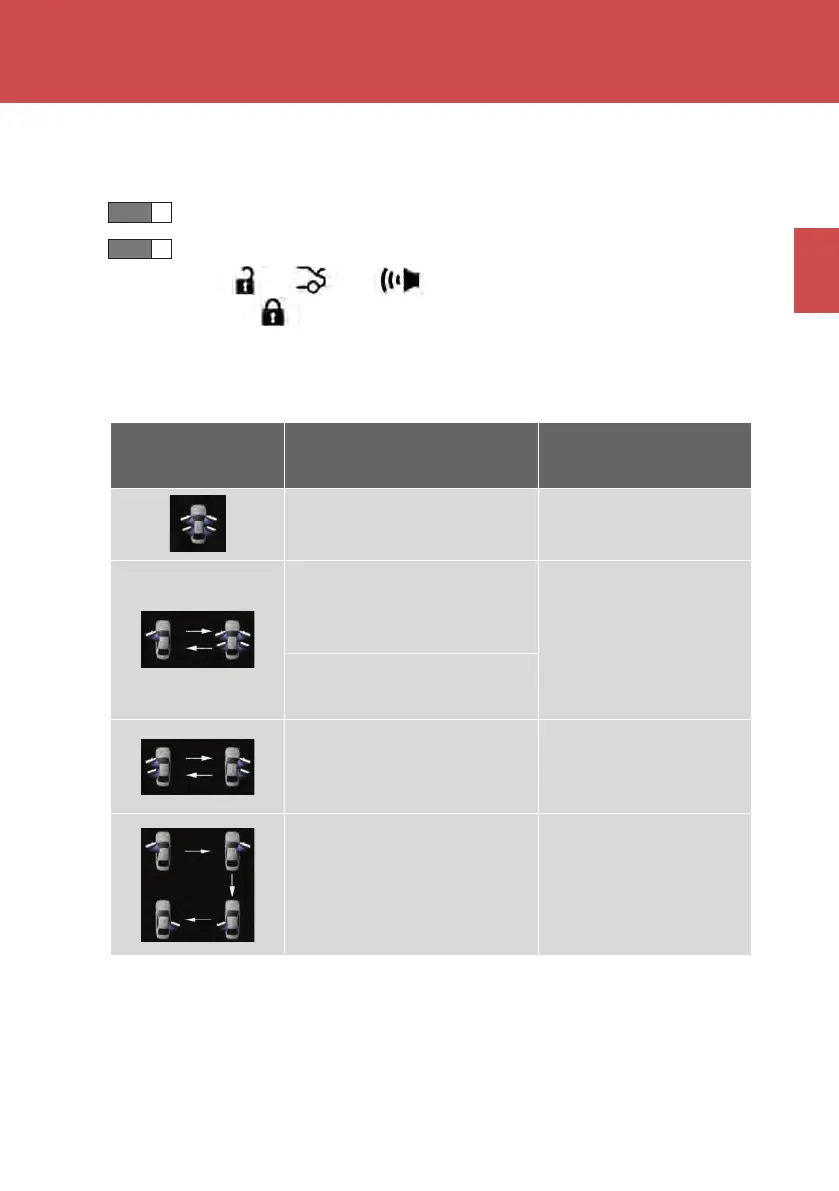
■ Switching the door unlock function
It is possible to set which doors the entry function unlocks.
Turn the “ENGINE START STOP” switch OFF.
When the indicator light on the key surface is not on, press and
hold , , or for about 5 seconds while pressing and
holding .
The setting changes each time an operation is performed, as shown below. (When
changing the setting continuously, release the buttons, wait for at least 5 seconds,
and repeat step 2.)
STEP 1
STEP 2
Multi-information
display
Unlocking doors Beep
Hold a door handle to unlock
all doors
Exterior: Beeps twice
Interior: Rings once
Hold the driver’s door handle
to unlock only the driver’s
door
Exterior: Beeps 3 times
Interior: Rings once
Hold a passenger’s door han-
dle to unlock all the doors
Hold the door handle to
unlock the front and rear
doors on your side
Exterior: Beeps 4 times
Interior: Rings once
Hold the door handle to
unlock the door
Exterior: Beeps once
Interior: Rings once
LS460_BZ_08.book 39 ページ 2007年10月18日 木曜日 午前11時18分



 To Next Page