403
5-1. Basic operation of the Remote Touch screen
5
Interior features
RX450h_U_OM0E023U
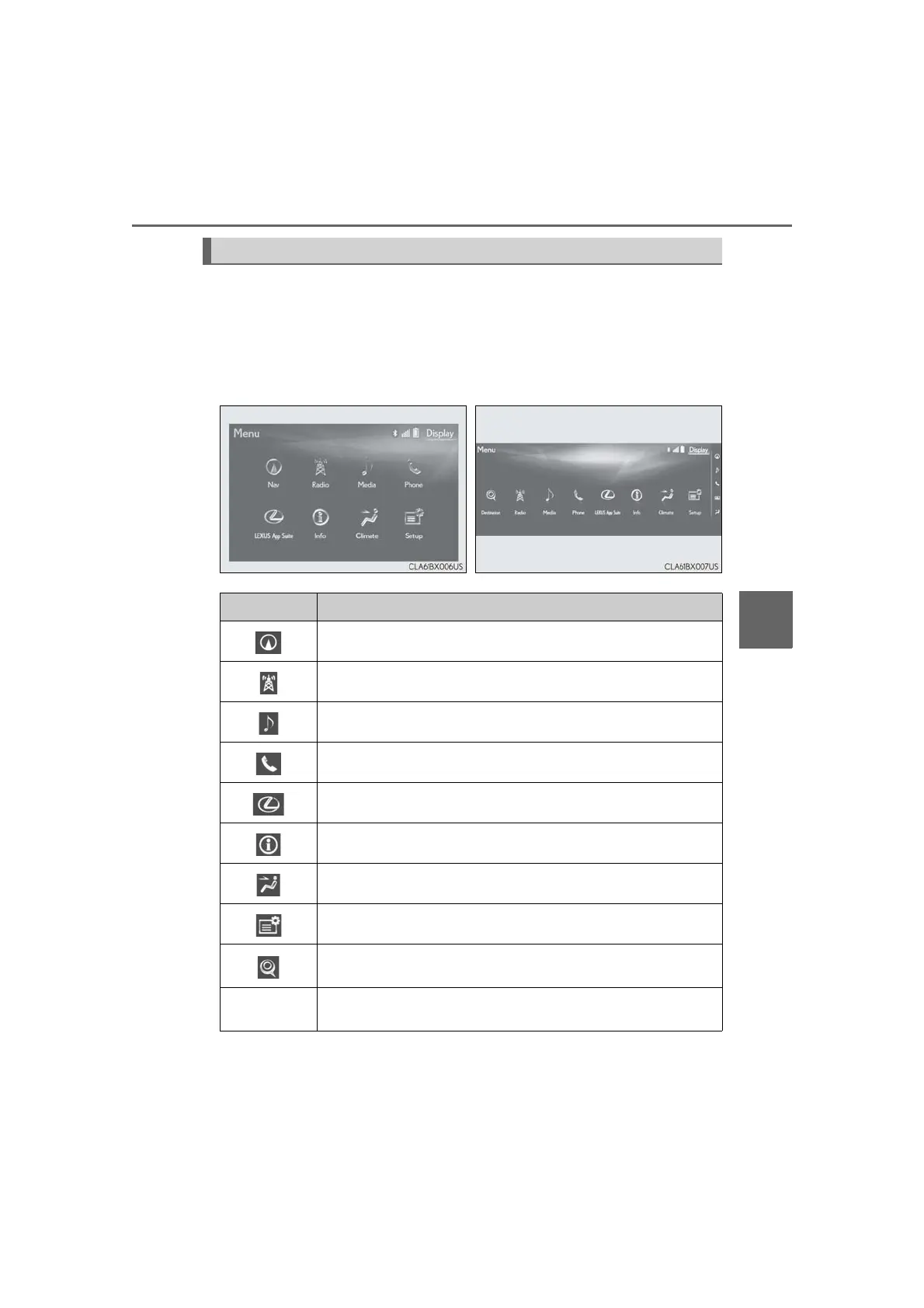
Press the “MENU” button on the Remote Touch to display the “Menu” screen.
The display may differ depending on the type of the system.
Vehicles with 12.3-inch display: When the split-screen display is selected, the “Menu”
screen will be displayed on the main display. (→P. 404)
*: Refer to the “NAVIGATION SYSTEM OWNER’S MANUAL”.
“Menu” screen
Vehicles with 8-inch display Vehicles with 12.3-inch display
Switch Function
Select to display the map screen (Vehicles with 8-inch display).*
Select to display the radio control screen.*
Select to display the media control screen.*
Select to display the hands-free operation screen.*
Select to display the “LEXUS App Suite” screen.*
Select to display the “Information” screen.*
Select to display the air conditioning control screen. (→P. 407)
Select to display the “Setup” screen.*
Select to display the “Destination” screen (Vehicles with 12.3-inch
display).
*
“Display”
Select to adjust the contrast and brightness of the screens, turn the
screen off, etc.
*






 To Next Page