347
5-6. Using the other interior features
5
Interior features
■ Deviation
The direction display deviates from the true direction determined by the earth’s
magnetic field. The amount of deviation varies according to the geographic posi-
tion of the vehicle.
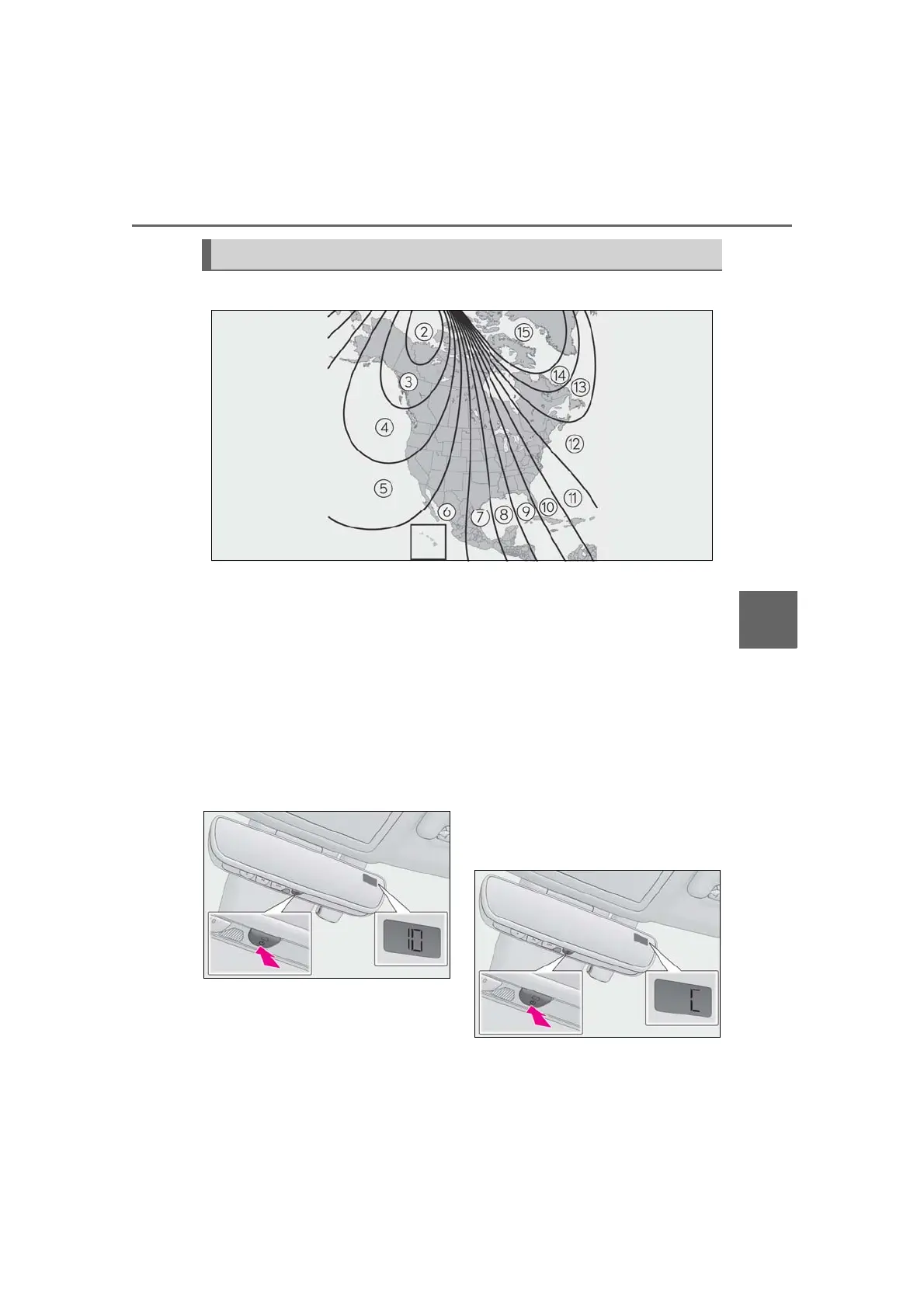
If you cross over a map boundary shown in illustration, the compass will deviate.
To obtain higher precision or perfect calibration, refer to the following.
■ Deviation calibration
1 Stop the vehicle.
2 Press and hold the switch for 6 sec-
onds. A number (1 to 15) appears
on the compass display.
3 Press the switch and, referring to
the map above, select the number
of the zone where you are.
If the direction is displayed several seconds
after adjustment, the calibration is com-
plete.
■ Circling calibration
1 Stop the vehicle in a place where it
is safe to drive in a circle.
2 Press and hold the button for 9 sec-
onds.
“C” appears on the compass display.
Calibrating the compass



 To Next Page