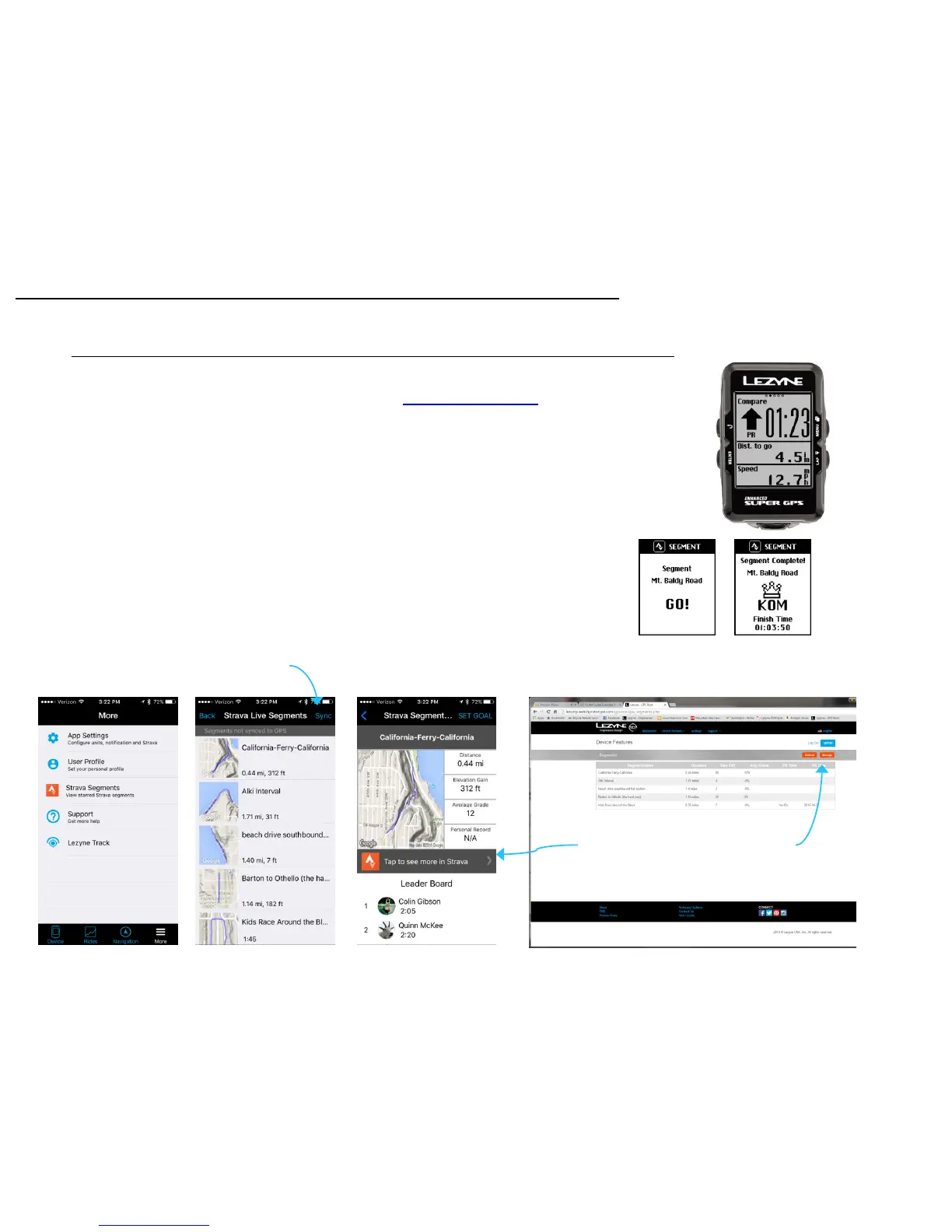
In the Lezyne GPS Root website or in the Lezyne GPS Ally App v2, you can sync Strava
Segments from the popular social network. strava.com/premium
While in the GPS Root or Ally App set your account to sync with Strava simply by login
through the Settings tab in the Ally App and GPS Root website.
If you are a Strava Premium member, you can Sync Strava Live Segments to your device
to get notifications when to start Strava Segments you choose to compete against.
*All Strava Segments are managed on the Strava Site and only synced to Lezyne GPS
Root and Ally App.
1. Star the Segments on the Strava Website or within the Strava App.
2. Open the Lezyne GPS Ally App v2.
3. Tap the More Tab, and tap Strava Segments.
4. Make sure you are paired to a Lezyne GPS Device.
5. Tap Sync and the Segments will be pushed to your Lezyne GPS device.
Strava Segments Set up *STRAVA Premium Membership Needed*
Strava Segments
25
Manage Segment List in your Strava Account
Refresh to make sure all Segments are up to
date
Tap to Sync
Segments to
GPS


 To Next Page