105
PICTURE CONTROL
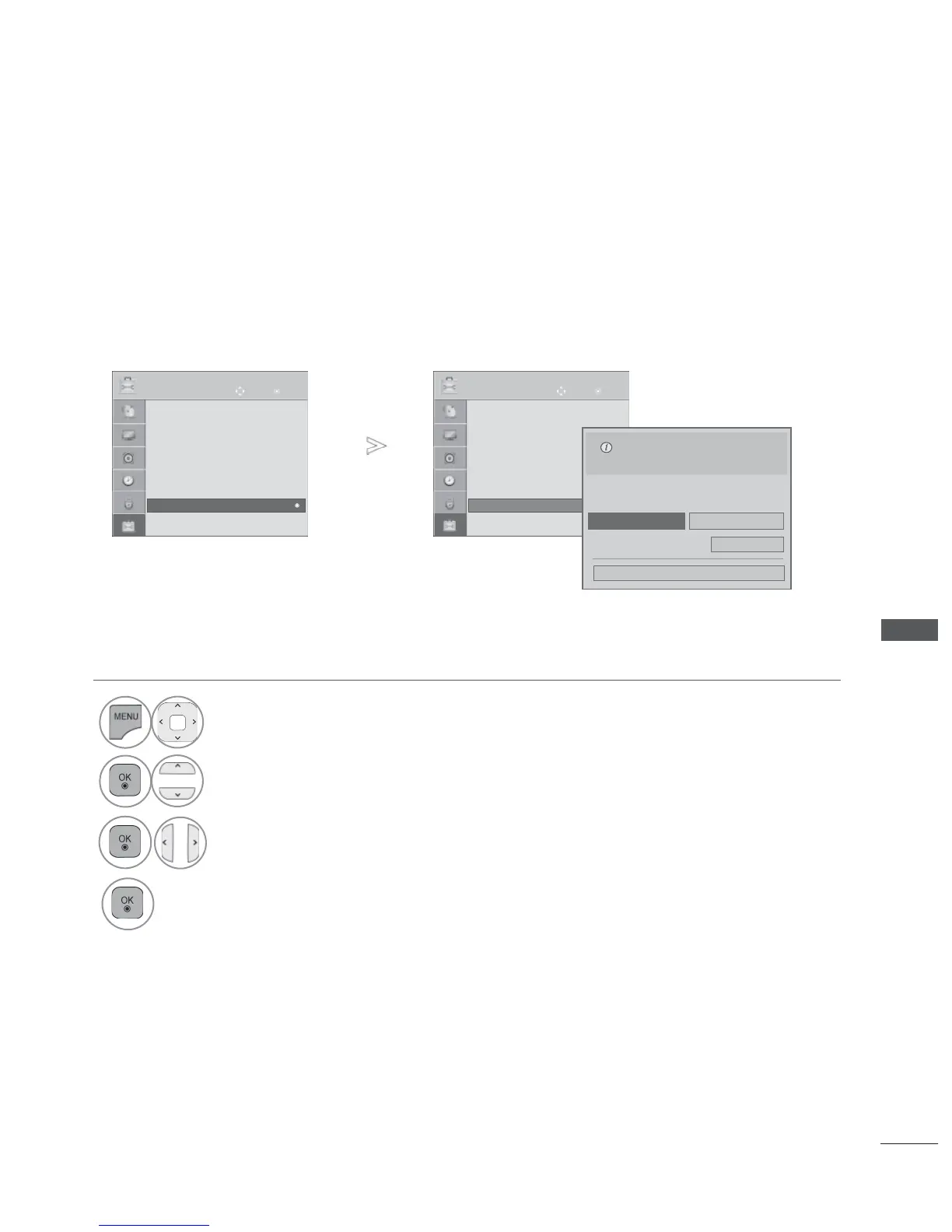
MODE SETTING
We recommend setting the TV to “Home Use ” mode for the best picture in your home environment.
“Store Demo ” mode is an optimal setting for displaying at stores.
• Press the MENU/EXIT button to return to normal TV viewing.
• Press the BACK button to move to the previous menu screen.
1
Select OPTION.
2
Select Mode Setting.
3
Select Store Demo or Home Use.
4
Save.
OK
Move
● Language(Language)
● Country : UK
● Disability Assistance
● Power Indicator
● Factory Reset
● Set ID : 1
● Mode Setting : Home Use
OPTION
● Mode Setting : Home Use
OK
Move
● Language(Language)
● Country : UK
● Disability Assistance
● Power Indicator
● Factory Reset
● Set ID : 1
● Mode Setting : Home Use
OPTION
● Mode Setting : Home Use
►
Off
Close
●
Demo Mode
Selecting the environment.
Choose the setting mode you want.
Select [Home Use] to use this TV at home. To use
this TV at store, select [Store Demo].
Home Use
Store Demo
Ofrecido por www.electromanuales.com



 To Next Page