EasyManua.ls Logo

LG 19LD35 - Selecting Resolution

LG 19LD35
220 pages
Print Icon
To Next Page IconTo Next Page
To Previous Page IconTo Previous Page
Loading...
15
EXTERNAL EQUIPMENT SETUP
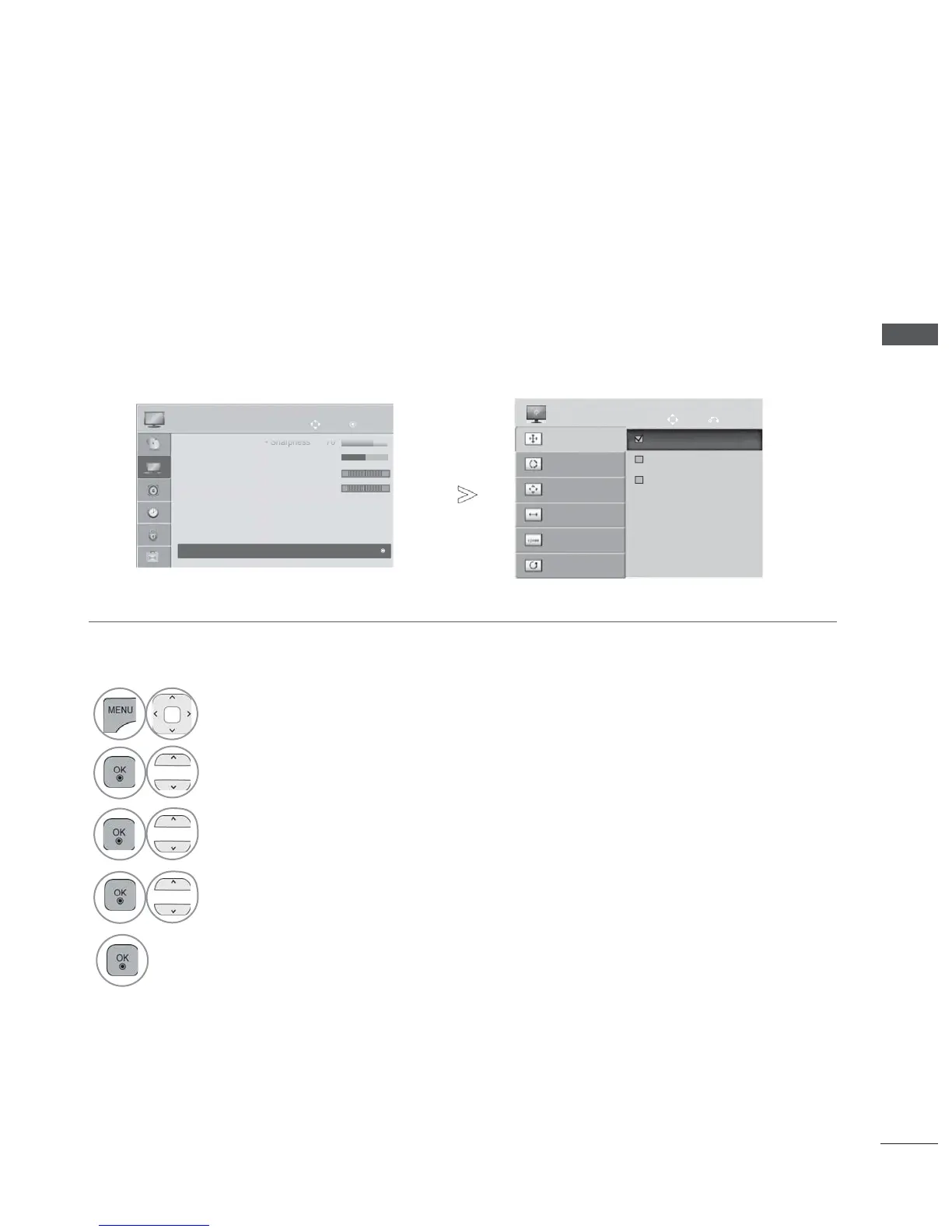
To view a normal picture, match the resolution of RGB mode and selection of PC mode.
This function works in the following mode: RGB[PC]
Selecting Resolution
• Press the MENU/EXIT button to return to normal TV viewing.
• Press the BACK button to move to the previous menu screen.
1
Select PICTURE.
2
Select Screen.
3
Select Resolution.
4
Select the desired resolution.
5
Auto Config.
SCREEN
Move
Prev.
Resolution
Position
Size
Phase
Reset
OK
Move
PICTURE
Sh
Sh
Sh
•Sh
•Sh
•Sh
•Sh
Sh
Sh
arpn
arpn
arpn
arpn
arpn
arpn
arpn
p
p
ess
ess
ess
ess
ess
ess
ess
70
70
70
70
70
70
70
70
70
• Colour 60
• Tint 0
• Colour Temp. 0
• Advanced Control
• Picture Reset
• TruMotion
• Screen
RG
W
C
• Screen
1024 x 768
1280 x 768
1360 x 768
►
Ofrecido por www.electromanuales.com

Table of Contents