19
WATCHING TV / PROGRAMME CONTROL
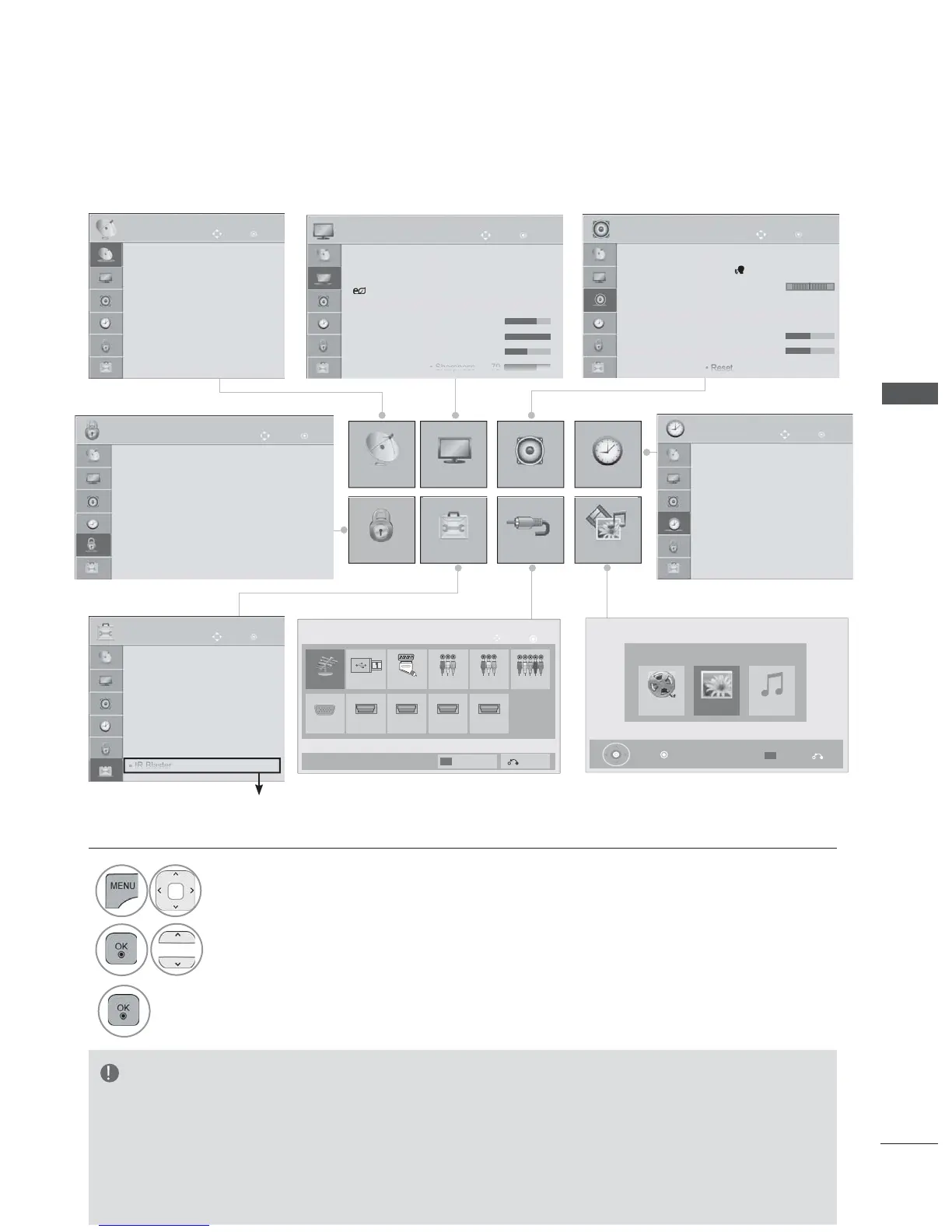
ON SCREEN MENUS SELECTION AND ADJUSTMENT
Your TV's OSD (On Screen Display) may differ slightly from that shown in this manual.
OK
Move
● Auto Tuning
● Manual Tuning
● Programme Edit
● CI Information
SETUP
• Press the RED button, you can check the
Customer Support menu.
• Press the GREEN button, you can check
the Simple Manual menu.
•
Press the MENU/EXIT button to return to
normal TV viewing.
• Press the BACK button to move to the pre-
vious menu screen.
NOTE
► It is not possible to use CI Information in Analogue mode.
►IR Blaster : For further information, refer to the optional “Wireless Media Box” manual for operat-
ing instructions.
►It is possible to use Movie List menu in 19/22/26/32LE3***, 32/37/42LE4***, 22/26LE5***,
32/37/42/47/55LE5***, 32/42/46/52/60LD56**, 32/37/42/47LD46**, 32/42/46/52/60LD555,
32/3742/47LD455, 19/22/26/32LD355, 19/22/26/32LD356, 19/22/26/32LD345, 19/22/26/32LD346
32/37/42/47LD425, 32/37/42/47LD426, 26/32LD335, 26/32LD336.
1
Display each menu.
2
Select a menu item.
3
Move to the pop up menu.
OK
Move
● Clock
● Off Time : Off
● On Time : Off
● Sleep Timer : Off
TIME
OK
Move
● Set Password
● Lock System : Off
● Block Programme
● Parental Guidance : Blocking Off
● Input Block
● Key Lock : Off
LOCK
● Language(Language)
● Country : UK
● Disability Assistance
● Power Indicator
● Factory Reset
● Set ID : 1
● Mode Setting : Home Use
AUDIO
LR
Movie List Music ListPhoto List
MY MEDIA
Exit
Option
Press OK( ) to see photos from the USB.
SETUP PICTURE
LOCK
OPTION
AUDIO
INPUT
TIME
MY MEDIA
(Except for 19/22/26/32LD3
***
,
32/37/42/47LD4
***
, 19/22/26LE3
***
, 22/26LE5
***
)
Antenna USB
HDMI2 HDMI3 HDMI4HDMI1
AV1 AV2 Component
RGB
OK
Move
Input List
Input Label
Exit
AV3
Ofrecido por www.electromanuales.com



 To Next Page