- 10 -
LGE Internal Use Only
Copyright © LG Electronics. Inc. All right reserved.
Only for training and service purposes
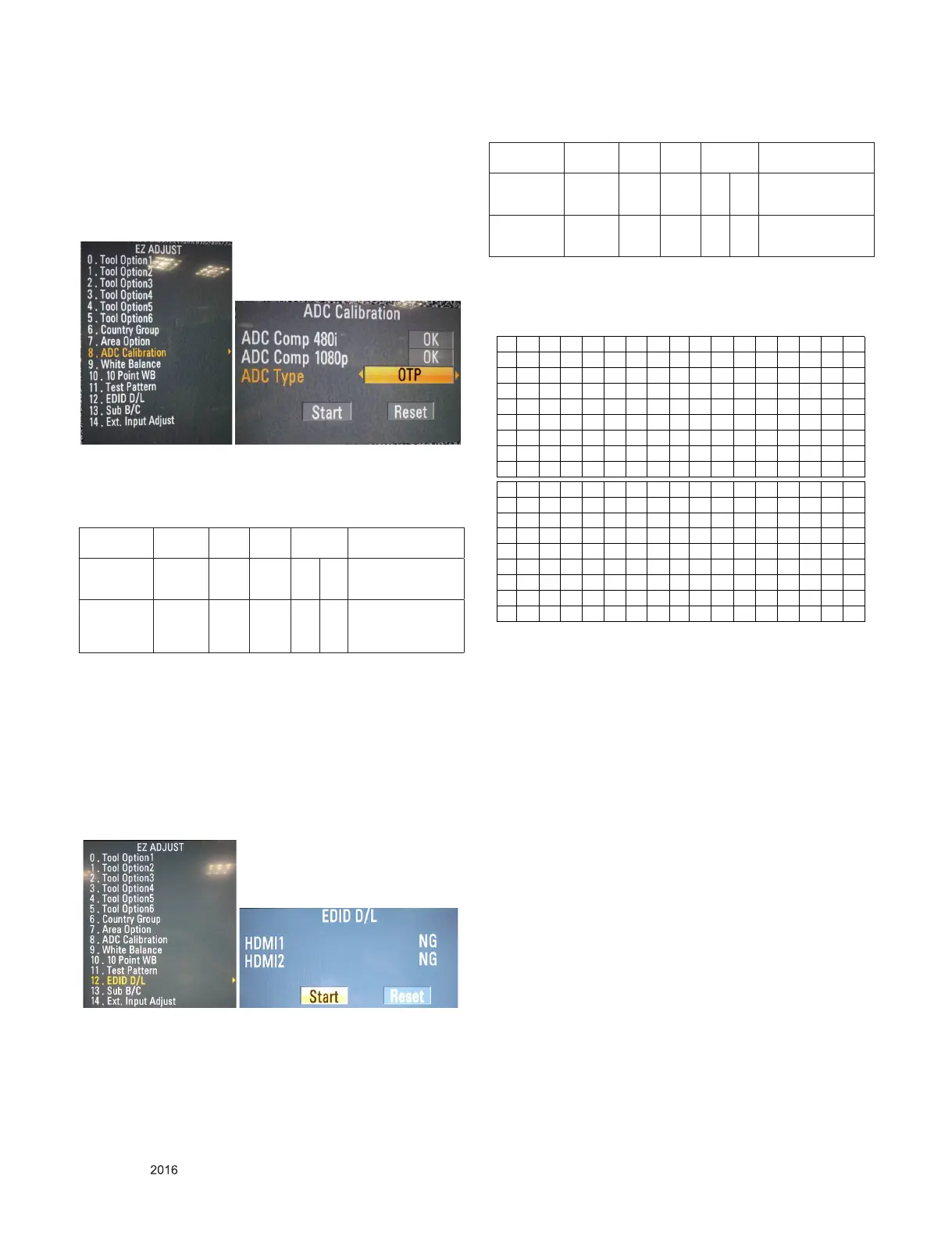
3.1. ADC Process (Optional) : If ADC pro-
cesses as OTP, There is no need to
proceed internal ADC.
1) Enter Service Mode by pushing “ADJ” key.
2) Enter Internal ADC mode by pushing “►” key at “ADC
Calibration”
→ Caution: Using ‘P-ONLY’ button of the Adjustment R/C,
power on TV.
* ADC Calibration Protocol (RS232)
NO Item CMD
1
CMD
2
Data 0
Enter
Adjust MODE
Adjust
‘Mode In’
A A 0 0 When transfer the
‘Mode In’,
Carry the command.
ADC adjust ADC
Adjust
A D 1 0 Automatically adjust-
ment
(The use of a internal
pattern)
Adjust Sequence
▪ aa 00 00 [Enter Adjust Mode]
▪ xb 00 40 [Component Input ]
▪ ad 00 10 [Adjust 480i & 1080p Comp]
▪ aa 00 90 End Adjust mode
* Required equipment : Adjustment R/C.
3.2. EDID Download
1) After enter Service Mode by pushing “ADJ” key.
2) Enter EDID D/L mode.
3) Enter “START” by pushing “OK” key.
→ Caution: - Do not connect HDMI Cable when download
EDID.
* Edid data and Model option download (RS232)
NO Item CMD
1
CMD
2
Data 0
Enter
download
MODE
Download
‘Mode In’
A A 0 0 When transfer the
‘Mode In’,
Carry the command.
EDID data and
Model option
download
Download A E 00 10 Automatically download
(The use of a internal
Data)
3.2.1. EDID
- HDMI : Checksum : 95 7E
3.3. Function Check
3.3.1. Check display and sound
■ Check Input and Signal items. (cf. work instructions)
1) TV(DTV, RF, Satellite(Satellite model))
2) AV (SCART/CVBS)
3) COMPONENT (480i)
4) HDMI1/2( MT58&22MT48 - PC : 1920 x 1080 @ 60Hz,
24/28/29MT48 - PC : 1366 x 768 @ 60Hz )
5) RGB(PC : 1920 x 1080 @ 60Hz)
6) PC Audio In
7) Headphone Out
8) USB
* Display and Sound check is executed by Remote control.
* Some models do not support AV & COMPONENT & RGB &
PC Audio In & Headphone Out. It depends on model spec.
→ Caution : Not to push the INSTOP KEY after completion if
the function inspection.


 To Next Page