6
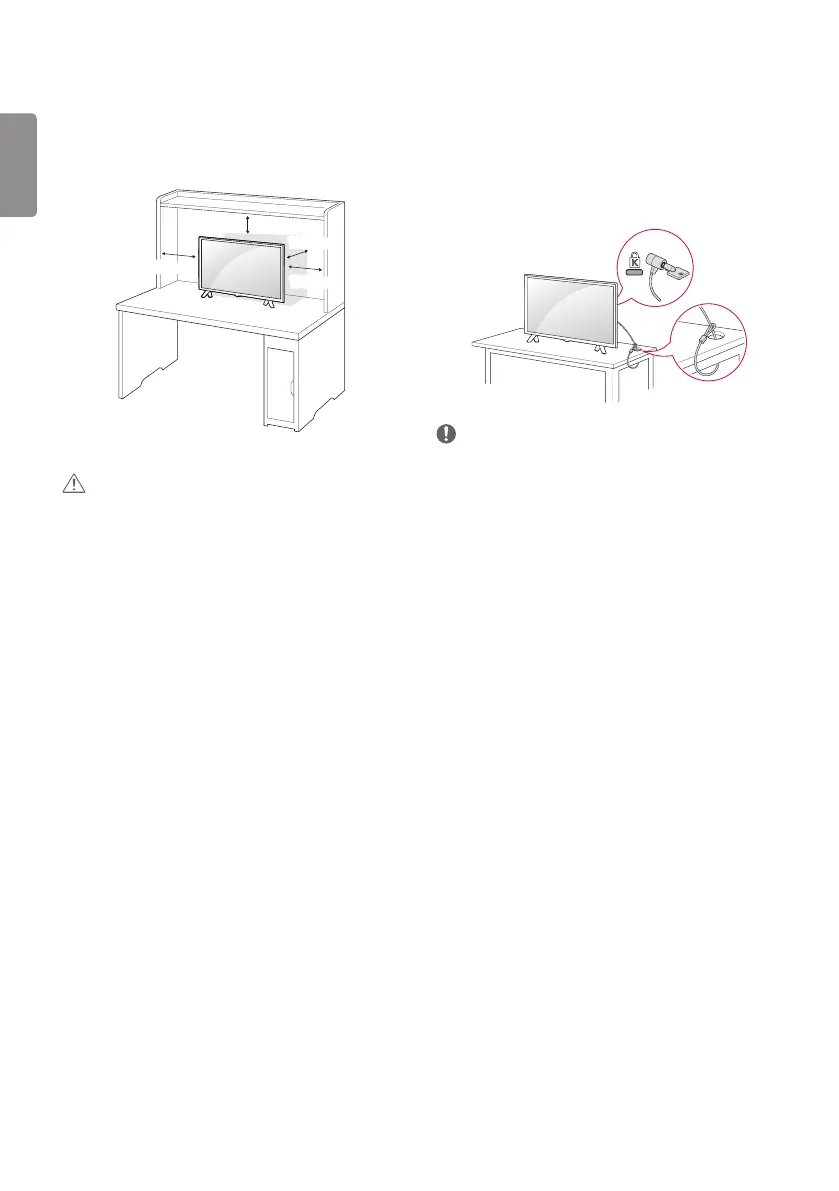
Using the kensington security system
(This is not available for all models.)
y Image shown may dier from your TV.
The Kensington security system connector is located at the rear of the
TV. For more information of installation and using, refer to the manual
provided with the Kensington security system or
visit http://www.kensington.com. Connect the Kensington security
system cable between the TV and a table.
NOTE
y The Kensington security system is optional. You can obtain
additional accessories from most electronics stores.
Mounting on a table
y Image shown may dier from your TV.
1 Lift and tilt the TV into its upright position on a table.
- Leave a 100 mm (minimum) space from the wall for proper
ventilation.
100 mm
100 mm
100 mm
100 mm
2 Connect the AC-DC Adapter and power cord to a wall outlet.
CAUTION
y Do not place the TV near or on sources of heat, as this may result in
re or other damage.
y Please be sure to connect the TV to the AC/DC power adapter before
connecting the TV’s power plug to a wall power outlet.


 To Next Page