PICTURE CONTROL
42
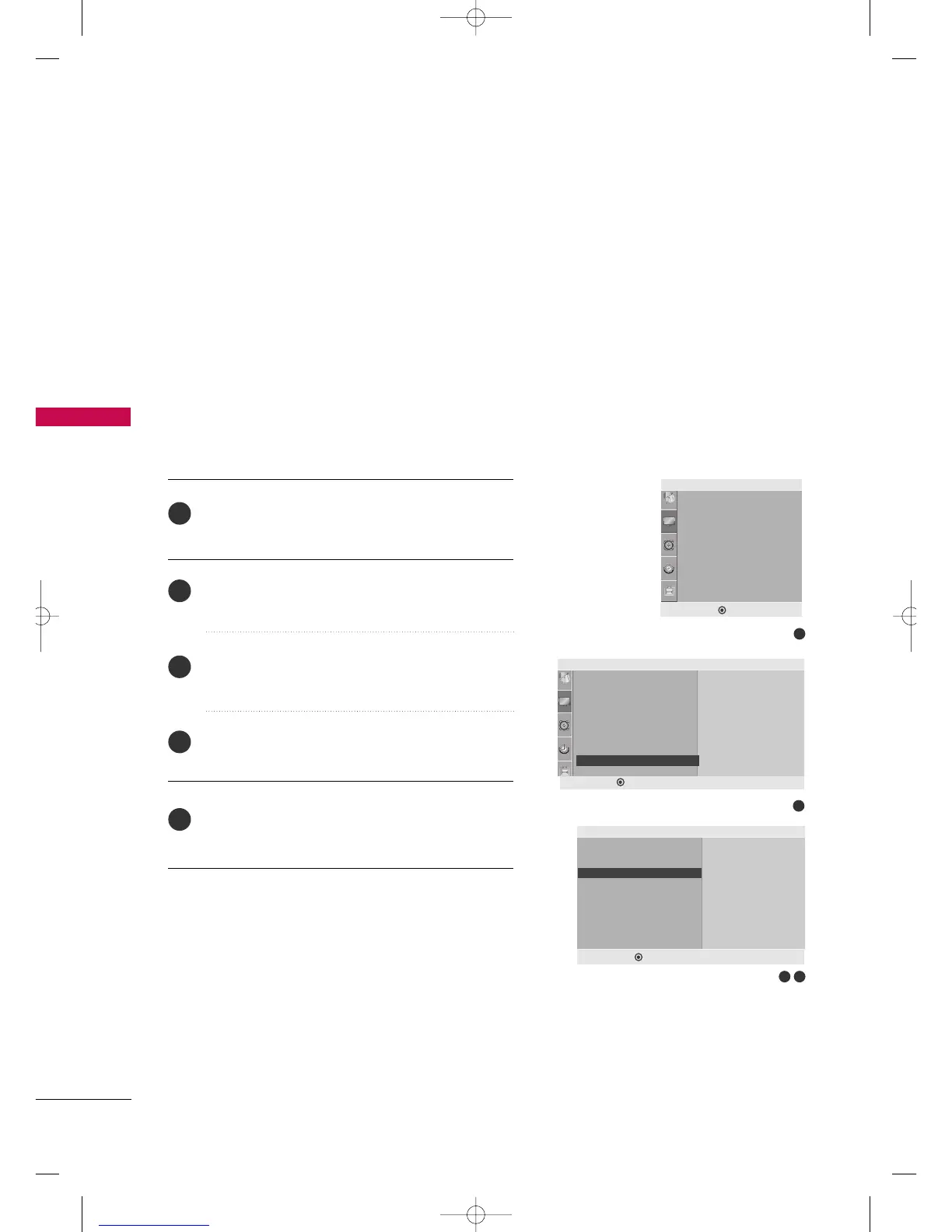
Screen Reset (Reset to original factory settings)
Press the
MMEENNUU
button and then use
DD
or
EE
button
to select the
PPiiccttuurree
menu.
Press the
GG
button and then use
DD
or
EE
button to
select
SSccrreeeenn
.
Press the
GG
button and then use
DD
or
EE
button to
select
RReesseett
.
Press the
GG
button.
Press the
MMEENNUU
button to move to the previous menu.
2
1
4
5
3
This function operates in current mode.
To initialize the adjusted value.
This function works in the following mode when the signal
exist : HDMI, Component
3 4
1
Aspect Ratio
Picture Mode
• Backlight 100
• Contrast 100
• Brightness 50
• Sharpness 70
• Color 70
• Tint 0
Picture
2
Screen
Manual Config.
Reset
To Set
Reset G
DEF G MENU
DEF G MENU
Picture
• Contrast 100
• Brightness 50
• Sharpness 70
• Color 70
• Tint 0
•
Advanced
•
Picture Reset
Screen
To Set
Screen G
DEF G MENU
E
MFL41469218-en 4/29/10 2:15 PM Page 42



 To Next Page