PICTURE CONTROL
PICTURE CONTROL
166
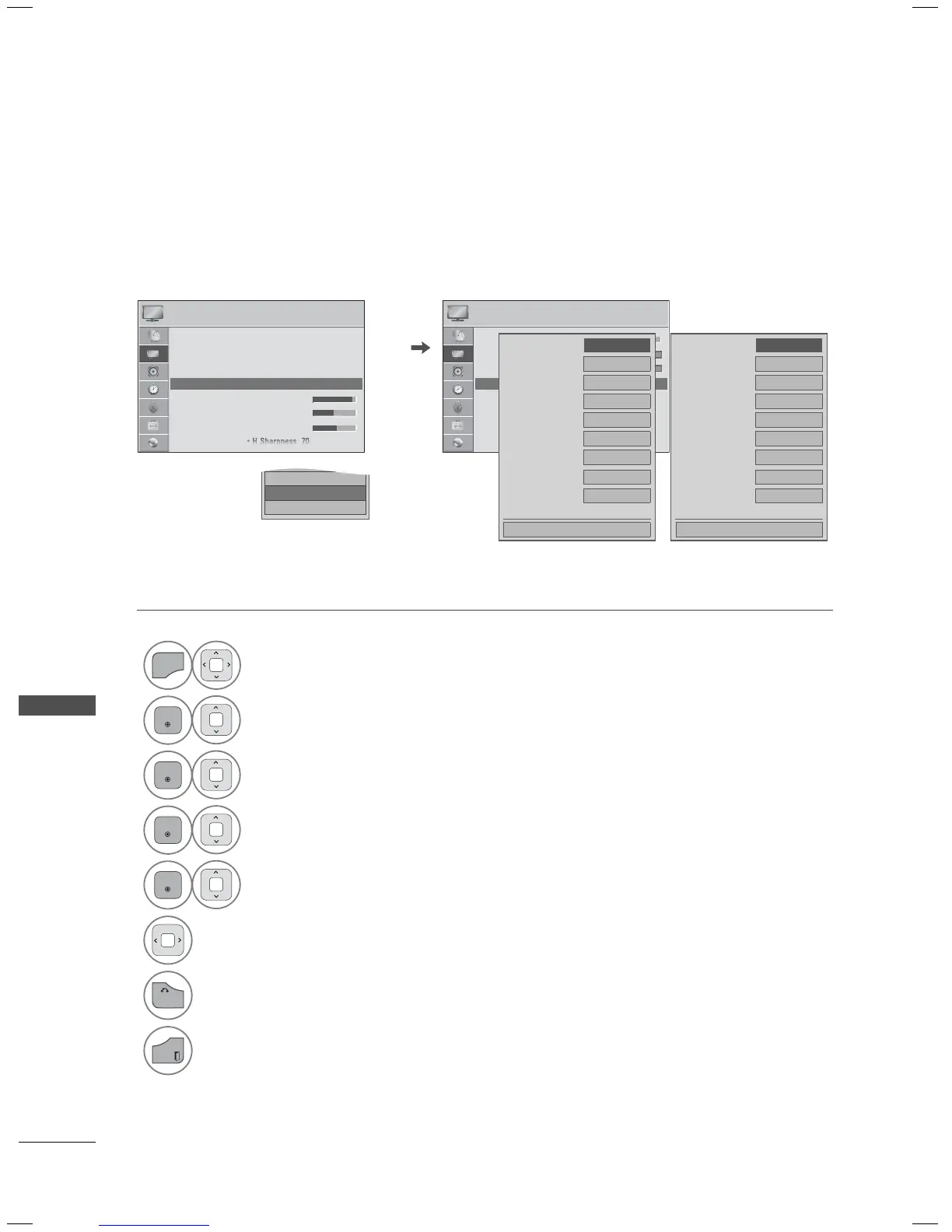
EXPERT PICTURE CONTROL
ꕋ Expert1 and ꕋ Expert2 provide even more advanced picture settings for users. Typical used by
professionals for calibrating the TV.
1
Select PICTURE.
2
Select Picture Mode.
3
Select ꕋ Expert1 or ꕋ Expert2.
4
Select Expert Control.
5
Select your desired menu option.
6
Make appropriate adjustments.
7
Return to the previous menu.
Return to TV viewing.
PICTURE
ꔂ Move ꔉ Enter
• Color 70
• Tint 70
• Expert Control
• Picture Reset
• TruMotion
• Screen (RGB-PC)
• LED Local Dimming : On
RG
WC
Dynamic Contrast ◀ Off ▶
Noise Reduction Off
Digital Noise Reduction
Off
Black Level Low
Real Cinema
On
Color Gamut Wide
Edge Enhancer High
xvYcc Auto
Expert Pattern Off
ꔍ
Close
Dynamic Contrast ◀ Off ▶
Noise Reduction Off
Gamma Medium
Black Level Low
Film Mode On
Color Gamut Wide
Edge Enhancer High
xvYcc Auto
Expert Pattern Off
ꔍ
Close
PICTURE
ꔂ Move ꔉ Enter
• Aspect Ratio : 16:9
• Picture Wizard
• ꕊ Energy Saving : Off
• Picture Mode : ꕋ Expert1 ꔉ
• Backlight 70
• Contrast 90
• Brightness 50
□ Sport
□ Game
ꔑ ꕋ Expert1
□ ꕋ Expert2
ꔀ
ꔉ
LED LCD TV,
LCD TV
Plasma TV


 To Next Page