SOUND & LANGUAGE CONTROL
SOUND & LANGUAGE CONTROL
174
AUTO VOLUME
SOUND & LANGUAGE CONTROL
Auto Volume makes sure that the volume level remains consistent whether you are watching a com-
mercial or a regular TV program.
Because each broadcasting station has its own signal conditions, volume adjustment may be needed
every time the channel is changed. This feature allows users to enjoy stable volume levels by making
automatic adjustments for each program.
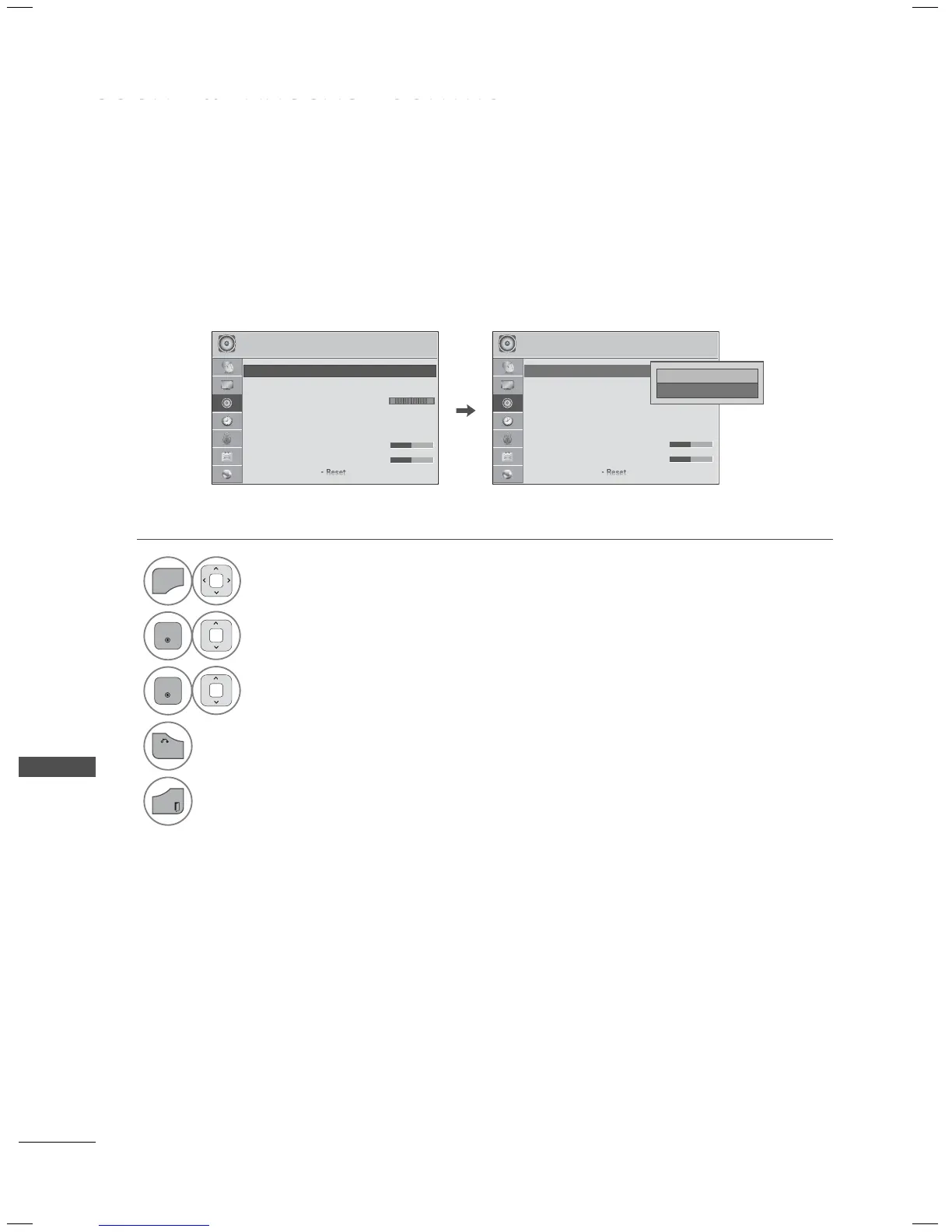
1
Select AUDIO.
2
Select Auto Volume.
3
Select On or Off.
4
Return to the previous menu.
Return to TV viewing.
AUDIO
ꔂ Move ꔉ Enter
LR
ꔡ
ꔉ
• Auto Volume : Off
• Clear Voice II : Off ꕅ 3
• Balance 0
• Sound Mode : Standard
• Infinite Sound : Off
• Treble 50
• Bass 50
AUDIO
ꔂ Move ꔉ Enter
• Auto Volume : On
• Clear Voice II : Off ꕅ 3
• Balance 0
• Sound Mode : Standard
• Infinite Sound : Off
• Treble 50
• Bass 50
LR
□ Off
ꔑ On
ꔉ
ꔠ


 To Next Page