GB-21
EXTERNAL EQUIPMENT SETUP
PC SETUP
This TV provides Plug and Play capability, meaning that the PC adjusts automatically to the TV’s settings.
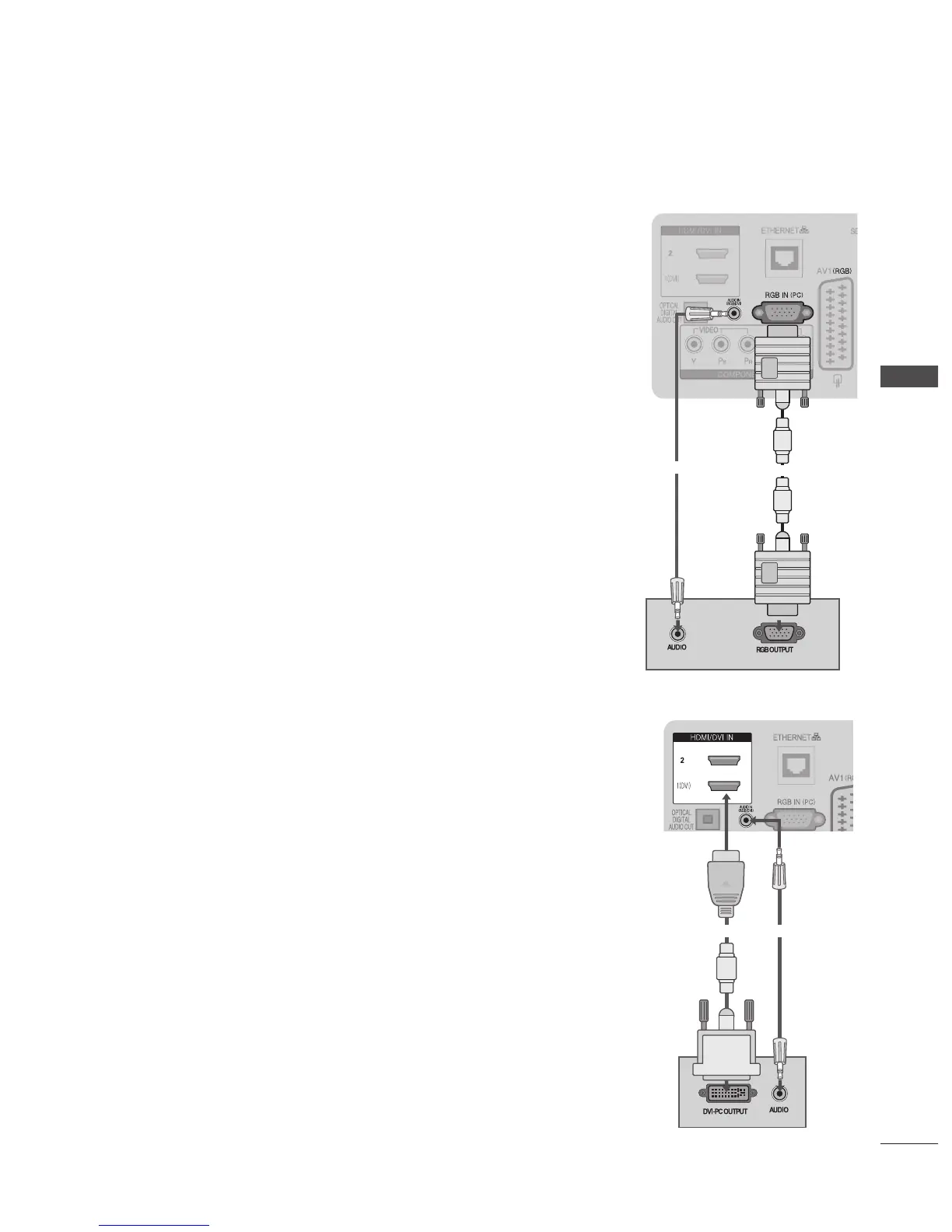
Connecting with a D-sub 15 pin Cable
➊
Connect the RGB output of the PC to the RGB IN (PC) jack on the TV.
➋
Connect the PC audio output to the AUDIO IN (RGB/DVI) jack on the TV.
➌
Turn on the PC and the TV
➍
Select RGB input source using the INPUT button on the remote control.
Connecting with an HDMI to DVI Cable
➊
Connect the DVI output of the PC to the HDMI/DVI IN 1 jack on the TV.
➋
Connect the PC audio output to the AUDIO IN (RGB/DVI) jack on the TV.
➌
Turn on the PC and the TV.
➍
Select HDMI 1 input source using the INPUT button on the remote control.
➊
➋
➊
➋



 To Next Page