GB-44
WATCHING TV / PROGRAMME CONTROL
WATCHING TV / PROGRAMME CONTROL
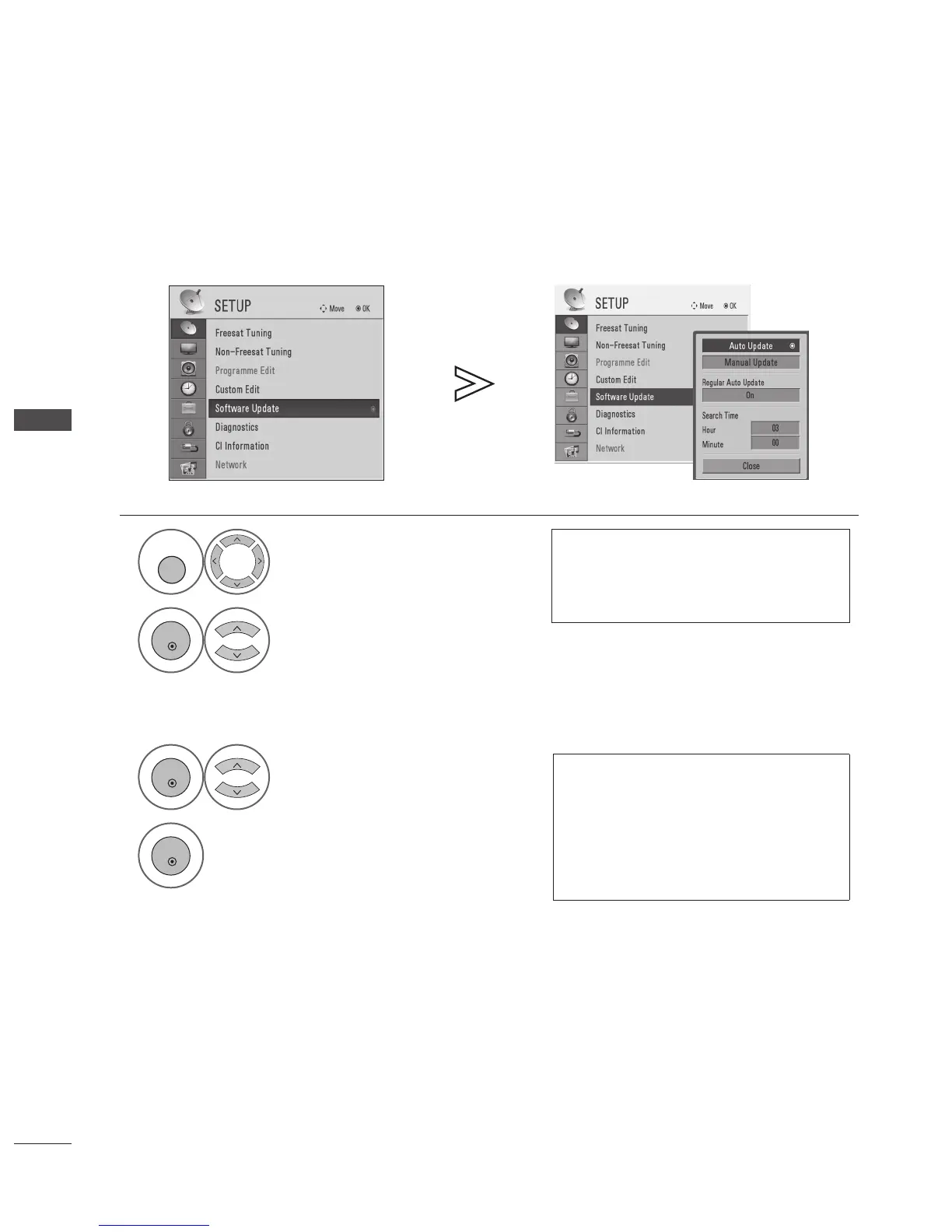
SOFTWARE UPDATE IN FREESAT MODE Freesat
Switch to Freesat mode using the FREESAT button.
(FREESAT button toggles between Freesat and Non-Freesat TV modes.)
Software Update allows you to update the system software to maintain proper performance of the product.
The software can be downloaded through the digital satellite broadcasting system.
1
Select SETUP.
• If you have selected On in LOCK > Lock
System menu, you will be prompted to enter
your password to access. Use NUMBER buttons
to input a 4-digit password.
2
Select Software Update.
■ Auto Update
1
Select Auto Update.
During Progress of a Software Update, please note
the following:
• Power to the TV must not be interrupted.
• The TV must not be switched off.
• The antenna must not be disconnected.
• After Software Update, you can conrm the
updated software version in Diagnostics menu.
2
The new software information will be
shown.
Refer to “When detecting new software
using Auto Update or Manual Update
menu”. (►p.49)
• Press the MENU button to return to normal TV viewing.
• Press the RETURN button to return to the previous screen.


 To Next Page