PICTURE CONTROL
PICTURE CONTROL
116
ꕊ
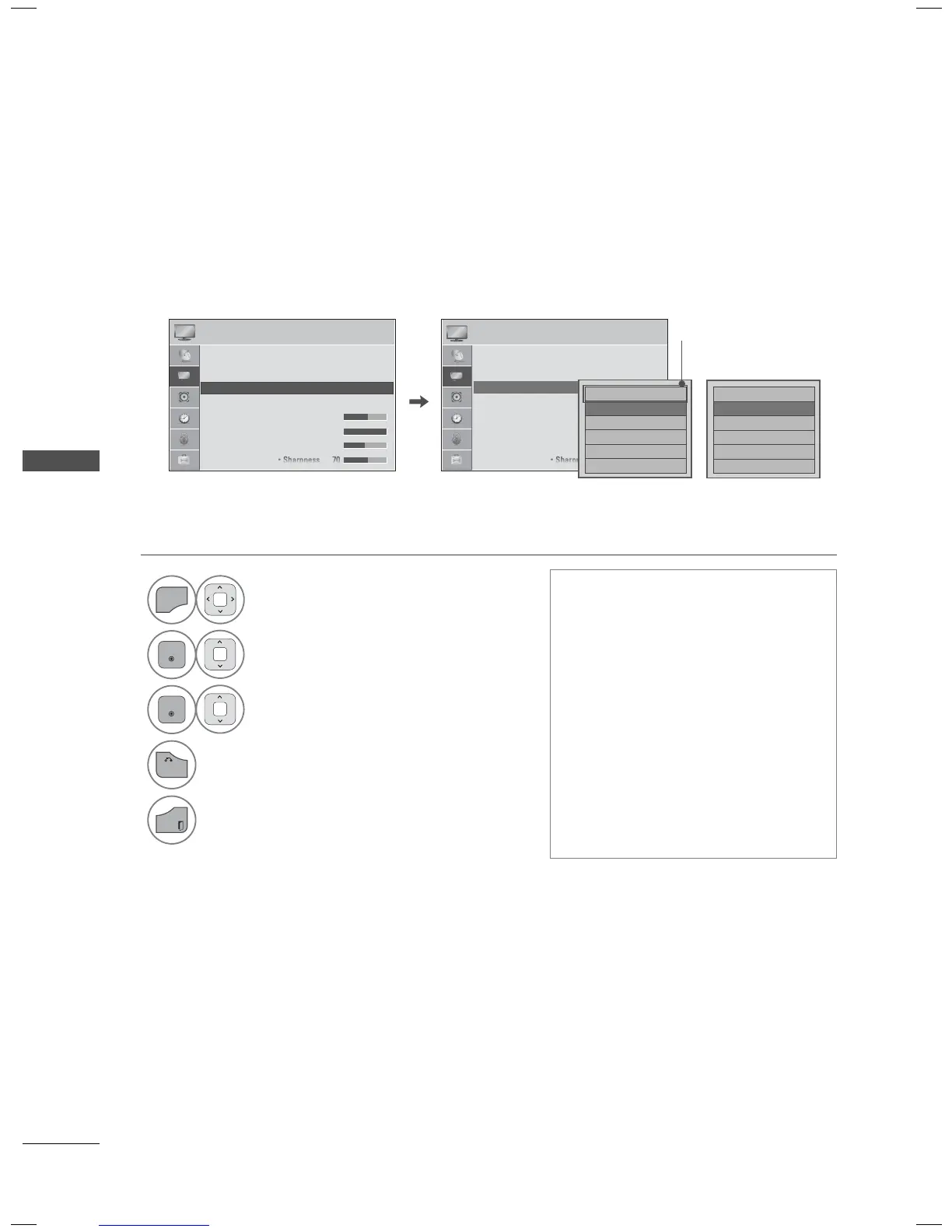
ENERGY SAVING
It reduces the TV’s power consumption by lowering the backlight level.
You can increase the brightness of your screen by adjusting the Energy Saving level or by setting the
Picture Mode.
ꔛ
When selecting Screen off, the
screen will turn off after 3 seconds.
ꔛ
If you adjust “Energy Saving-Auto
(For 32/37/42/47/55LE5300),
Maximum”, Backlight option will not
work (For LED LCD TV/LCD TV).
ꔛ
When selecting Auto, Backlight is
automatically adjusted through
Intelligent Sensor according to the
surrounding conditions. (For LED
LCD TV/LCD TV)
ꔛ
Press the ENERGY SAVING button
repeatedly to select the appropriate
Energy Saving setup.
PICTURE PICTURE
ꔂ Move ꔉ Enter ꔂ Move ꔉ Enter
ꔀ
ꔉ
• Aspect Ratio : 16:9
• Picture Wizard
• ꕊ Energy Saving : Off
• Picture Mode : Standard
• Backlight 70
• Contrast 90
• Brightness 50
• Aspect Ratio : 16:9
• Picture Wizard
• ꕊ Energy Saving : Off
• Picture Mode : Standard
• Backlight 70
• Contrast 100
• Brightness 50
LED LCD TV,
LCD TV
Plasma TV
□ Auto
ꔑ Off
□ Minimum
□ Medium
□ Maximum
□ Screen Off
□ Intelligent Sensor
ꔑ Off
□ Minimum
□ Medium
□ Maximum
□ Screen Off
ꔀ
ꔉ
ꔀ
ꔉ
Depending on models
1
Select PICTURE.
2
Select ꕊ Energy Saving.
3
Select your desired options.
4
Return to the previous menu.
Return to TV viewing.



 To Next Page