63
WATCHING TV / CHANNEL CONTROL
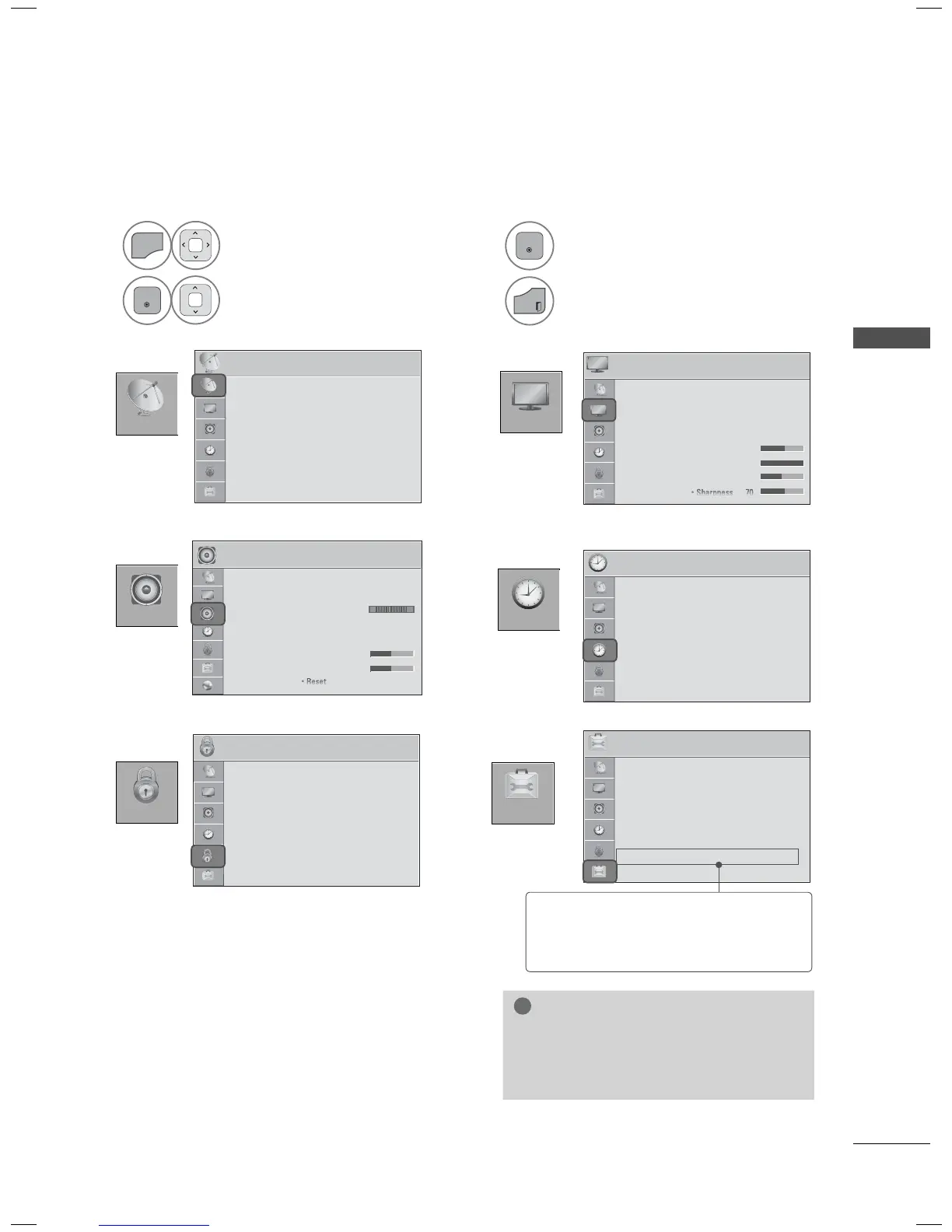
ON-SCREEN MENUS SELECTION
Your TV's OSD (On Screen Display) may differ slightly from that shown in this manual.
1
Display each menu.
2
Select a menu item.
3
Accept the current selection.
4
Return to TV viewing.
CHANNEL
OPTION
PICTURE
AUDIO
TIME
LOCK
PICTURE
ꔂ Move ꔉ Enter
• Aspect Ratio : 16:9
• Picture Wizard
• ꕊ Energy Saving : Off
• Picture Mode : Standard
• Backlight 70
• Contrast 100
• Brightness 50
TIME
ꔂ Move ꔉ Enter
• Clock
• Off Time : Off
• On TIme : Off
• Sleep Timer : Off
LOCK
ꔂ Move ꔉ Enter
• Set Password
• Lock System : On
• Block Channel
• Rating
• Input Block
• Key Lock : Off
OPTION
ꔂ Move ꔉ Enter
• Language
• Caption : Off
• Power Indicator
• Initial Setting
• Set ID : 1
• Mode Setting : Home Use
• IR Blaster : Off
AUDIO
ꔂ Move ꔉ Enter
• Auto Volume : Off
• Clear Voice II : Off ꕅ3
• Balance 0
• Sound Mode : Standard
•
Infinite Sound: Off
• Treble 50
• Bass 50
LR
CHANNEL
ꔂ Move ꔉ Enter
• Auto Tuning
• Manual Tuning
• Channel Edit
• Scan Option
• System Color
NOTE
► ISM Method: For Plasma TV.
► Backlight, TruMotion, Power Indicator:
For LED L
CD TV/LCD TV.
ꔛ
For further information, refer to the
optional “Wireless Media Box”
manual for operating instructions.



 To Next Page