- 14 -
8. EDID(The Extended Display
Identification Data)/DDC
(Display Data Channel) Download
This is the function that enables “Plug and Play".
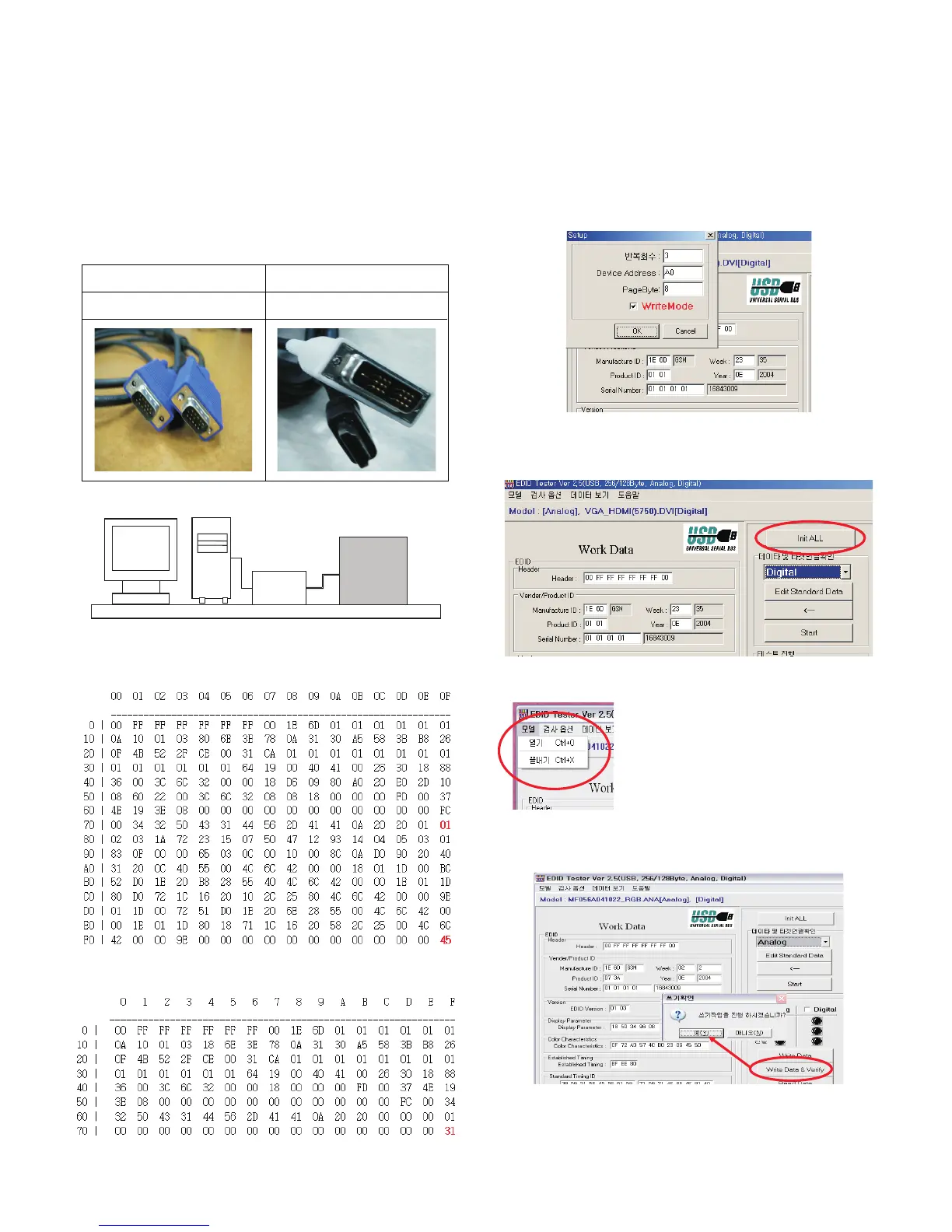
8-1. Required Test Equipment
(1) PC, Jig for adjusting DDC.
(PC serial to D-sub Connection equipment)
(2) DVI to HDMI Connector.
8-2. Setting of Device
8-3. EDID DATA
(1) HDMI EDID DATA.
(2) HDMI EDID DATA.
8-4. Act or set the EDID S/W
1) As above Fig. 6, Connect the Set, EDID Download Jig, PC
& Cable.
2) Turn on the PC & EDID Download Jig. And Execute the
S/W : EDID TESTER Ver,2.5.
3) Set up S/W option.
Repeat Number : 3
Device Address : A0
PageByte : 8
8-5. How to use the EDID S/W
1) Init the data.
2) Load the EDID data.(Open File)
42PC1DV_AA_HDMI(0145).DVI
42PC1DV_AA_RGB(31).ana
3) Press the “Write Data & Verify”button. and input the
data.
4) If the writing is finished, you will see the “OK” message.
Analog EDID
D-sub to D-sub
HDMI EDID
DVI-D to HDMI



 To Next Page