- 15 -
LGE Internal Use OnlyCopyright©2007 LG Electronics. Inc. All right reserved.
Only for training and service purposes
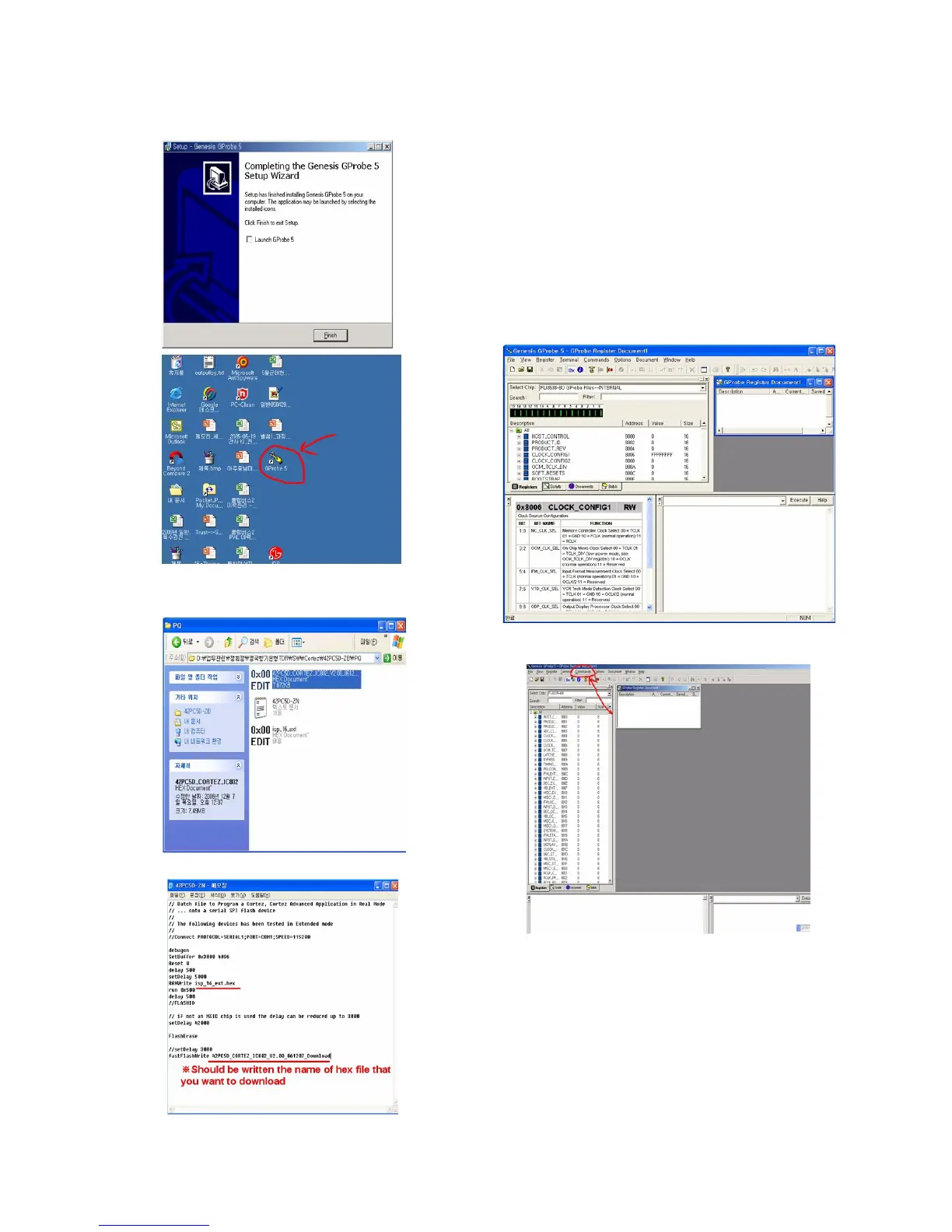
5) Install GProbe5.0.0.15.EXE - 4.
(2) Download hex file using GProbe
1) Prepare a ‘*.hex‘, ‘isp_16_ext.hex‘, ‘*.txt‘ in the same folder.
* In the TEXT FILE
2) Connect TV set and PC by using RS232 cable.
3) SVC MENU Setting for CORTEZ DOWNLOAD.
case 1. Press the ‘tilt’ button on the Adjustment Remote Control.
case 2. Press the ‘ADJ’ button.
1) Press the ‘System Control 2’ menu
2) Enter the ‘GProbe’ on the ‘RS-232Host menu’
3) Enter ‘115200bps’ on the ‘Baud Rate menu’
4) Enter the ‘Cortez’ on the ‘Download menu’
* If you don’t have a Adjustment Remote Control ‘Menu’
button on the Remote Control + ‘Menu’ button on the
Local Key during 7~8sec.
4) Execute the GProbe Program.
5) Open the batch file - 1.
1. Click the ‘Commands’.



 To Next Page