- 16 -
LGE Internal Use OnlyCopyright©2007 LG Electronics. Inc. All right reserved.
Only for training and service purposes
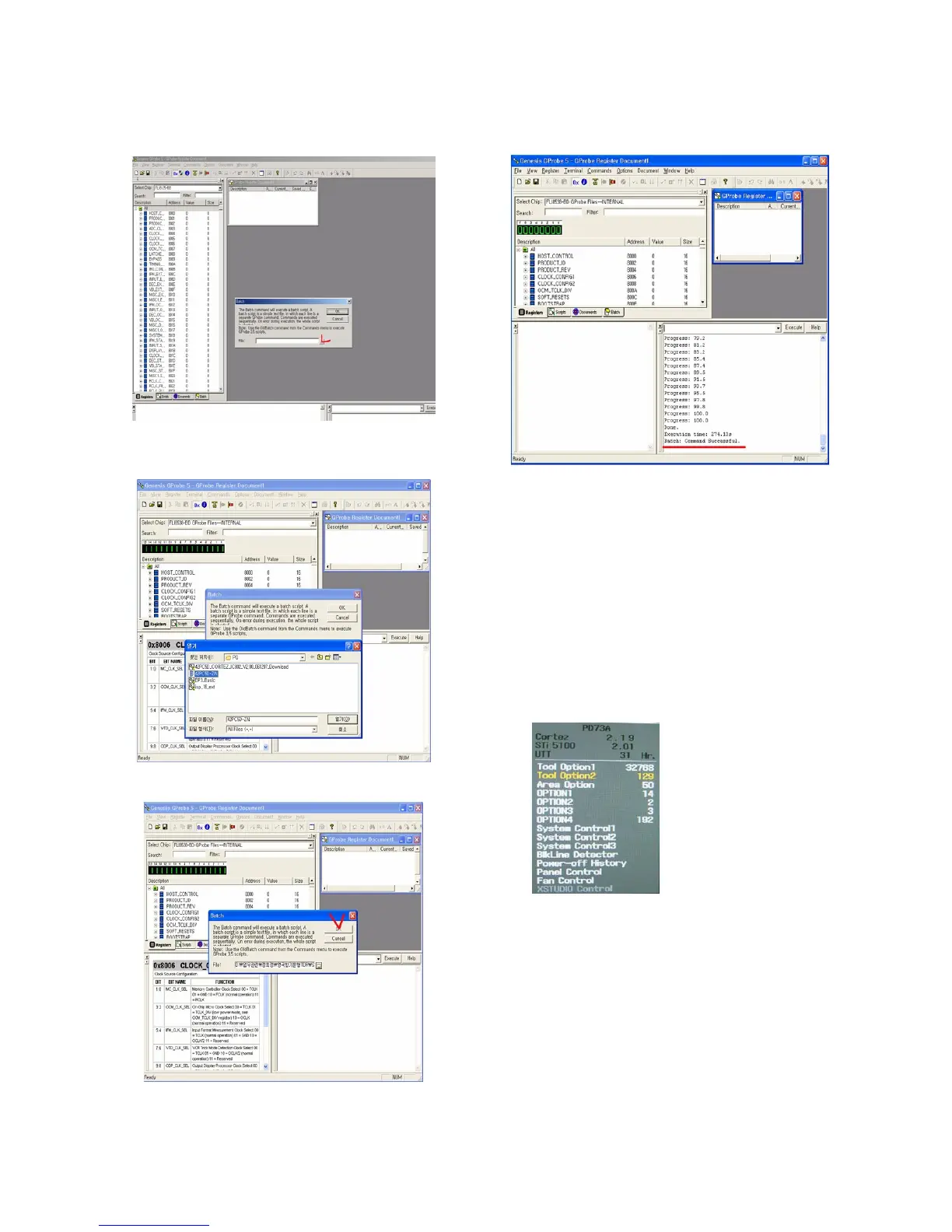
6) Open the batch file - 1.
1. Click the ‘Commands’.
7) Open the batch file - 2
1. Click ‘Bach’ in the ‘Commands’ menu & express the
‘...’ icon (It’s marked by the red check).
8) Open the batch file - 3.
1. Choose the text file.
9) It takes 300sec ~ 360sec, Wait the final message.
1. Turn off the TV after download -> Turn on.
18. Insert the ‘TOOL OPTION’ &
SERIAL NUMBER
V When you change a Main Ass’y, you should insert the TV
SET’s original Serial Number & MODEL NAME. It is the
way how to insert original number.
18-1. Insert the ‘Tool Option’
1) Insert ‘2176’ on ‘Tool Option1’, ‘1697’ on ‘Tool Option2’ for
42PC35 Press the ‘ENTER’ Button.
1. Before change the ‘Tool Option’, you should check
the White Balance Value.
2. Because change the ‘Tool Option’, the White Balance
Value is reset.



 To Next Page