- 7 -
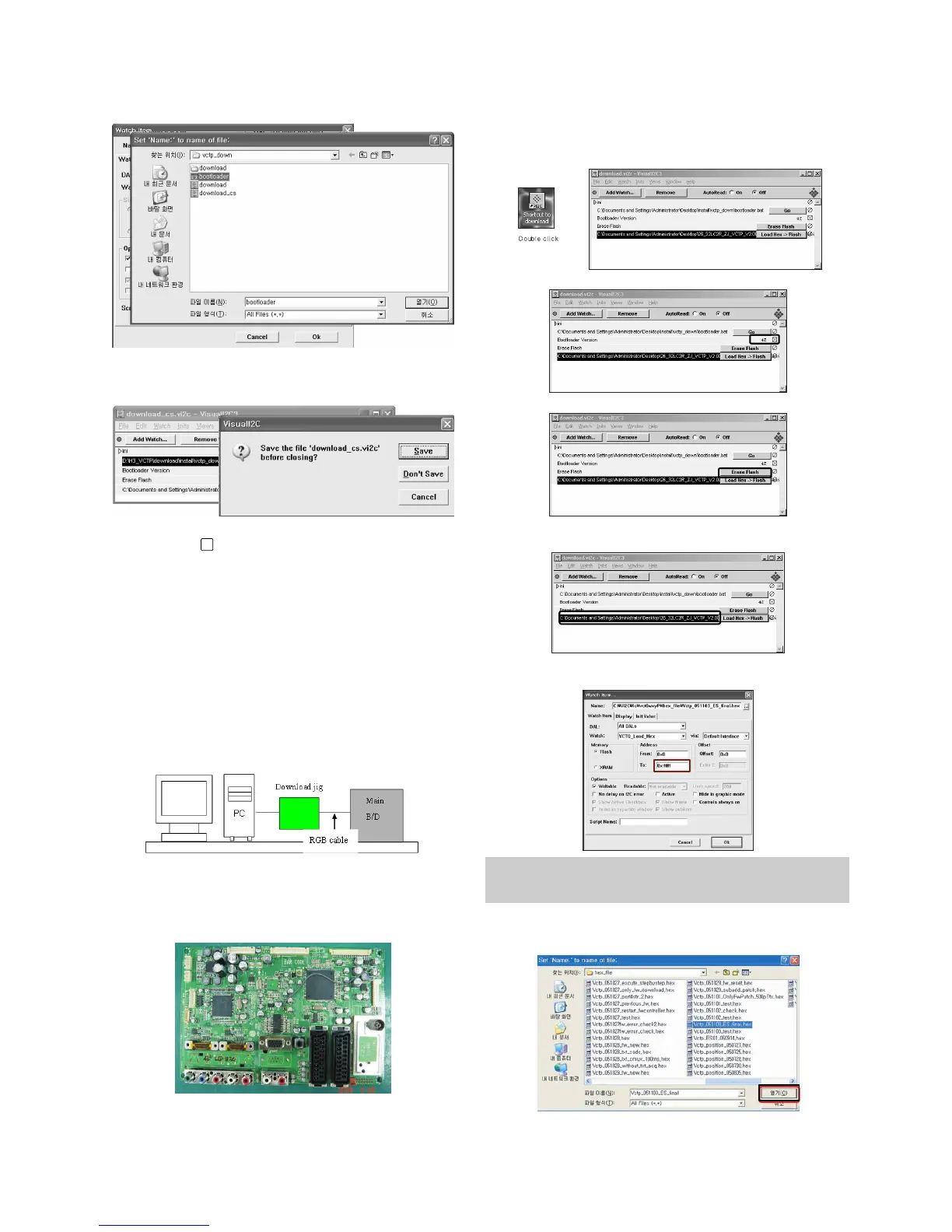
=> Select the "Bootloader.bat" file.
(install > VCTP_download > Bootloader)
=> Push "OK".
=>
Finish the program, after saving the file "download_cs.vi2c".
(if you click , the massage appears automatically)
5. S/W program download
5-1. Profile
: This is for downloading the s/w to the flash memory of the
vctp(IC500)
5-2. Required Test Equipment
(1) PC.
(2) Visual IIC program.
(3) Download jig.
5-3. Connection structure
6. Download method
6-1. Download method 1 (PCB Ass’y)
(1) Connect the download jig to D-sub jack.
(2) Execute ‘Download.vi2c’ program in PC, then a main
window will be opened.
(3)
Double click the blue box and confirm "Bootloader Version" as 42.
(4) Click the "Erase Flash" button.
(5) Double click the download file low, then "edit" window will
be opened.
(6) Click the choice button in the “edit window”, then “file
choice window” will be opened.
(7) Choose the Hex file in folder and execute downloading
with click " open" button.
x
You must verify the words of “0xfffff” in the black box of figure.
(In case of H3 Service it is 0x7ffff : If you make H4 service after
the H3 service, there could be some problem)


 To Next Page