- 9 -
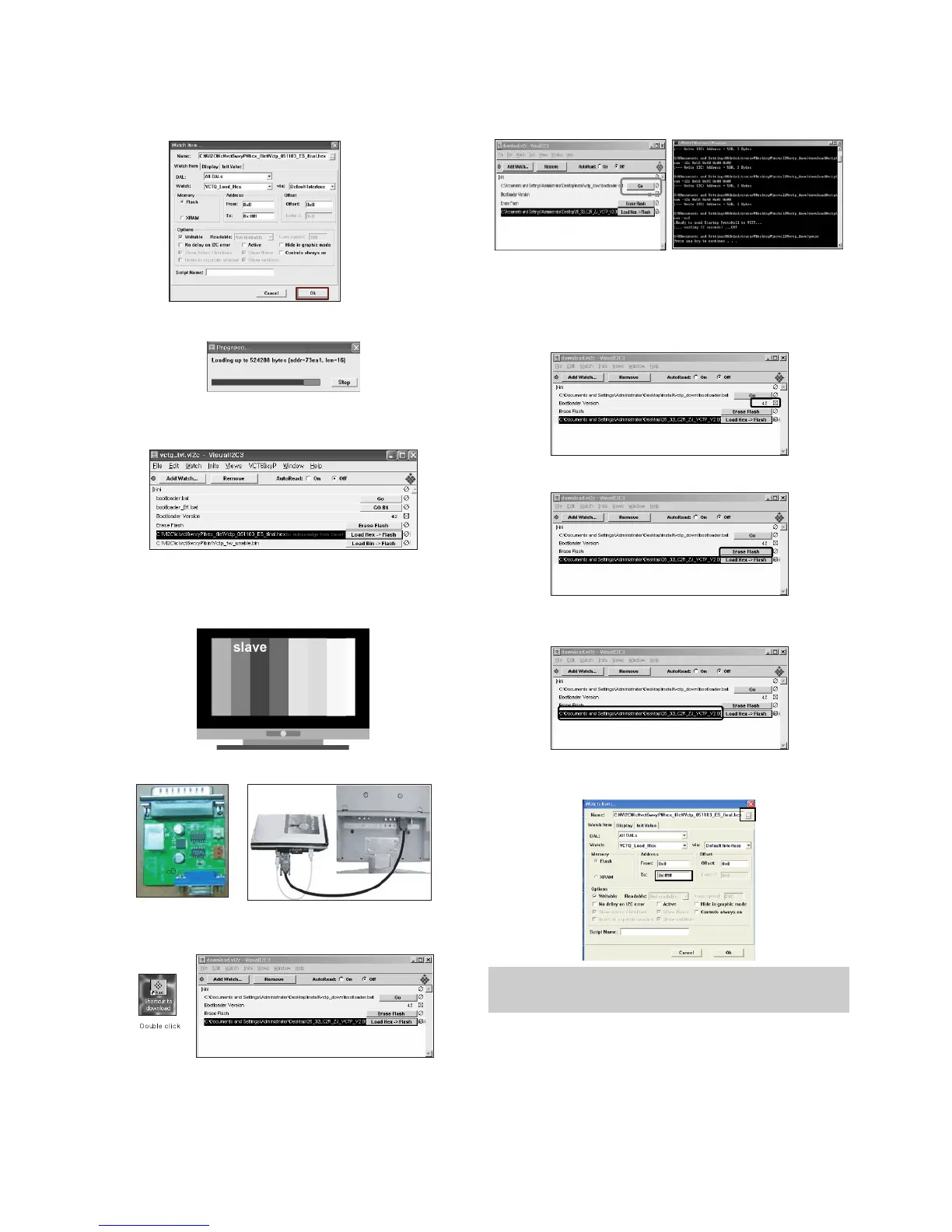
(11) Click OK button at the "edit window".
(12) Under Downloading progress.
(13) If download is failed, for example "No acknowledge from
slave", execute download again from (1).
6-3.Download method 3 (SET)
(1) Push the “Tilt” button in an Adjust Remocon Then the
PLASMA TV will change a “slave mode”.
(2) Connect Zig to TV using a D-sub cable.
(3) Execute ‘Download_CS.vi2c’ program in PC, then a main
widow will be opened.
(4) Click "GO" button.
If you don’t push the “go”, the Hex file would not be
downloaded although the download proceeds normally at
first glance.
(5) Double click the blue box and confirm "Bootloader
Version" as 42.
(6) Click the "Erase Flash" button.
(7) Double click the download file low then, "edit" window will
be opened.
(8) Chick the choice button I n the "edit window", then "file
choice window’ will be opened.
(9) Click the “load > flash” button.
You must verify the words of “0xfffff” in the black box(A) of figure.
(In case of H3 Service it is 0x7ffff : If you make H4 service after
the H3 service, there could be some problem)


 To Next Page