7
ENGLISH
Adjusting the Menu
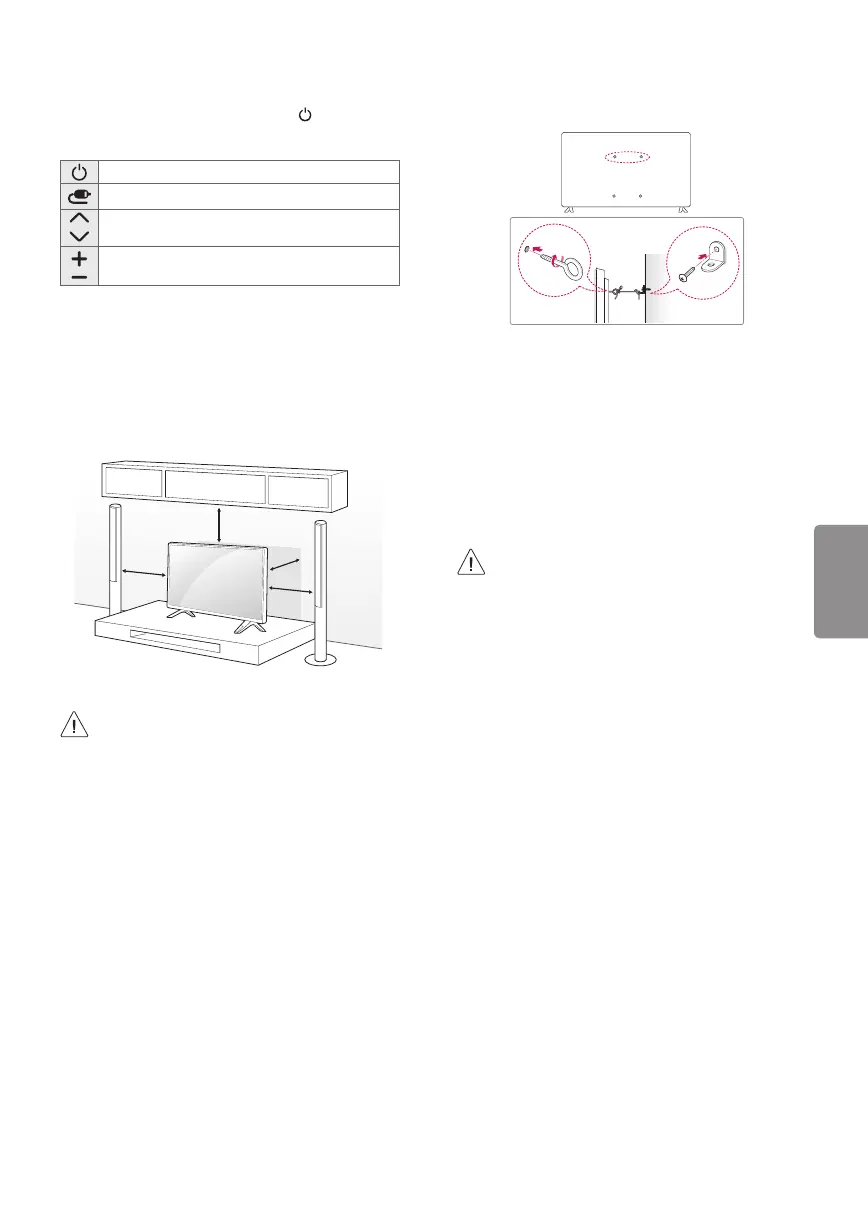
When the TV is turned on, press the button one
time. You can adjust the Menu items using the
button.
Turns the power off.
Changes the input source.
Scrolls through the saved channels.
Adjusts the volume level.
Mounting on a Table
1 Lift and tilt the TV into its upright position on a
table.
- Leave a 10 cm (minimum) space from the wall
for proper ventilation.
10 cm
10 cm
10 cm
10 cm
2 Connect the power cord to a wall outlet.
• Do not apply foreign substances (oils,
lubricants, etc.) to the screw parts when
assembling the product.
(Doing so may damage the product.)
Securing the TV to a Wall (optional)
(Depending upon model)
1 Insert and tighten the eye-bolts or TV brackets
and bolts on the back of the TV.
- If there are bolts inserted at the eye-bolts
position, remove the bolts first.
2 Mount the wall brackets with the bolts to the
wall. Match the location of the wall bracket and
the eye-bolts on the rear of the TV.
3 Connect the eye-bolts and wall brackets tightly
with a sturdy rope or cable. Make sure to keep
the rope parallel to the flat surface.
• Make sure that children do not climb on or
hang on the TV.
• Use a platform or cabinet that is strong and
large enough to support the TV securely.
• Brackets, bolts, and ropes are optional. You
can obtain additional accessories from your
local dealer.


 To Next Page