6
ENGLISH
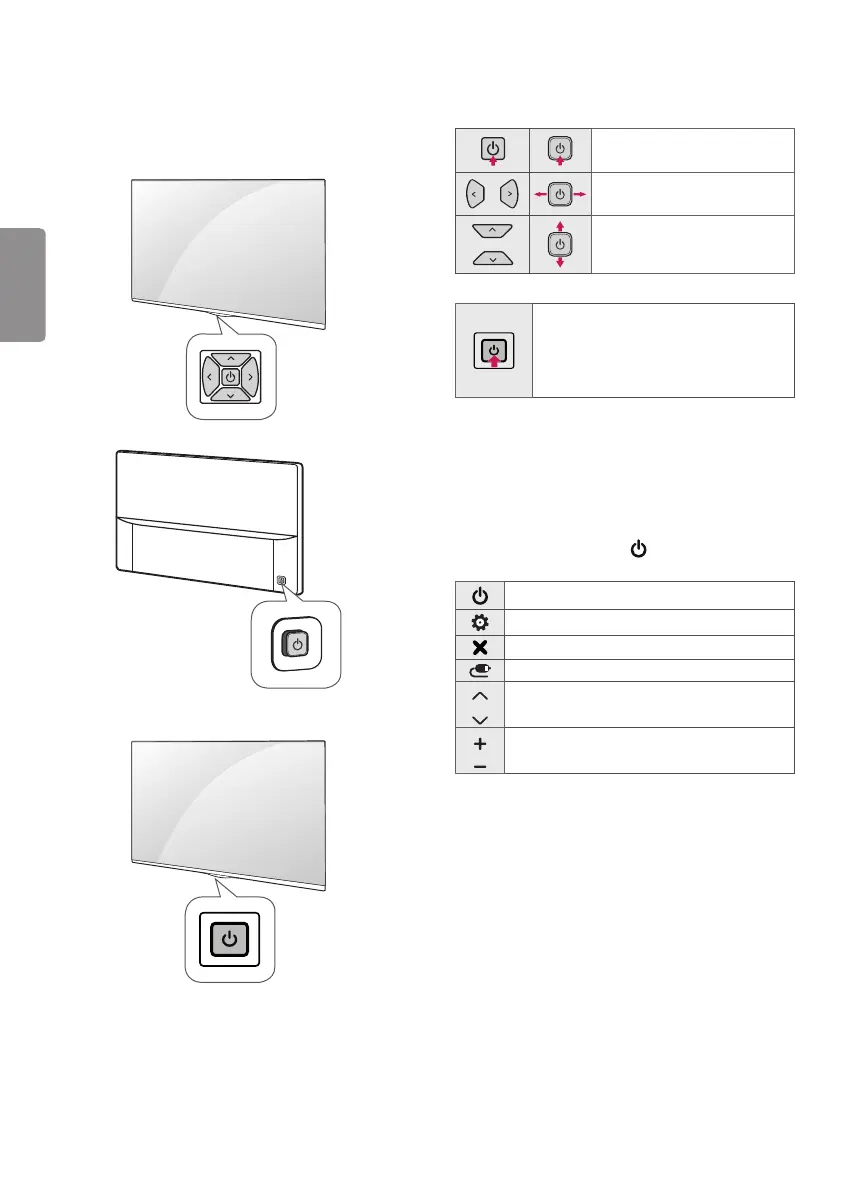
Using the button
(Depending on model)
You can simply operate the TV functions, using the button.
(A Type)
(B Type)
(C Type)
Basic Functions
(A/B Type)
Power On (Press)
Power Off
1
(Press and Hold)
Volume Control
Programmes Control
(C Type)
Power On (Press)
Power Off
1
(Press and Hold)
Menu control (Press
2
)
Menu selection (Press and Hold
3
)
1 All running apps will close, and any recording in progress will stop.
2 You can access and adjust the menu by pressing the button when
TV is on.
3 You can use the function when you access menu control.
Adjusting the Menu
When the TV is turned on, press the button one time. You can
adjust the Menu items using the buttons. (Depending on model)
Turns the power off.
Accesses the setting menu.
Clears on-screen displays and returns to TV viewing.
Changes the input source.
Scrolls through the saved programmes.
Adjusts the volume level.



 To Next Page