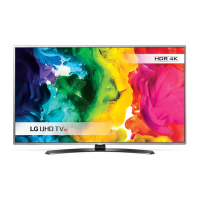
Need help?
Do you have a question about the LG 43UU662H-ZE and is the answer not in the manual?
This document is an owner's manual for an LG LED TV, providing essential information for safe operation, setup, and maintenance. The TV utilizes an LCD screen with LED backlights.
The manual begins with crucial safety instructions, emphasizing the importance of proper ventilation and protection of the power cord. Users are warned against exposing the TV to rain, moisture, direct sunlight, high humidity, heat sources, or flammable objects. It also advises against placing objects filled with liquids on or near the TV. The document highlights the risk of electric shock and fire, urging users not to remove the back cover or attempt unauthorized modifications. In case of damage, liquid ingress, smoke, or unusual odors, users are instructed to immediately unplug the product and contact customer service. The manual also provides guidelines for outdoor antenna grounding, where applicable, to protect against voltage surges and static charges.
Regarding batteries, the manual advises storing them out of reach of children, not short-circuiting, disassembling, or overheating them, and disposing of them properly according to local regulations. It also warns against mixing old and new batteries or exposing them to excessive heat.
For moving the TV, the manual recommends using the original packaging, disconnecting all cables, and handling the TV by its top and bottom frame, avoiding the screen, transparent parts, speakers, or speaker grill areas. For larger TVs, at least two people are recommended. The TV should be kept upright during transport, and excessive pressure on the panel should be avoided to prevent damage.
Cleaning instructions specify unplugging the power cord and wiping the TV gently with a soft, dry cloth. Users are warned against spraying water or liquids directly onto the TV and against using chemicals like glass cleaner, air fresheners, insecticides, lubricants, wax, abrasives, thinner, benzene, or alcohol, as these can damage the product or its panel.
The "Preparing" section notes that initial TV setup may take a few minutes and that the on-screen display (OSD) and available menus may vary by model or input source. It also mentions that new features may be added in the future. For optimal connections, HDMI cables and USB devices should have specific bezel dimensions, and an extension cable is recommended for USB devices that don't fit directly into the TV's USB port. The manual advises using certified HDMI cables to avoid display or connection errors.
The manual details separate purchase items like the LED Clock (LEC-005) and Magic Remote Control (AN-MR650H, AN-MR18HA), noting that compatibility depends on the TV model's Bluetooth support. Stand models for specific TV sizes (43/49UU662H-ZE, 55UU662H-ZE, 65UU662H-ZE) are also listed.
Instructions for wall mounting are provided, including VESA standard dimensions and screw types for various models. It emphasizes using appropriate screws and wall mount brackets, and recommends professional installation for optimal safety. Before wall mounting, the stand should be removed. The manual also suggests covering stand holes with tape to prevent dust and insects from entering.
For securing the TV to a wall, the manual describes inserting eye-bolts or TV brackets into the back of the TV, mounting wall brackets to the wall, and connecting them tightly with a sturdy rope, ensuring the rope remains horizontal. It stresses using a strong platform or cabinet to support the TV and obtaining additional accessories from a local dealer.
The Kensington security system connector is located at the rear of the TV, and users are directed to the Kensington manual or website for installation and usage information.
The "Using Button" section explains how to operate the TV using its physical button, covering power on/off, menu control, input source selection, program scrolling, and volume adjustment. It also describes how to adjust the TV's swivel angle (up to 20 degrees left or right) for optimal viewing, cautioning users to watch their fingers to prevent injury and to avoid tilting the TV too much to prevent it from falling.
The remote control section details the functions of each button, including power, energy saving, live zoom, input selection, number buttons, program list, volume control, smart menu access, app access, mute, navigation, settings, exit, teletext, subtitle, and media control buttons. It also mentions that some buttons and services may not be available depending on the model or region.
The "Connections" section covers connecting various external devices, including antenna/cable, satellite dish, CI module, and HDMI devices. It provides guidance on improving image quality, using signal splitters, and ensuring proper CI module insertion. For HDMI, it lists supported audio formats and explains the "HDMI ULTRA HD Deep Colour" setting for UHD models, advising users to adjust it based on the connected device's compatibility.
For USB connections, the manual notes that some USB hubs may not work, and recommends connecting USB devices directly to the TV or using USB 1 for webcams. It also lists available external devices such as Blu-ray players, HD receivers, DVD players, VCRs, audio systems, USB storage devices, PCs, and gaming devices. Specific advice for PC mode includes adjusting resolution, refresh rate, brightness, and contrast to avoid noise. For wired LAN connections, a CAT 7 cable is recommended.
The manual also describes connecting external speakers, specifying the use of a 3 Pole 3.5 mm Stereo Jack and warning against connecting headphones to the external speaker port. It explains the method of volume control port, detailing cable specifications and CPU detection for volume control.
For network connection, the manual outlines how to connect the TV to a Pro:Centric server via the LAN port, either directly from a modem/router or through a PC. It warns against using modular phone cables and advises following telecommunication carrier specifications.
The "Troubleshooting" section addresses common issues such as the remote control not working (check sensor, obstacles, batteries), no image/sound (check power, wall outlet), TV turning off suddenly (check power control settings, auto-off function, signal inactivity), and no signal from PC (reconnect HDMI, restart PC). It also explains abnormal display phenomena like "flicker" on cold startup, tiny dots on the panel (not a malfunction), and image sticking from prolonged display of still images. Generated sounds like "cracking" noise (due to thermal contraction) and "electrical circuit humming/panel buzzing" (from high-speed switching circuits) are described as normal. Cleaning precautions are reiterated, emphasizing not to allow liquids into gaps and to wring excess water from cloths.
Finally, the manual includes "Software Download Information" for UU64* models, directing users to the LG Electronics website for SuperSign software and manuals. It also lists supported video and audio formats, along with "Open Source Software Notice Information" and various licenses, including HDMI, DTS, Dolby Laboratories, and HEVC Advance. The manual concludes with a space to record the TV's model and serial number for service purposes.
 General
| Screen Size | 43 inches |
|---|---|
| Display Type | LED |
| Resolution | 3840 x 2160 (4K UHD) |
| Picture Engine | Quad Core Processor |
| Smart TV | Yes |
| Operating System | webOS |
| Connectivity | Wi-Fi, Ethernet |
| HDMI Ports | 3 |
| USB Ports | 2 |
| Digital Audio Format | Dolby Digital |
| Output Power / Total | 20W |
| VESA Mounting Interface | 200 x 200 |
| Speaker System | 2.0 Ch Speaker |
| Refresh Rate | 50Hz |
| Weight | 8.1 kg |
| HDR Technology | HDR10 |

 To Next Page